
Key Takeaways
- Start with clarity: A tech stack only works if you first understand your current tools, gaps, and operational bottlenecks.
- POS as backbone: Your POS must support real-time sync and open integrations, or every other system will inherit its limitations.
- One menu, many channels: Consistency across web, app, QR, and delivery channels prevents errors, delays, and customer frustration.
- Kitchen drives reality: KDS routing, timing rules, and inventory sync ensure your digital setup matches how your kitchen actually works.
- Loyalty in the flow: Rewards, promos, and communication should live inside the ordering experience, not in separate apps or workflows.
- Payments with friction: Flexible gateways and secure digital wallets reduce checkout drop-offs and help control processing costs.
- Data that aligns: Unified reporting allows restaurants to forecast demand, optimize menus, and make decisions based on real patterns.
- Restolabs choice: Restolabs gives restaurants an integrated, scalable platform that keeps ordering, payments, loyalty, and reporting tightly connected.
Since 2020, the restaurant industry has entered a new era of digital evolution, one fueled by consumers’ demand for convenience, speed, and flexible dining options. Today, 70% of diners say they’d use an app to order, and 65% would use one to pay.
Using QR codes for contactless payments has also become a familiar part of that journey. At the same time, many restaurants still rely on outdated POS terminals, disconnected software tools, and manual workflows, which simply don’t support this level of change.
These, in turn, limit real-time visibility across operations, increase labor costs and maintenance needs, and render inventory planning far less reliable and inefficient.
So, how do you fix this problem? By building a restaurant tech stack.
This blog explores everything that goes into building one, along with tips to keep in mind during the implementation process. Let’s get started.
What Is a Restaurant Tech Stack?
A restaurant tech stack refers to the set of interconnected software systems that support your operation. It encompasses order capture, menus, kitchen workflows, payments, inventory management, customer data, and reporting.
Each system relies on clean integrations and real-time sync, so data moves smoothly across service points.
Advantages of a Fully Integrated Tech Stack
Let’s take a look at why it makes sense to have a tech stack:
1. Profitability
An integrated stack removes the small operational leaks, like manual fixes, mismatched menus, slow ticket flow, which quietly cut into margins. When everything updates together, you push more orders through the same labor and keep profitability intact.
2. Operational ease
With one connected workflow, your team isn’t juggling tools or correcting errors created by disconnected systems. Instead, they focus their energies on what they should: serving customers.
3. Better management
A single view of orders, timing, inventory, and channel performance lets managers understand what’s happening in real time, minus the overwhelm. They can make quick adjustments that keep service on track.
4. Faster decision-making
Centralized data reveals patterns quickly – what’s selling, where delays form, how demand shifts. You can refine menus, adjust staffing, and optimize workflows based on real-time insight, not guesswork.
5. Stronger staff alignment
When every station sees the same information, shifts run smoother. Tickets are accurate, availability is consistent, and the team doesn’t need to double-check or interpret conflicting data.
Core Components of a Restaurant Tech Stack
When you look at your restaurant’s technology, it helps to understand the main pieces that keep everything running. Each one plays a different part in how your guests order, how your team works, and how smoothly your days feel.
The table below walks you through the key modules you’ll come across. You’ll see what each tool is meant to handle, the features that matter most, and the warning signs that usually lead to frustration later.
Use it as a simple guide while you map out your own stack and decide what fits your style of service and the way your restaurant operates.
How to Build an Effective Restaurant Tech Stack
Below is a simple framework, along with the modules you can use to structure your entire tech stack:
1. POS infrastructure
Whether you’re running a cafe, a fast-casual spot, or a multi-location brand, your POS is the system every other tool depends on. That’s why it’s important to ensure it connects to your direct ordering platform, and syncs menu updates, price changes, and orders in real-time.
1.1 POS configuration and multi-location controls
Review its integrations with the rest of the tech stack. If your POS doesn’t support it (or it only connects through unreliable workarounds), that’s something to document. Here, you’ll also want to think about flexibility. For instance:
- Can menus be managed centrally?
- Can pricing or hours be adjusted at the store level?
- Can you view reporting across locations from a single dashboard?
- Does each store need its own hardware setup, or is the system adaptable?
1.2 POS integrations and service connectivity
Confirm whether the POS integrates with essential service providers. Look for compatibility with platforms like Stripe, Authorize.net, and FreedomPay; delivery systems such as Uber Direct and DoorDash; and gift card providers like Valuetech and GiveX.
2. Ordering and delivery systems
Then, create a consistent ordering experience that accurately routes every order into your POS and kitchen, regardless of how or where it was placed.
2.1 Online ordering and channel management
Set up your direct online channels and configure how each mode works.
For example, your website, your mobile app (if you have one), and even your QR codes for dine-in should all present the same menu, pricing, and prep expectations. They shouldn’t feel like three different systems.
That means a customer ordering at a table should have the same clarity as someone ordering for delivery at home. Plus, your kitchen shouldn’t be dealing with conflicting information.
At the same time, your tech stack should give you the flexibility to run channel-specific menus—for example, delivery-only bundles, dine-in exclusives, or QR-limited menus—without breaking sync with your POS.
The key is flexibility with consistency on the backend, not uniformity for the sake of it.
2.2 Delivery integrations and order routing
If you work with partners like DoorDash, Uber Eats, or a dispatch network, connect those integrations early and test them thoroughly to ensure seamless functionality.
Ensure that delivery orders are transmitted directly to your POS with accurate address information, fees, and order notes.
Determine whether your delivery zones align with where you actually want to send food and adjust delivery fees based on distance or time of day if needed.
2.3 Ordering experience and UI validation
Lastly, test the ordering experience on your phone, on a desktop, and on different devices:
- Is the menu easy to browse?
- Are customizations clear?
- Are fees and taxes transparent?
- Do you face unnecessary steps that might frustrate your customers?
Smoothing out such details will make a noticeable difference in conversions, especially during peak hours when your customers want to place orders quickly.
3. Back-of-house operations
With your ordering channels running smoothly, pay attention to the part of the operation that feels the pressure the most: your kitchen.
This is where good online ordering platforms truly show their value. When everything routes correctly and consistently, your team can work faster, stay organized, and handle peak hours without stress.
3.1 KDS routing and station mapping
Start with your KDS as it’s essentially the kitchen’s version of a communication hub. It should receive every order from your POS, whether it came from your website, a mobile app, a QR code table, or a delivery partner, and display it in a way that allows cooks to act on it immediately.
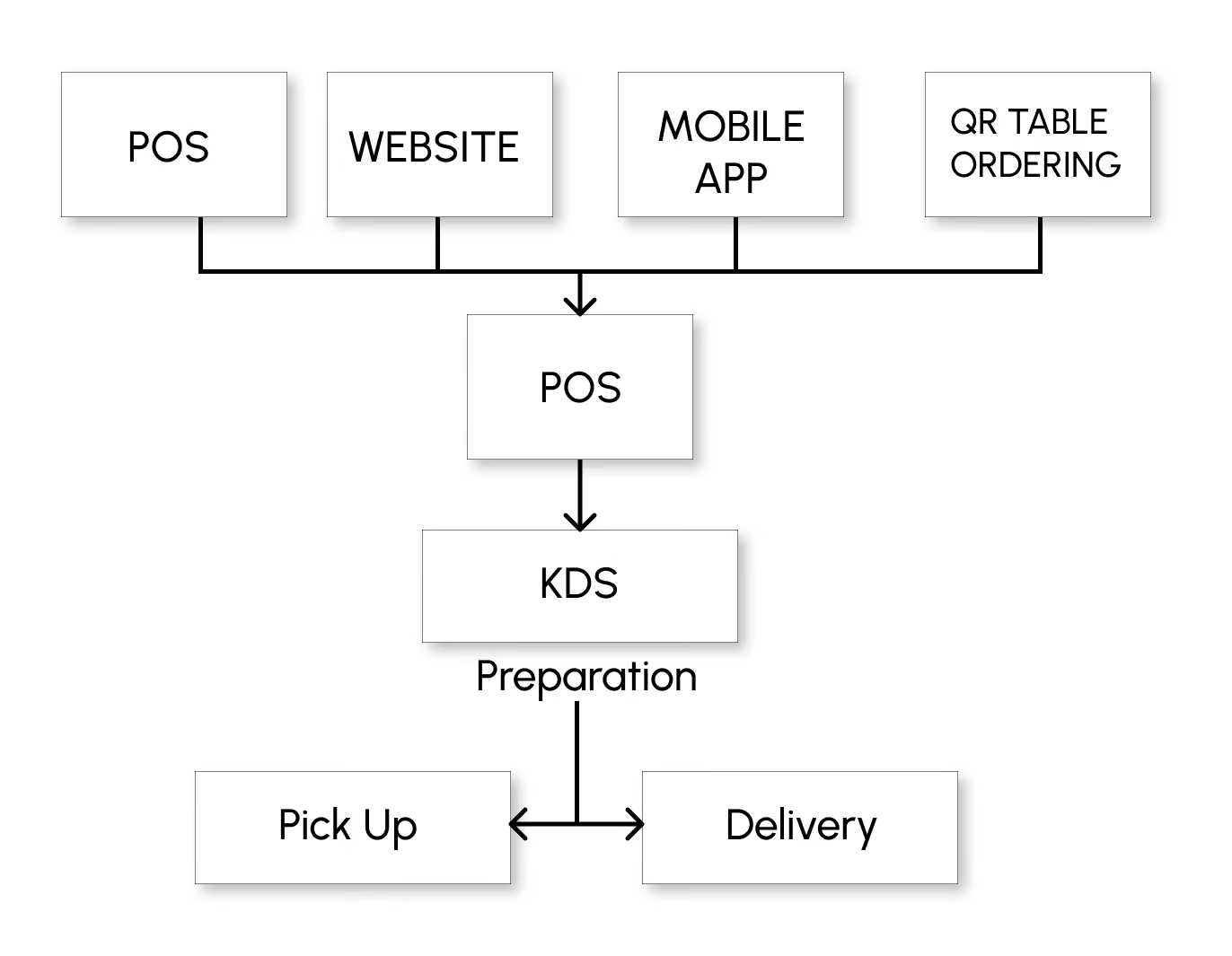
To set this up well, walk through your kitchen workflow. Identify which station handles what: grill, salad, fry, dessert, barista, expo, whatever your structure looks like. Your KDS should mirror this sequence. For example:
- Burgers route to grill
- Fries route to fry
3.2 Data security and compliance controls
Security isn’t the most glamorous part of building a tech stack. But it’s one of the most important—45% of customers express concerns about the privacy and security of their personal information when interacting with restaurant technology platforms.
Therefore, look for systems that support:
- PCI-compliant processing, ensuring that card data is transmitted and stored securely
- Encrypted transactions to reduce exposure to fraud or data theft
- Tokenization, so sensitive information never sits on your servers
- GDPR compliance, protecting customer information and privacy
3.3 Prep-time management and ticket firing rules
Configure the prep times because they affect how tickets appear and when items fire. For example, you may want specific items to be fired immediately, while others should wait so that the entire ticket finishes together.
The more accurate your timing rules, the more evenly paced your kitchen becomes.
3.4 Inventory sync and real-time item availability
If you’re using specific tools for managing it, connecting them to your ordering system can make a meaningful difference.
For example, ingredient levels should update automatically as items sell. When a menu item is running low, the system should be able to hide it from customers or mark it as unavailable, avoiding disappointment and last-minute cancellations.
Run a small simulation—just five to ten orders—using different ordering modes and combinations. Ideally, incoming orders should appear on the kitchen screen instantly, complete with item details and modifiers
3.5 Kitchen load management and pressure tools
Set up “pressure controls,” which often include:
- Order throttling to limit incoming online orders when the kitchen is at capacity
- Stock counters to signal low inventory before it becomes a service issue
- Pre-order scheduling for customers who want to order ahead
A well-connected back-of-house improves and gives your team the predictability needed to deliver excellent service at the pace your restaurant requires.
4. Customer experience and engagement
Your tech stack isn’t complete until it supports how your customers interact with your restaurant beyond the order itself. This layer determines whether they order once or become repeat customers who return every week.
4.1 Loyalty systems and reward mechanics
A good place to begin is with the loyalty tools. For example, reward customers based on the number of visits or total spending. That’s simple and familiar, and you don’t need an elaborate points system to make loyalty work.
When your customers can earn rewards, redeem offers, view their ordering history, and save their preferences all within one app, engagement feels natural.
If they order regularly, they should be able to see their points, redeem them easily, and experience that little moment of appreciation, which makes them want to return. And from your side, it should be just as simple to manage.
4.2 Promotions, offers, and menu incentives
Can you create time-based coupons for slower hours, limited-time bundles, or add-on deals that encourage customers to explore more of your menu? Well-structured offers can help you balance demand, introduce new items, and encourage repeat visits.
4.3 Customer communication and order transparency
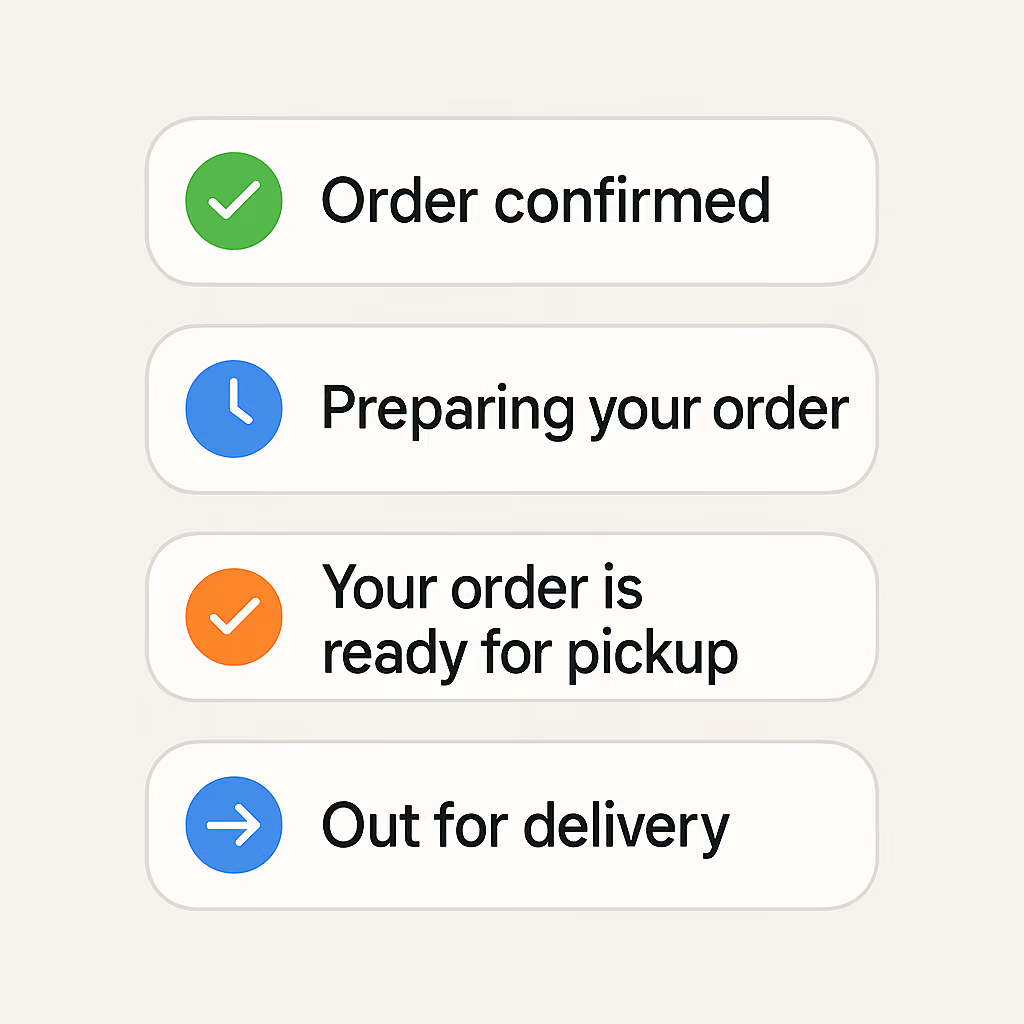
Each one of your customers wants to know what’s happening with their order, especially for pickup and delivery. Therefore, order confirmations, status updates, and “your order is ready” alerts go a long way in minimizing calls to the restaurant and building trust.
5. Payments and security infrastructure
The final component of your tech stack is one you feel every single time a customer completes an order: payments.
If this part of the experience is smooth, they’ll barely notice it, and that’s exactly what you want. However, if the payments are limited, confusing, or unreliable, it will create friction at the very moment your customer is most ready to convert.
5.1 Payment methods and digital wallet support
Review your payment methods. Your customers might want to place orders on their phone, tablet, or desktop, and each person will have their own preference for how they want to pay. Some may use Apple Pay or Google Pay because they are convenient and fast options.
Some might prefer PayPal because it’s familiar. Others may want to save a card for future orders, so checkout is as easy as one tap next time. You should ensure that you offer enough flexibility that no one feels limited, regardless of device or comfort level.
5.2 Payment gateways and transaction processing
Once you know which payment methods you want to offer, review your payment gateway, which is the processor that sits between your system and the bank. It affects everything, from transaction fees to payout timing to which digital wallets you can support.
Your ordering system should connect easily with gateways such as Stripe, Authorize.net, and FreedomPay.
If you operate multiple locations, you may benefit from connecting different gateways at each location to negotiate more favorable processing fees or accommodate regional payment preferences.
How to Audit Your Stack and Set Goals
By this point, you have a sense of what a modern tech stack looks like and how each part supports your daily operations. The next step is understanding your own systems.
A short audit creates a clear picture of your workflows, and defining goals gives you direction as you introduce or refine tools:
1. Perform a technology audit
First things first: before making any changes, take stock of all the tools your team relies on daily. Most restaurants skip this step and proceed directly to purchasing new ones. But the truth is: if you don’t understand your current setup, you can’t build a better one.
a. Review your current systems
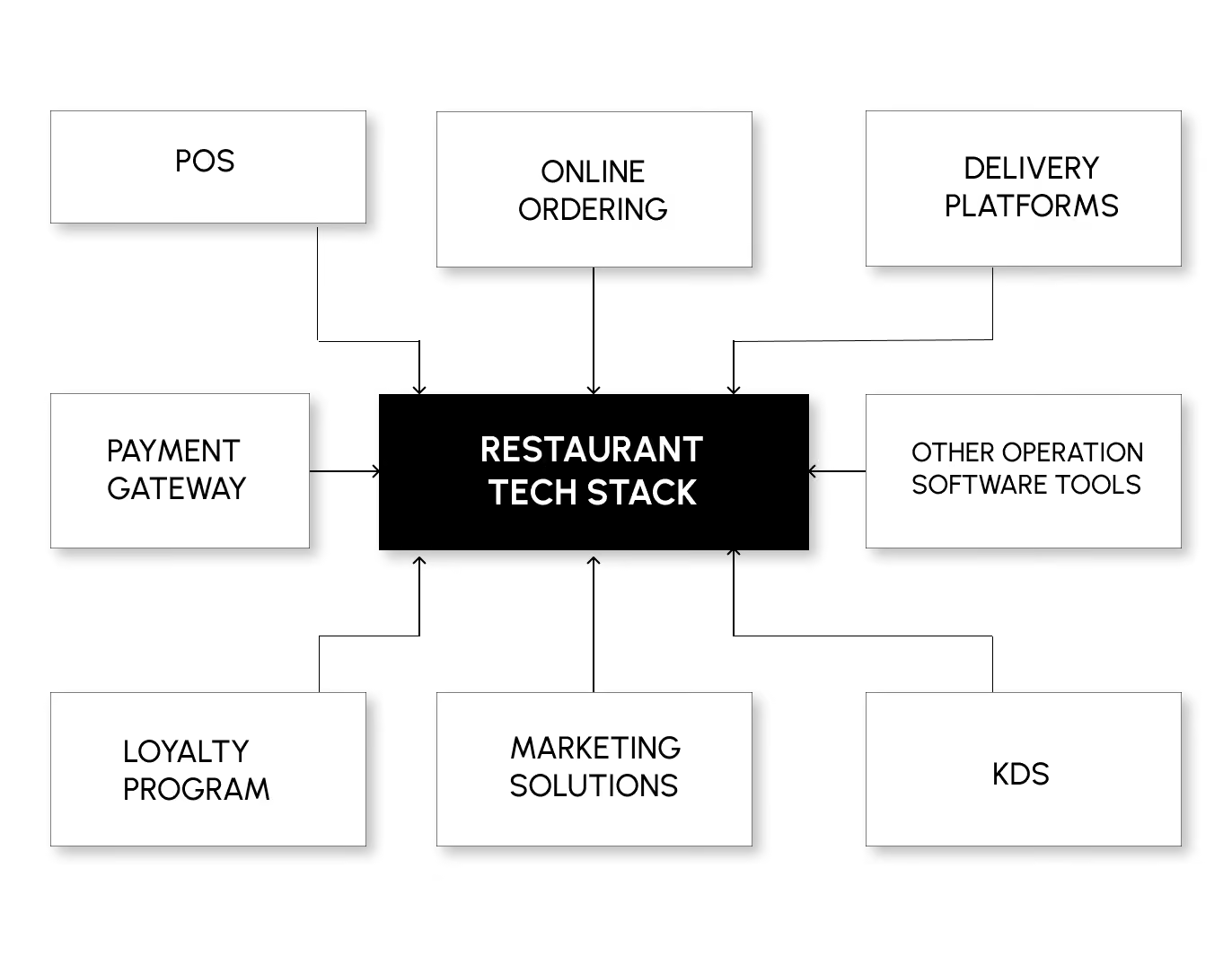
So sit down with your managers, front-of-house leads, and the kitchen team to list your POS, payment gateways, online ordering software, delivery platforms, loyalty programs, marketing solutions, kitchen display systems (KDS), and even the WiFi setup that ties everything together.
b. Put your current setup to the test
Once that’s done, the real work begins: test how each of these tools performs in practice, not during a calm hour but during the type of service that strains your operations.
For instance, select one of your most popular items. Update its price or description in your POS and then verify that it appears correctly everywhere: your online ordering platform, delivery menu, and KDS. If everything updates within a few seconds, great.
But if you have to refresh or edit the same item in multiple places manually, you’ve already found one of your biggest bottlenecks.
2. Define your core operational goals
Next, turn your observations from Step 1 into something useful: a focused set of objectives that will guide every future tech decision you make.
1. Analyze what you found
Start by grouping what you found into four simple buckets. Most restaurants don’t need more than these:
- How orders enter your system
- How orders move through the kitchen
- How orders leave your restaurant (pickup, curbside, delivery)
- How money and customer details are captured
2. Identify all learnings
Based on each bucket, write a few clear, outcome-driven statements, which should describe what needs to happen during service in a way that can be measured or observed. For example:
- Orders should appear in the POS and KDS within a few seconds of being placed.
- Menu changes should only be made once and updated everywhere automatically.
- The kitchen should always receive complete tickets with accurate modifiers and prep notes.
3. Do proper research
Talk to your team. Find out which tasks slow them down the most. Ask your kitchen what causes friction during peak hours, and check with your hosts or cashiers on the most common customer complaints. Once you understand their pain points, the right goals become much easier to define.
Challenges in Restaurant Tech Implementation
What happens after you’ve planned your tech stack? Implement it! However, that isn’t free from its own set of challenges. Let’s quickly have a go at them:
1. Integration complexity and system silos
Disconnected systems are one of the biggest reasons restaurant tech stacks underperform. When your POS, online ordering, delivery partners, and loyalty tools don’t sync, the entire workflow slows down and your team is forced to fill the gaps manually.
This creates inconsistencies across menus, ticket routing, prep times, and reporting, all of which directly impact service speed and accuracy.
As one restaurant operator put it on Reddit:

Pro Tip: Before you sign with any vendor, ask them to walk you through a live end-to-end order flow using your menu — POS → KDS → printer → inventory → reporting. If they can’t show real-time sync in a single demo, you’ll spend months compensating for it in service.
2. Data cleanup during migration
Menus, modifiers, customer profiles, and inventory data rarely move cleanly from one system to another. Almost always, old categories, inconsistent naming, or outdated items can confuse the go-live process.
Pro Tip: Set aside time for a cleanup phase. Align your item structure, remove unused entries, and review any data that affects reporting or order accuracy before activating the new system.
3. Data fragmentation and inaccurate reporting
When different tools store their own versions of sales, inventory, and customer data, nothing lines up. Managers end up comparing reports that don’t match, inventory drifts, and decisions rely on partial information instead of a single source of truth.
Without unified data, even good tools produce unreliable insights, and everyday planning becomes guesswork.
Pro Tip: Pick one “source of truth” system, usually your POS or ordering platform, and make every other tool pull from it. When data originates from one place instead of five, reporting becomes consistent automatically, and you avoid the classic problem of chasing mismatched numbers.
4. Security and access-control checks
Strong access controls protect both your customers and your restaurant’s reputation. If permissions aren’t set correctly, you may end up with your team accessing areas they shouldn’t or systems that are harder to manage during turnover.
Pro Tip: Before you go live, confirm that your tools:
- Encrypt guest and transactional data
- Follow PCI requirements for payments
- Offer permission controls based on staff roles
- Provide a straightforward process for password resets and login management
5. Hidden costs that surface during setup
Implementation often reveals fees that weren’t apparent at the time of purchase, such as configuration charges, additional terminals, menu build support, or paid add-ons for features you assumed were included.
Pro Tip: Review each tool contract carefully and confirm what’s covered in your plan. This keeps your budget predictable and avoids mid-project surprises.
Unlike many providers with opaque or scattered setup charges, Restolabs offers transparent pricing and access to key features, like analytics, menu tools, multi-location management, and customization, even in its basic plan.
6. Staff training and uneven adoption across shifts
New systems introduce new habits. If your team isn’t trained consistently, you’ll see slow adoption, mistakes, or a mix of old and new workflows co-occurring.
Pro Tip: Create a simple training plan, roll it out by shift, and use vendor resources where available. For instance, here’s how your calendar can look:
- Day 1: POS and ordering workflow walkthrough for shift leaders
- Day 2: Front-of-house training on order entry, payments, and order status
- Day 3: Kitchen training on KDS navigation, ticket structure, and prep-time adjustments
- Day 4: Delivery and pickup workflow training for staff handling off-premise orders
- Day 5: Review day – gather feedback and fine-tune settings before full launch
7. System overload from adding too many tools simultaneously
It’s certainly tempting to connect every new feature immediately. However, when too many components are launched together, they can create confusion and additional work.
Pro Tip: Introduce tools in phases. For instance, start with the essentials, such as POS, KDS, and basic inventory, stabilize your daily workflow (i.e., confirm menu sync, order flow, and prep-time accuracy), and then add advanced modules, like loyalty programs, marketing tools, and analytics dashboard, when your team is ready.
Look for commission-free ordering systems that can organize channel-level data, menu performance, customer insights, and location reporting in a single dashboard.
Some systems now include centralized analytics in their basic plans, for example, Restolabs provides consolidated reporting without requiring an upgrade, making it easier to operate from accurate, real-time information.
Tech Can Be Overwhelming. Restolabs Makes It Easier.
Running a restaurant today means navigating a maze of tools, and for most people, it’s stress-inducing. You know the value of technology. But you shouldn’t have to become an IT expert just to run a smooth service.
A modern restaurant runs on connected systems, not isolated software. The real advantage comes from a tech stack that integrates cleanly, syncs data in real time, and can evolve without operational disruption.
Restolabs is built for that reality.
It centralizes online ordering, loyalty, analytics, payments, and delivery management, while supporting integrations with leading POS systems and third-party tools. As your business expands, you can add modules or new locations without needing to restructure the stack.
More importantly, you’re not left to figure it out alone. The Restolabs team helps restaurants move past technical bottlenecks, configure workflows correctly, and stay on track during setup, rush hours, or unexpected issues.
If something feels confusing or you don’t have the time to troubleshoot, we step in. If you’re looking for a technology partner that keeps things simple, connected, and reliable, Restolabs helps you focus on hospitality while we handle the tech.
Book a demo with Restolabs to build a scalable, integration-first ecosystem.

Asavari drives content development at Restolabs. With over a decade of experience partnering with fast paced technology and marketing teams, she turns complex product and industry details into clear, meaningful communication for restaurant partners.
Frequently Asked Questions
Modern customers expect menus, pricing, and availability to be consistent across dine-in, pickup, delivery, and QR ordering, which is prompting restaurants to adopt more unified tools. There’s a clear shift toward real-time inventory visibility, modular tech stacks that allow you to add tools as needed, and kitchen automation features that help manage prep times.
AI helps restaurants make decisions based on real patterns instead of guesswork. For example, AI tools can forecast busy hours, anticipate low-stock items, highlight menu choices that slow down the kitchen, or suggest promotions based on what regular guests tend to order. This provides clearer direction in your daily workflow.
A scalable stack provides a single structure to run every location, while still allowing each store sufficient flexibility to operate smoothly. Central control over menus, pricing, and availability ensures your brand's consistency, while local settings will enable each branch to adjust hours, preparation times, or delivery zones based on demand. Shared reporting across outlets provides real-time visibility into performance, and role-based access ensures staff permissions are organized.
.jpeg)




.webp)

.svg)
.webp)