
Key Takeaways
- Map menu control by function: No single tool manages menus end-to-end. Different systems control presentation, ordering, transactions, analytics, tableside access, or multi-location governance.
- Separate display from enforcement: Some tools manage what customers see, while others determine what can actually be ordered and fulfilled during live service.
- Choose tools by channel behavior: Dine-in, pickup, delivery, QR ordering, and catering each impose different menu rules, pricing logic, and availability constraints.
- Account for transaction proximity: The closer the menu control is to billing and order execution, the more carefully updates must be timed to avoid service disruption.
- Plan for location governance: Multi-location operations require shared base menus, controlled overrides, and role-based access to prevent inconsistency at scale.
- Distinguish execution from optimization: Analytics solutions guide what to change, but separate systems are responsible for applying those changes safely across channels.
- Understand consolidation tradeoffs: All-in-one platforms like Restolabs reduce tool sprawl, but tightly couple menu behavior to ordering and promotion logic, limiting independent control.
If you run a restaurant today, your menu is likely to be edited more than your interiors or overall branding. You see, prices change after supplier updates, recipe cost reviews, and tax adjustments. Items go out of stock mid-service. Portions evolve.
Plus, if you offer direct online ordering, that introduces delivery menus that differ from dine-in menus.
The point is, every change—big or small—needs to be reflected everywhere the menu exists. But that’s also where things tend to break down:
- A price is updated in one system but not another
- An item removed from in-store ordering remains available online
- A location continues using an outdated menu because no one realized a change was pushed last week
Sounds familiar?
This post examines how restaurant menu management software handles these updates, what it’s technically responsible for, and how different tools address different parts of the workflow.
What Is Restaurant Menu Management Software?
At its core, a menu management software is a tool that maintains a centralized menu database and synchronizes it across ordering and point-of-sale (POS) environments.
The software supports menu logic, including time-based availability, channel-specific pricing, modifier dependencies, and location-level overrides. These rules determine where and when an item appears and how it behaves when ordered.
Why Menu Management Software Matters
Here are five reasons why leveraging such software makes a difference:
- Predictable order flow during service: Orders reflect the current menu configuration, so your kitchen receives tickets that match customers' selections without manual correction.
- Faster updates with less coordination overhead: Menu changes are applied through a single update process instead of parallel edits across POS, online ordering, and delivery tools.
- Clear handling of availability and timing: Items can be shown or hidden based on time of day, stock status, or channel, minimizing last-minute adjustments during service.
- Reduced reliance on staff intervention: Menu rules are enforced automatically, lowering the need for explanations, overrides, or order fixes by your front-of-house teams.
- Controlled updates across multiple locations: Shared menus can be updated centrally while allowing location-level differences for pricing, availability, or item selection.
Types of Restaurant Menu Management Software
Menu management isn’t handled by a single system. Different types of software control different aspects of how menus are displayed, ordered, and enforced across a restaurant’s operations. Here are the top six types of restaurant menu management software:
1. Digital menu management software
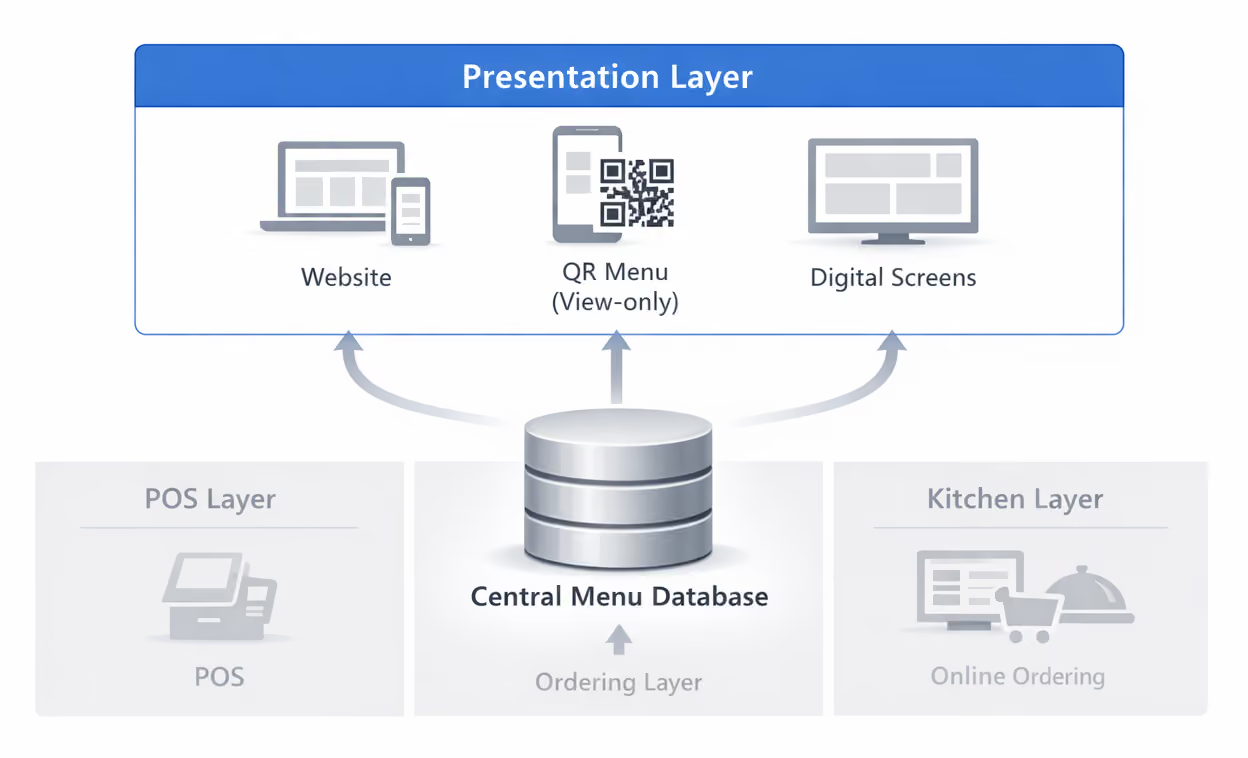
This software handles how your menu is displayed to customers when ordering isn’t part of the system. You use it to create, edit, and update menu text, prices, and images across digital touchpoints, including your website, QR menu, and in-store screens.
Typical use cases
Having a digital menu management tool makes sense when your menu needs frequent updates, but your ordering flow is handled elsewhere.
You can change prices, hide items, or publish time-bound menus without touching your POS or ordering setup. Those changes apply only to what the customer sees, not to how an order is placed or fulfilled. It also saves you from incurring menu reprinting costs.
Scope and limitations
A digital menu management software doesn’t process orders, payments, or kitchen tickets. Its responsibility ends at presentation.
2. POS-integrated menu management systems
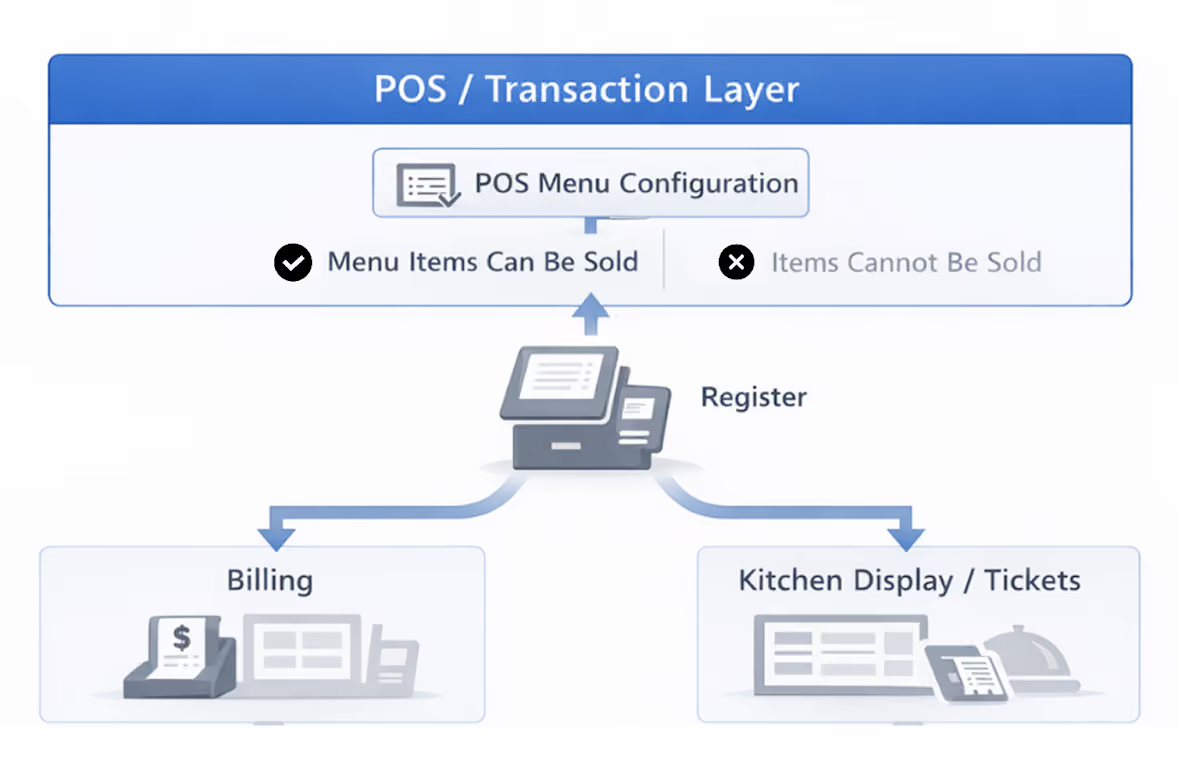
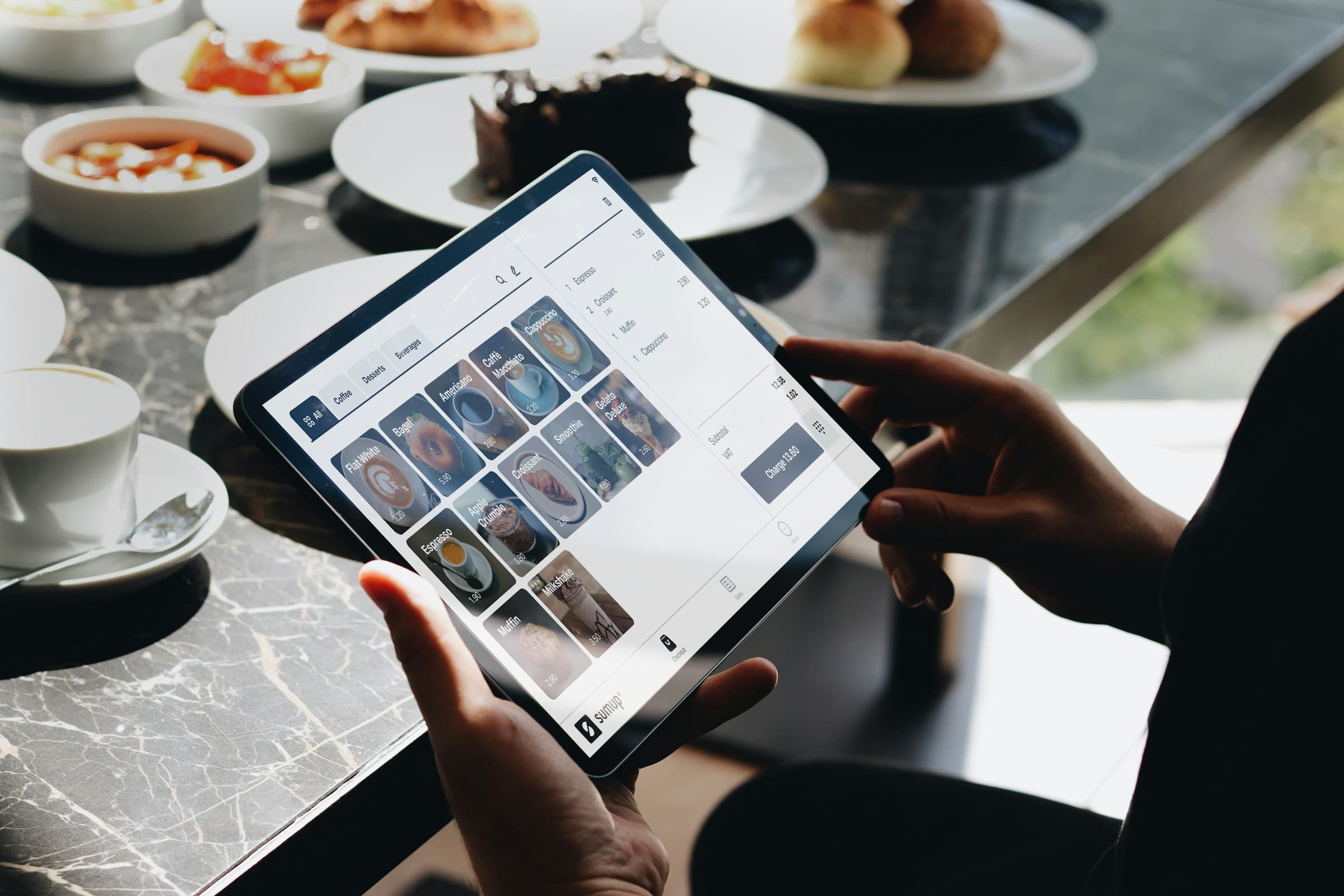
This type of restaurant menu management software manages the menu directly inside your POS system.
You define items, prices, modifiers, and combos in the POS, and that configuration controls what can be ordered at the counter and what reaches the kitchen. The menu is tied to transactions. If an item exists in the POS, it can be sold. If it doesn’t, it can’t.
Typical use cases
The setup works well in dine-in restaurants and high-volume service operations where most orders are placed in-store and menu logic is closely tied to preparation and billing.
Modifier rules, combo pricing, and item dependencies are enforced at the register, which reduces ambiguity between what’s ordered and what’s prepared.
Scope and limitations
Menu updates made in the POS take effect immediately in live ordering. That also means changes need to be timed carefully. For instance, price edits and item removals can interrupt service if applied mid-shift.
3. Online ordering menu management software

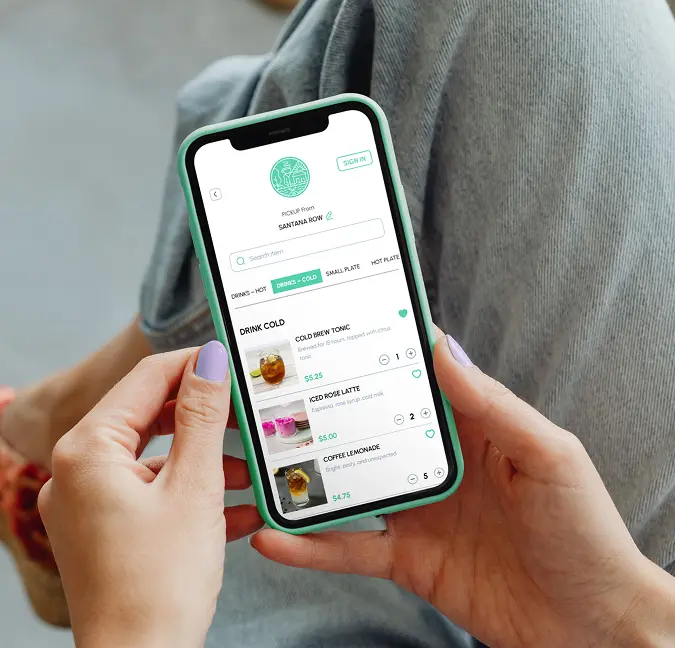
This category focuses specifically on menus used for pickup, mobile ordering, and delivery management.
You configure items, prices, modifiers, bundles, and availability specifically for online orders. The menu is optimized for how customers browse and order without staff assistance. Item names, modifier limits, and upsells are structured to reduce confusion and incomplete orders.
Availability rules are usually more granular. Items can be shown or hidden by time, channel, or fulfillment type, which, in turn, prevents orders that the kitchen can’t fulfill during certain hours or service conditions.
Typical use cases
Using this type of menu management makes sense where off-premise menus need to behave differently from dine-in menus.
You can maintain separate menus for pickup and delivery, remove items that don’t travel well, vary pricing by fulfillment type, and simplify modifier options for self-serve ordering.
Upsells, bundles, and add-ons can be configured directly into the ordering flow, rather than relying on staff prompts. Availability and pricing can also be controlled by time of day, channel, or fulfillment type, helping prevent orders your kitchen can’t support under specific conditions.
Scope and limitations
Online ordering menu management software controls off-premise menus. However, it doesn’t govern dine-in menus or in-store ordering. Order execution still depends on the POS and kitchen systems, which means menu changes must be coordinated to avoid disrupting live service.
4. Multi-location menu management platform
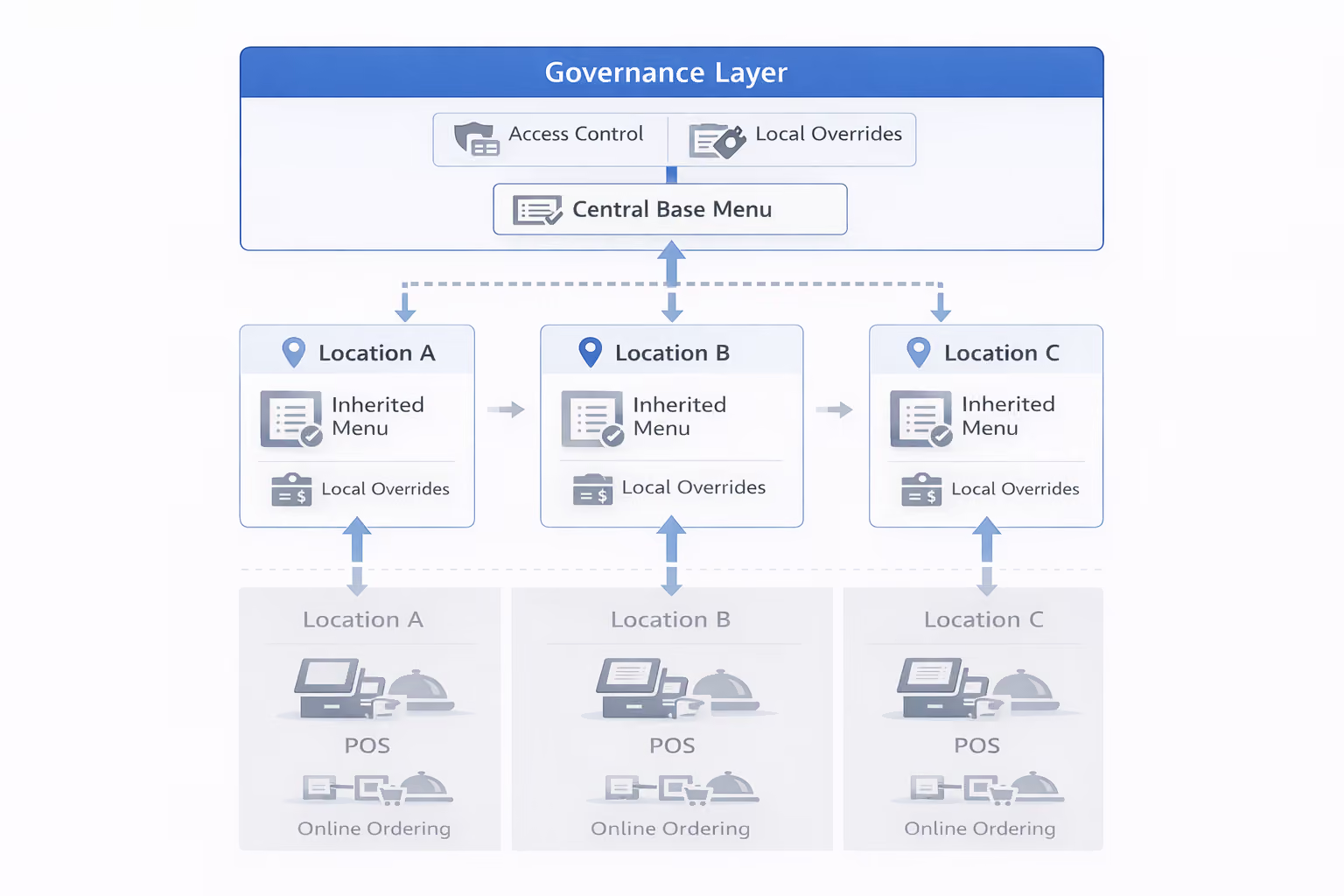
This system is used when the same menu must be coordinated across multiple locations—think restaurant chains, franchises, and multi-brand operators.
You maintain a shared menu centrally, then apply location-level differences for pricing, availability, or item selection. Changes are introduced once and inherited by locations without manual updates at each site.
Typical use cases
Access control is a key part of the setup. You decide who can change the core menu and who can make local adjustments. This keeps accidental changes at bay while still allowing locations to respond to daily constraints.
Scope and limitations
As locations use different POS or ordering systems, maintaining consistent behavior requires additional integrations and testing, which can quickly become tedious.
5. Menu engineering and analytics software
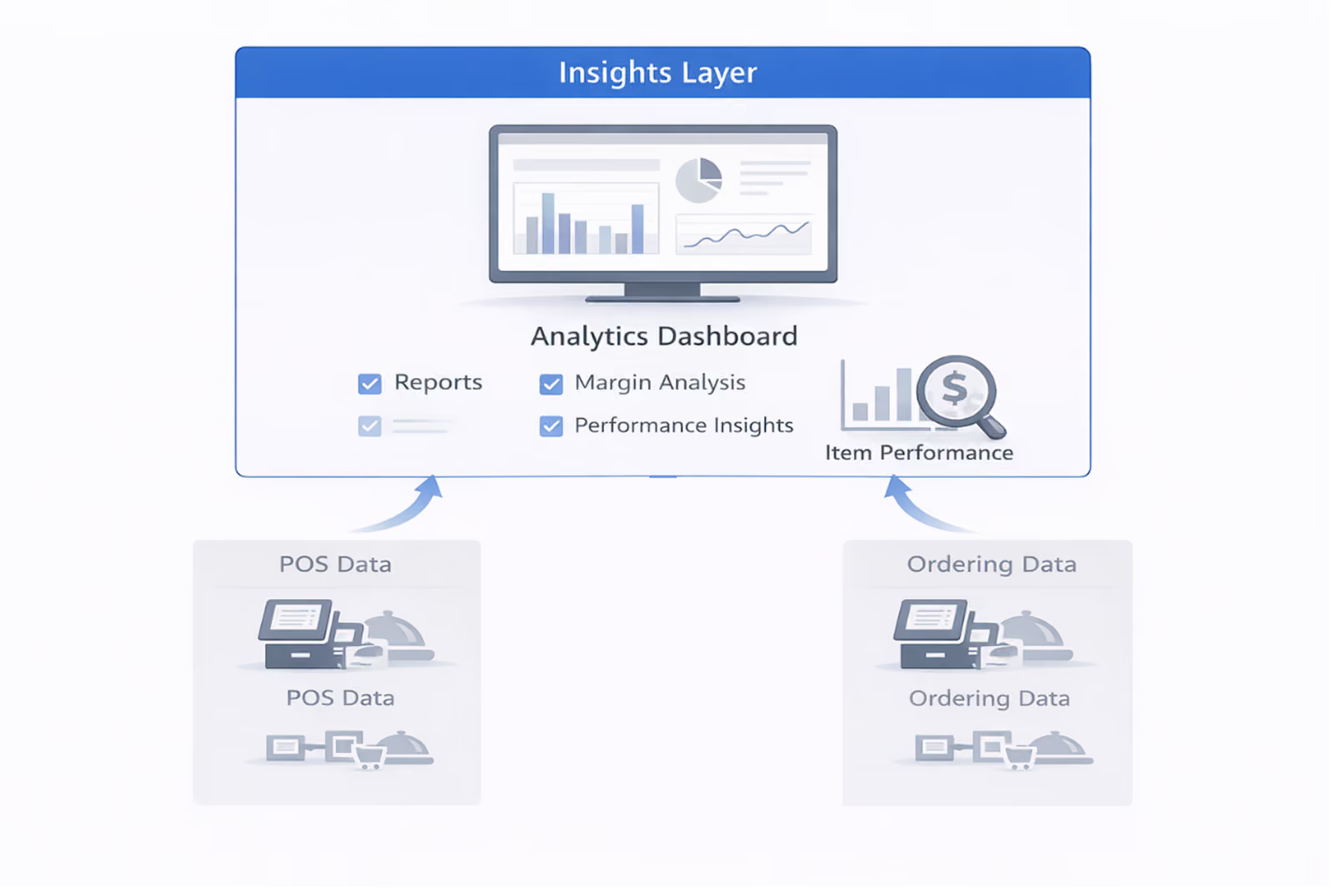
This software focuses on how menu items perform after they are sold. You use it to analyze item-level sales, contribution margins, and ordering patterns. The menu is evaluated based on what moves, what stalls, and what affects revenue per order.
Typical use cases
The menu engineering and analytics software is suitable for environments where menu execution is stable and optimization happens in cycles. It pulls data from POS and ordering systems to compare item popularity against profitability.
Ideally, your menu management software should include this capability so you can continuously review and understand how your menu is performing.
Items that sell frequently but return low margins are easy to spot, as are items that generate margin but receive little attention. These insights guide pricing, placement, and bundling decisions during menu optimization cycles.
Scope and limitations
The menu engineering and analytics software doesn’t control how menus are published or updated across channels.
6. QR code and tableside menu system
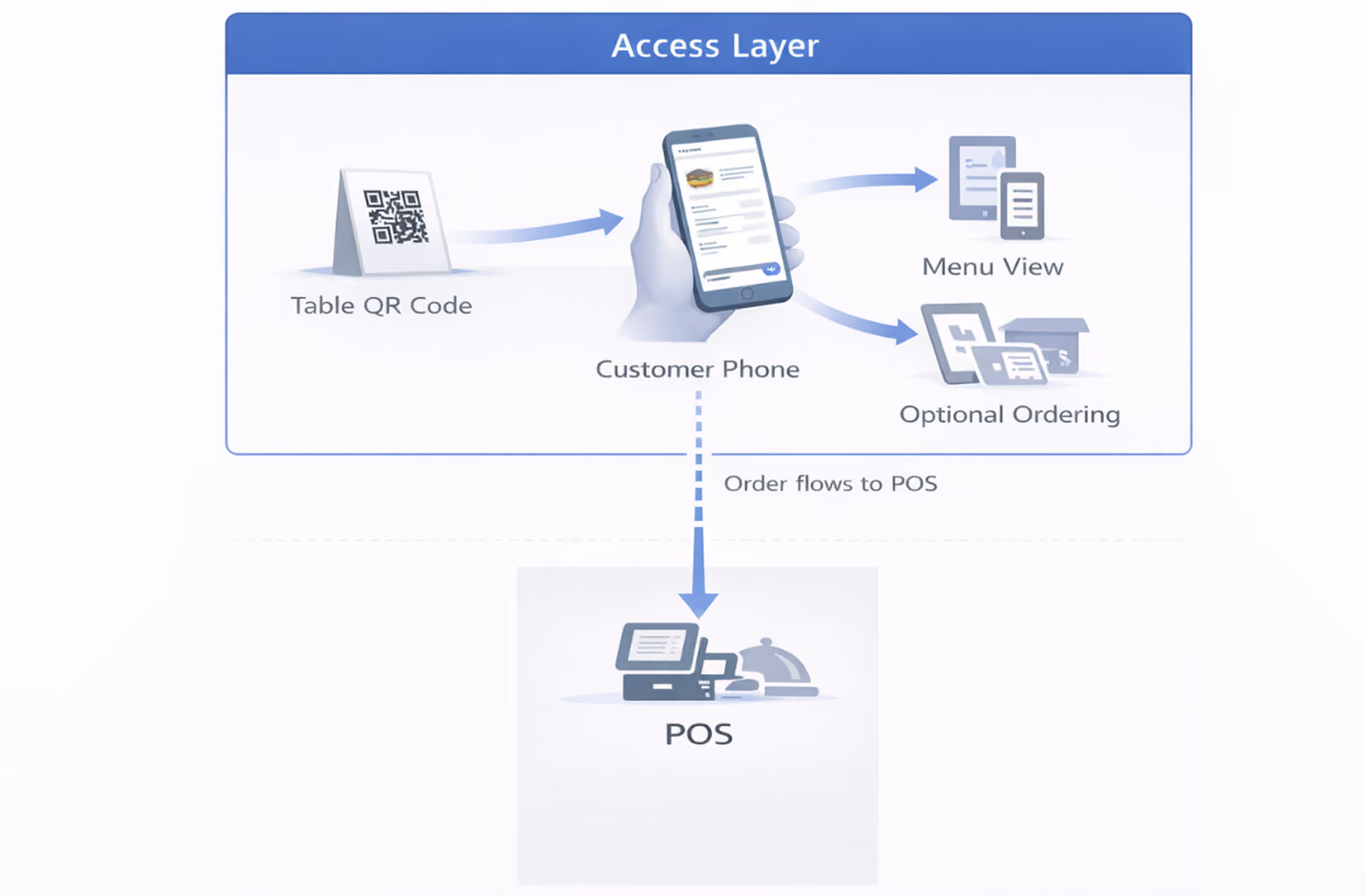
This system controls how your customers access the menu at the table. You present the menu via scannable codes or table-specific links that open on their devices, allowing you to update menus without printed copies or manual replacements.
In some setups, the menu is view-only. In others, it integrates with tableside ordering and payment. Availability and timing controls are essential here. You can hide items during specific hours or remove them quickly when stock runs out, without involving your staff.
Typical use cases
You typically use the system in casual dining restaurants, cafés, bars, and other fast-paced service settings where customers need quick, self-serve access to the menu.
Scope and limitations
The QR code and tableside menu system is restricted to the tableside experience. It doesn’t manage menu behavior across other channels unless you explicitly integrate it with POS or ordering systems.
7. All-in-one restaurant platform
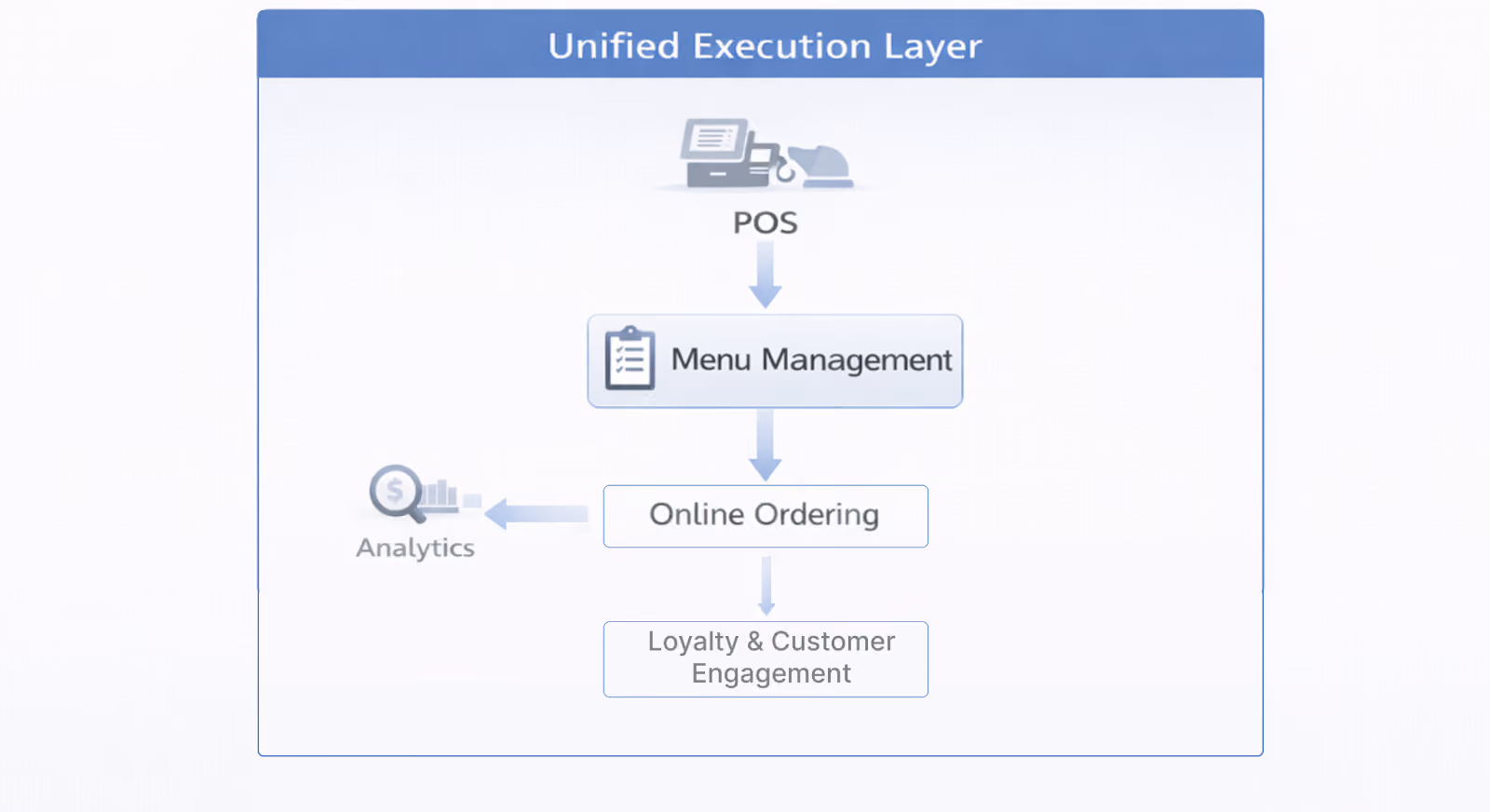
This type of restaurant menu management software considers menus as part of a broader ecosystem that also includes online ordering, promotions, and customer data.
You maintain the menu in the same environment where you configure ordering flows, discounts, and limited-time offers.
Menu changes are closely tied to how orders are placed and how promotions are applied, rather than being managed as a standalone layer. This model reduces day-to-day tool sprawl by consolidating everything into a single space.
Typical use cases
An all-in-one restaurant platform is a good fit when you want to simplify your tech stack and are comfortable managing menu changes within a larger ordering and marketing workflow.
Menu changes are applied within the same system that controls ordering and promotions. As a result, updates need to be made with awareness of how items are currently bundled, discounted, or scheduled.
For example, removing an item or changing its price can affect active offers, bundles, or limited-time campaigns that reference it. This makes testing and timing important, especially during live service or promotional periods.
Scope and limitations
An all-in-one platform prioritizes consolidation over modularity. While this reduces the number of tools you manage, menu behavior is defined within the platform’s ordering and promotion framework.
That means you have less ability to manage menu logic independently. Changes are governed by how the platform models ordering flows, discounts, and offers, rather than by a standalone menu control layer.
How Restolabs approaches all-in-one restaurant menu management
Restolabs is a centralized menu and ordering platform that stores menu structure, pricing, availability, and ordering rules in a single backend and applies them consistently across all customer ordering channels.
With Restolabs, you can:
- Standardize menus across channels: Create and manage a single menu that dynamically adapts to dine-in, pickup, delivery, catering, and QR ordering—without duplicating or rebuilding menus for each channel.
- Sync menus with POS: Automatically align pricing, availability, and item status across online ordering and QR menus through POS integrations, ensuring customers only see what can actually be ordered.
- Control availability in real time: Show or hide menu items by time of day, day of week, stock status, location, or ordering mode without pausing service or taking menus offline.
- Customize by order mode: Set different prices, modifiers, bundles, taxes, and fulfillment rules for pickup, delivery, and dine-in, all from the same menu structure.
- Balance control with local flexibility: Roll out brand-wide menu updates centrally while allowing individual locations to override pricing, hours, or availability when needed.
- Analyze menu performance: Track top-selling and underperforming items across channels and locations using actual ordering behavior—not assumptions—so menu decisions are data-driven.
You spend less time reconciling menus across systems and more time managing how the menu actually performs.
Key Features That Make Menu Management Software Usable
On paper, most menu management software promises faster edits. In service, the difference shows up when a sold-out item disappears from ordering, kiosks, and QR menus without three separate logins. The strongest systems act like a single control room. One change flows outward, so staff stop patching inconsistencies table by table, channel by channel.
Another giveaway is how the platform handles menu structure. A pizza shop is not just adding a name and price; it is juggling sizes, crusts, add-ons, combo rules, and item availability. If the software treats modifiers as an afterthought, the menu becomes brittle fast. Good menu management software keeps that logic organized, so changes do not unravel checkout or confuse guests.
Then there is control. Operators often need location-specific pricing, daypart menus, seasonal categories, and temporary pauses for low-stock items. Without permissions and scheduling, every update becomes a small fire drill. The better platforms reduce that drama. They let teams decide who can publish, what changes apply everywhere, and when a menu should shift without a last-minute scramble.
Top 5 Restaurant Menu Management Software for 2026
Now that we’ve broken down the different types of menu management software, here’s how leading platforms map to those control layers in practice:
*Pricing is indicative and varies by region, contract, and add-ons.
How to Evaluate the Right Menu Management Software for Your Restaurant
Different tools control different layers of the menu workflow. The right choice depends on how your restaurant operates today and where complexity is increasing. Here are the key questions to ask as you evaluate your setup:
1. Where do menu changes need to be enforced?
If most orders are placed in-store, POS-integrated menu control may be sufficient. If orders come from multiple channels, you’ll need menu logic that extends beyond the POS and stays consistent everywhere the menu appears.
2. How many channels does your menu serve today?
A single dine-in menu has very different requirements than menus spanning dine-in, pickup, delivery, QR ordering, and catering. As channels increase, coordination alone breaks down, and shared menu logic becomes even more critical.
3. How often does your menu change during live service?
Frequent price updates, stock-outs, or time-based availability require tools that can apply changes safely without interrupting service. The closer the menu control is to billing and order execution, the more carefully updates must be timed to avoid service disruption.
4. Do you operate across multiple locations?
Multi-location setups introduce governance challenges. Shared base menus, controlled overrides, and role-based access matter more than raw editing flexibility.
5. Are you optimizing the menu, or just keeping it accurate?
Some tools help you execute menus reliably. Others allow you to analyze performance and refine pricing, placement, and bundles over time. In many cases, you’ll use both—but for different purposes.
A Practical Rollout Plan for Menu Management Software
Rolling out menu management software starts before the first import. Teams need to map where menu data lives today: POS records, printed menus, delivery apps, spreadsheets, and staff memory. That exercise usually exposes the real problem. It is not just outdated item names. It is conflicting versions, missing modifier rules, and no clear owner for changes once service gets busy.
The next step is a controlled test. A restaurant might begin with a narrow slice of the menu—best sellers, high-customization items, or one daypart—and pressure-test how updates move across channels. If a guest cannot remove onions online or a cashier sees different pricing at the counter, the rollout has found a weak spot early, before it reaches every order.
After launch, discipline matters more than excitement. Someone should own naming conventions, photo standards, category logic, and publish approvals, even if several managers can edit the menu. That simple governance keeps the system clean over time. Otherwise, menu management software turns into the digital version of a taped-over paper menu: usable for a week, then messy again.
For restaurants that want online ordering tied closely to menu control, Restolabs gives operators a cleaner starting point. Its platform is built to keep digital menus easier to manage while supporting integrations and menu sharing across channels. Restaurants that want to see that flow in practice can Book a Demo.
Align Menu Behavior Across Channels With Restolabs
As menus expand across dine-in, pickup, delivery, and QR ordering, the cost of each change increases. What used to be a quick edit now touches ordering flows, availability rules, and location behavior across systems.
This is where Restolabs comes into the picture.
Restolabs centralizes menu structure, pricing, availability, and ordering rules in one backend, then applies them consistently across customer ordering channels. You make a change once, and the same logic governs how it appears and behaves everywhere it’s used.
That clarity reduces day-to-day coordination. Teams don’t have to reconcile versions or confirm which system is the current one. Menu updates follow defined rules instead of ad-hoc fixes, even as channels and locations increase.
If you’re evaluating how your menu operation should evolve as your business grows, seeing centralized menu and ordering control in action can help clarify what’s possible. Book a demo with Restolabs today.

Asavari drives content development at Restolabs. With over a decade of experience partnering with fast paced technology and marketing teams, she turns complex product and industry details into clear, meaningful communication for restaurant partners.
Frequently Asked Questions
No. A POS processes orders, payments, and billing. Menu management software controls how menu items, prices, modifiers, and availability are defined and updated. In some setups, menu management may be handled within the POS or in a separate system.
Yes. Many menu management systems allow you to control which items appear by order type. Prices, modifiers, bundles, and availability can differ across dine-in, pickup, and delivery channels depending on how each channel is served.
They maintain a shared base menu and apply location-level changes where needed. Updates are applied centrally, while pricing or availability can vary by location without changing the core menu.
No. QR menus control menu access and, in some cases, table ordering. POS systems still handle billing, payments, and kitchen workflows. QR menus may connect to a POS, but they do not replace it.

%2520(10).avif)

.avif)




.webp)

.svg)
.webp)