
-p-800%2520(1).jpeg)
Key Takeaways
- Dining has evolved: Diners expect faster, tech-driven experiences—and a restaurant table ordering system makes that possible with simple QR scans and instant digital menus.
- Digital ordering drives efficiency: With digital table ordering for restaurants, you can streamline service, reduce staff dependency, and increase average check sizes by up to 20%.
- QR-based systems lead the way: Affordable, scalable, and easy to implement, this table service ordering technology helps restaurants improve speed and accuracy without sacrificing experience.
- Choose solutions built for your workflow: The best restaurant table ordering solutions integrate with your POS, support contactless payments, and deliver real-time insights for smarter operations.
- Restolabs simplifies it all: With customizable menus, multilingual support, and seamless POS integrations, Restolabs makes setup fast and growth effortless.
Dining out has evolved. Diners no longer want to wave for a server or flip through paper menus. They prefer faster, more interactive ways to order, and that’s exactly what a restaurant table ordering system delivers.
With a quick QR scan, your customers can explore a digital menu, place orders, and even pay without waiting for staff assistance. It’s a win-win: you simplify operations, improve service speed, and give diners a smoother experience.
On top of that, research shows that diners tend to spend 20% more when ordering through digital systems—a simple upgrade that can directly boost your bottom line.
In this guide, you’ll learn what a restaurant table ordering system is, the main types available, and how each can benefit your business. You’ll also find a list of the six best table ordering solutions, along with practical steps to help you implement one in your restaurant.
What Is A Restaurant Table Ordering System?
A restaurant table ordering system allows diners to place their orders directly from their table using a digital interface, whether through a QR code, a tablet, or a mobile app. Instead of going through a physical menu, they can browse dishes, customize their selections, and send orders straight to the kitchen in just a few taps.
Types Of Table Ordering Systems: The Right Fit For Your Restaurant
Table ordering systems generally fall into three main categories:
- QR code-based
- Tablet-based
- Mobile app-based
Each offers its own advantages depending on your restaurant’s size, service style, and budget.
Among these, QR-code-based ordering systems stand out for their flexibility and ease of use. They’re affordable, scalable, and work especially well in restaurants where speed and minimal staff involvement are priorities.
Tablet-based systems, on the other hand, suit fine-dining or full-service environments where presentation and guest engagement matter. They support rich visuals, detailed descriptions, and even wine pairings, offering an elevated, interactive experience.
Now that you’ve seen the types available, let’s look at why a QR-based ordering system can make a real difference in your restaurant.
Why QR-Based Ordering Systems Make Sense For Your Restaurant
Digital table ordering for restaurants isn’t just trendy; it’s a practical way to make service faster, more accurate, and more enjoyable for both your customers and your staff. Here’s how they make a difference:
1. Always get orders right the first time
In many restaurants, order errors happen when instructions are relayed incorrectly or missed altogether. With a restaurant table ordering system, diners send their orders directly to the kitchen. This eliminates confusion, reduces food waste, and helps you focus on preparing great meals instead of fixing mistakes.
2. Serve more diners with less staff
During peak hours, every second counts. Table service ordering technology speeds up order-taking and payments, allowing you to turn tables faster and serve more diners, even with a smaller team.
3. Increase revenue per order
Digital menus naturally encourage browsing and upselling. Diners can see add-ons, sides, and pairings as part of the ordering flow, making it easy to personalize their meal and spend more.
For example: a customer at your restaurant orders a $50 steak. Your ordering system can quickly suggest truffle fries for $10 and a glass of wine for $15. That’s an additional $25 in revenue — all from a single table.
When every order adds up like this, your average check size rises without extra effort from your staff.
Look For These Factors When Choosing A Restaurant Table Ordering System
Choosing an online ordering system might seem like a big decision, but it doesn’t have to be. Focus on these factors to ensure your investment supports both your staff and customers:
- POS Integration: Your ordering system should connect seamlessly with your existing POS. This keeps orders, payments, and reporting in sync.
- Payment options: Look for built-in payment integration so diners can pay directly from their table. Whether it’s card, wallet, or QR payments, checkout should feel effortless.
- Customer support: When something goes wrong (and it occasionally will), responsive support makes all the difference. Choose a provider with quick, knowledgeable assistance available during your peak hours.
- Pricing transparency: Find a system that fits your budget without surprise fees. Look for clear, transparent pricing and features that deliver real value instead of unnecessary extras.
- Menu display and user experience: The menu should be visually appealing and easy to navigate. Your customers shouldn’t need a tutorial to place an order.
- QR codes linked to table numbers: Make sure your system automatically connects each QR code to a specific table number. This eliminates manual mapping, prevents mix-ups, and saves valuable time during busy service periods.
Top 6 Restaurant Table Ordering Systems
Here’s a list of the top restaurant table ordering systems to help you choose:
1. Restolabs
Restolabs is a powerful, easy-to-use restaurant table ordering system that helps restaurants grow faster without tech headaches or long onboarding cycles.
Trusted by over 2,000 restaurants across 10+ countries, it empowers you to accept and manage orders from your website, mobile app, and QR codes while maintaining complete control of your brand and customer data.
Restolabs integrates seamlessly with POS, payment, and delivery partners like Stripe, Checkmate, Uber Direct and DoorDash. Plus, restaurants can run custom loyalty programs, personalized promotions, and push notifications to drive repeat orders and increase customer lifetime value.
What Restolabs Gets Right
- Instant QR ordering, no apps required: Each table gets a unique QR code linked to its number. Guests scan and order instantly, right from their browser.
- Direct to kitchen or POS: Orders go straight to your POS or kitchen display system in real time, reducing missed tickets, manual entry, and back-and-forth with staff.
- Live menu control: Update your menu in seconds when you run out of an item or launch a special. Your digital menu refreshes instantly.
- Effortless upselling: Extras, sides, and drinks appear as natural suggestions in the ordering flow, boosting average check size without your staff needing to pitch.
- Multilingual guest experience: Guests can view the digital menu in over 10 languages, making table service ordering technology accessible and comfortable for every diner.
- Transparent pricing and no commissions: Get QR table ordering, delivery, and pickup all in one plan—no hidden add-ons or commission fees. Instead of charging separately for dine-in features, Restolabs gives you everything under one predictable monthly cost.
What Restolabs Could Improve
- Evolving marketing tools: The marketing and loyalty modules are still expanding, with upcoming enhancements to automation and personalization features.
Restolabs Pricing
2. Menu Tiger
Menu Tiger is a no-code restaurant table ordering system that helps restaurants design and manage QR-code-based digital menus. It streamlines service by enabling guests to order directly from their tables, making it one of the best restaurant table ordering solutions for venues seeking simplicity and flexibility.
What Menu Tiger Gets Right
- Real-time digital menu creation: Allows restaurants to create and update mobile-optimized menus instantly, keeping information accurate across all locations.
- Table-specific QR codes: Generates unique codes for each table, helping staff track and manage orders efficiently.
- Multi-store management: Lets restaurant groups manage multiple outlets under a single account, ideal for multi-location operations.
- Customer feedback collection: Built-in feature to gather and analyze guest feedback for continuous improvement.
What Menu Tiger Could Improve
- Limited POS compatibility: Some users note that the platform couldn’t integrate with a wider range of POS systems.
- Connectivity requirement: QR codes need an active internet or mobile data connection, which can cause occasional disruptions in areas with poor connectivity.
- Basic analytics: While helpful, reporting tools could be expanded to provide deeper insights into digital table ordering for restaurants.
Menu Tiger Pricing
3. HungerRush
HungerRush is an all-in-one restaurant table ordering system and Restaurant Management System (RMS) that unifies dine-in, online, and delivery operations. It’s built to simplify day-to-day management, improve customer experiences, and provide real-time insights for data-driven decisions.
What HungerRush Gets Right
- Comprehensive analytics and reporting: Delivers detailed insights on sales, order trends, and customer behavior to guide smarter decisions.
- Multi-channel ordering: Combines dine-in, online, and delivery orders in one place.
- 24/7 customer support: Offers round-the-clock assistance, reducing downtime during busy service hours.
- Intuitive user interface: The modern design makes managing digital table ordering for restaurants simple and efficient.
What HungerRush Could Improve
- Frequent upgrade requirements: Some users report being pushed to upgrade regularly to retain key features.
- Outdated hardware compatibility: A few reviews mention dependency on older hardware and software setups.
- Limited third-party integrations: While HungerRush works well within its ecosystem, integration with external tools like loyalty or marketing platforms can be restrictive.
HungerRush Pricing
4. Instalacarte
Instalacarte is a lightweight table service ordering technology that lets restaurants create and manage QR menus directly from a smartphone. It allows diners to place dine-in, takeaway, or delivery orders seamlessly.
What Instalacarte Gets Right
- Visual, multilingual menus: Displays a vibrant, image-rich menu that supports up to 12 languages for a more inclusive guest experience.
- Instant menu updates: Restaurants can edit and publish menu changes instantly from any device.
- User-friendly setup: Built for quick onboarding, making digital table ordering for restaurants fast and accessible.
What Instalacarte Could Improve
- Limited customization options: QR menus offer fewer branding and layout choices than other platforms.
- Single-menu limitation: Currently supports one QR menu per location, requiring guests to select their table number manually.
- No POS integration: Doesn’t connect directly with POS systems, requiring manual updates and order tracking.
Instalacarte Pricing
5. Square
Square is a restaurant POS system that also provides QR based table ordering solutions for small restaurants and food trucks. It helps you manage dine-in and takeaway orders through one easy-to-use dashboard.
Square supports features like Busy Mode, Pre-orders, and Pause Online Orders give you complete control over your sales flow.
What Square Gets Right
- Simple setup and UI: The drag-and-drop builder lets you create a mobile-friendly site that supports digital table ordering for restaurants.
- Smooth POS integration: Square connects directly with Square POS, making it a strong option for restaurants already using the Square ecosystem.
- Built-in loyalty program: Offers a basic points-based system integrated into the POS to help you reward returning guests.
What Square Online Could Improve
- Account reliability: Some restaurants report unexplained account deactivations that interrupt service.
- Limited POS flexibility: You’re locked into Square’s POS and payment terms, reducing freedom to switch providers.
- Variable subscription pricing: Costs scale based on the number of customers in your directory, which can increase expenses as you grow.
- Rigid and Limited System : Square Online can feel rigid if you want custom flows, upsells, dynamic menu rules and segmented promotions.
Square Pricing
6. Toast POS
Toast POS is a restaurant POS system that combines front-of-house and kitchen management with staff scheduling, payroll, and analytics via a central hub.
What Toast POS Gets Right
- Location-based pricing: Simplifies menu adjustments by letting you set prices for each location with a single click, which makes it ideal for multi-branch restaurants.
- Marketing tools: Offers automated discounts and loyalty workflows, making it a reliable table service ordering technology for restaurants seeking efficiency.
- Kiosk and digital ordering: Customers can order via self-serve kiosks or digital menus, enhancing speed and accuracy for both dine-in and takeaway service.
What Toast POS Could Improve
- Hidden processing costs: The free starter plan often includes higher transaction fees, which may affect smaller venues.
- Limited integration options: Online ordering works only within Toast’s own POS ecosystem, reducing flexibility.
- Product focus: Since Toast is primarily a POS platform, its digital table ordering for restaurant features may feel secondary, occasionally leading to slower support and feature gaps.
Toast POS Pricing
Set Up a Restaurant Table Ordering System with Restolabs
Once you’ve selected your preferred solution, setting up a restaurant table ordering system is simpler than you might think. Here’s how you can get started with Restolabs in just a few steps:
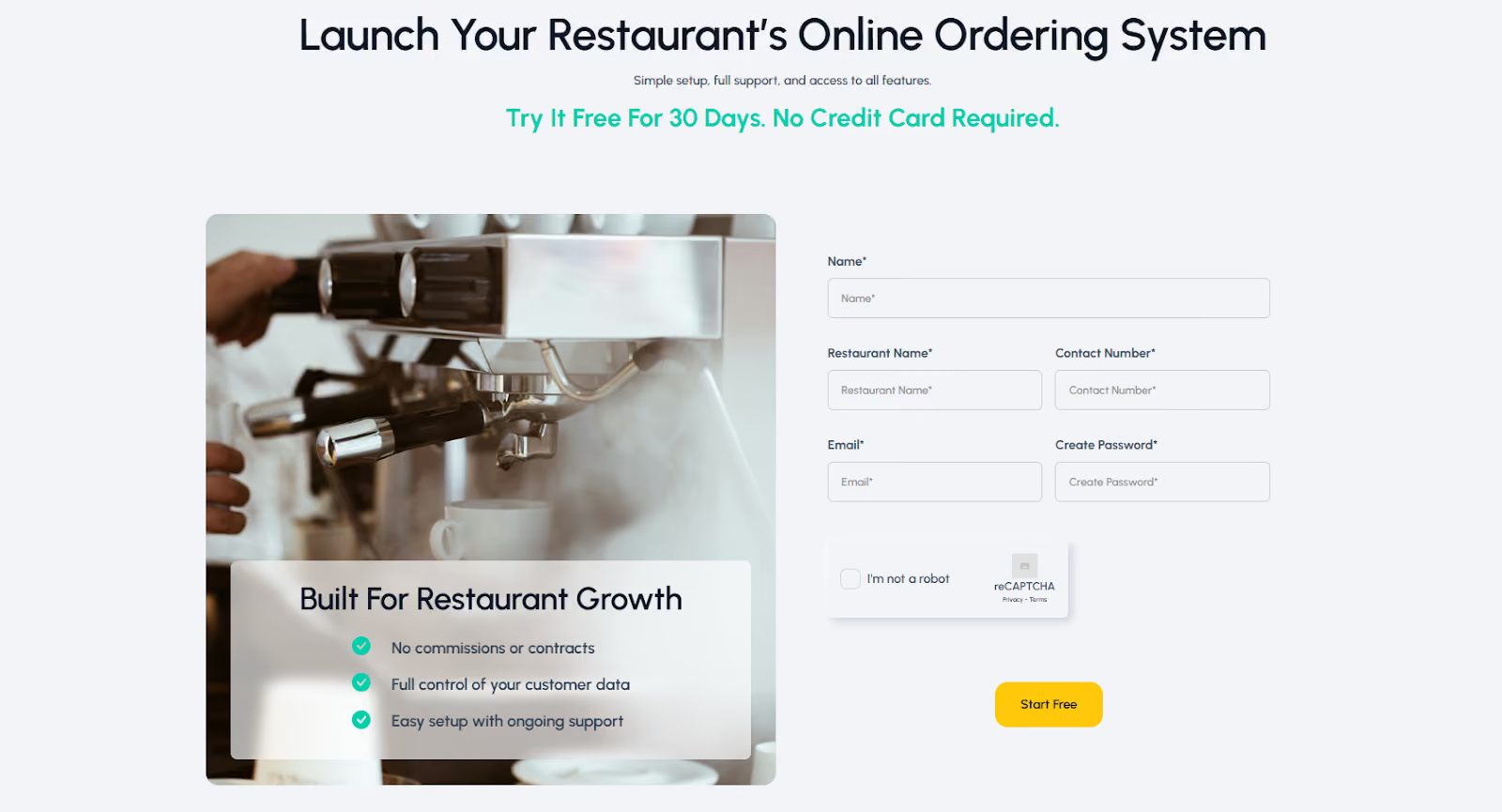
1. Sign up with Restolabs
Start by creating an account on Restolabs and filling out the quick onboarding form. From there, you’ll be guided through each step to get your restaurant’s profile and menu ready.
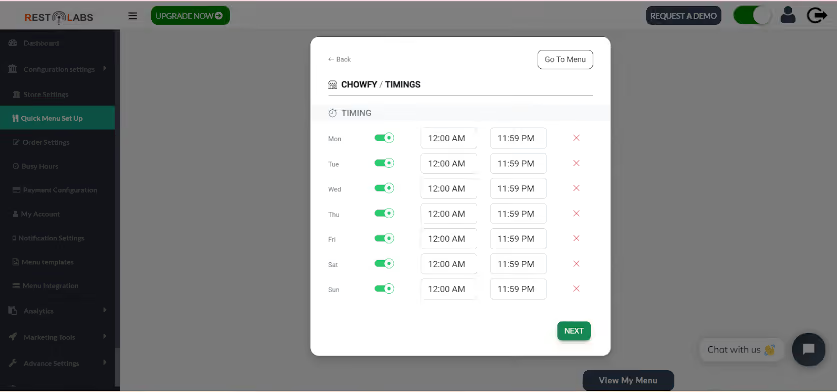
2. Select your setup options
Use the intuitive dashboard to customize your dine-in setup. You can adjust your restaurant hours, set service types, and configure dine-in settings.
3. Choose a payment method
Restolabs integrates with more than 50 global payment gateways that support multiple currencies and comply with PCI standards. This means your customers can order and pay securely without leaving their table.
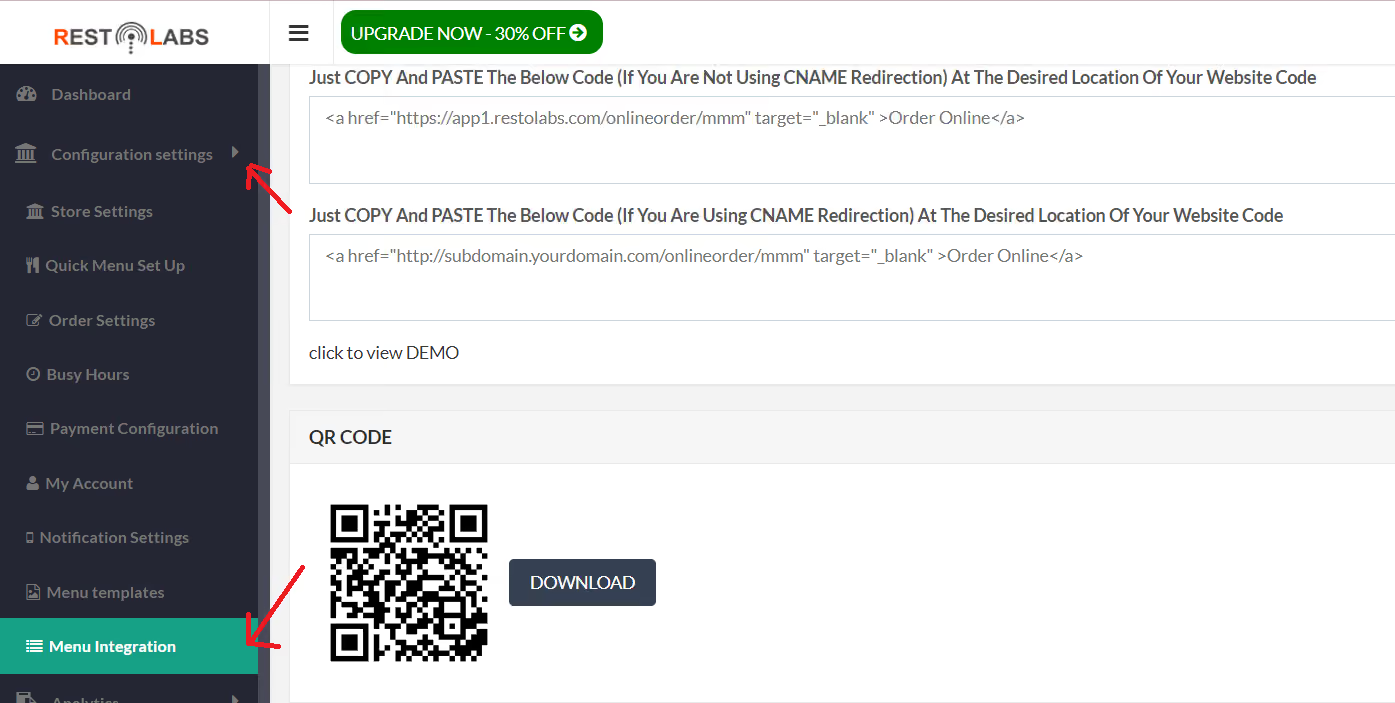
4. Generate your QR codes
From the dashboard, select Menu Integration under Configuration Settings. You can generate unique QR codes for each table that automatically link to your digital menu and table number.
5. Print and display the QR codes
Print the QR codes and place them on each table where they’re easy to scan. Once scanned, diners can instantly browse your menu, place an order, and pay.
The Future of Dining Lies in Restaurant Table Ordering Systems
Gone are the days when modern dining was solely about great food. Today, convenience, control, and connection matters just as much. Diners expect quick, seamless service that feels personal, even when it’s powered by technology.
A restaurant table ordering system helps you deliver exactly that. Restolabs, for instance, connects your front-of-house, kitchen, and customers in real time. You can serve faster, reduce errors, and gain insights that drive smarter business decisions.
So the question isn’t if you’ll implement the table service ordering technology. It’s rather “when.” Start now, and let us help you lead the way.

Sruthi Sekar specializes in brand strategy, growth, and user experience in the hospitality industry. As the driving force behind Restolabs, she helps restaurants harness technology to scale and thrive. With a background in design, branding, and entrepreneurship, she brings a sharp focus on crafting digital experiences that drive real business impact.
Frequently Asked Questions
Each table has a unique QR code linked to its number. When guests scan it, they see your live menu in their browser, place their order, and it’s sent straight to the kitchen or POS.
Yes. From quick-service outlets and cafés to casual and fine-dining restaurants, digital table ordering can adapt to any service model. It’s especially useful for venues with high traffic or limited waitstaff.
QR table ordering speeds up service, reduces order errors, and lets your team serve more guests with less stress. Guests enjoy faster dining, easier reorders, and more control, and restaurants benefit from higher table turnover and larger check sizes.
Most QR ordering systems only support dine-in. Restolabs goes further, offering QR table ordering, delivery, and pickup under one plan. You also get POS integration, real-time menu updates, multilingual menus, and detailed sales analytics, all from one dashboard.






.webp)

.svg)
.webp)