

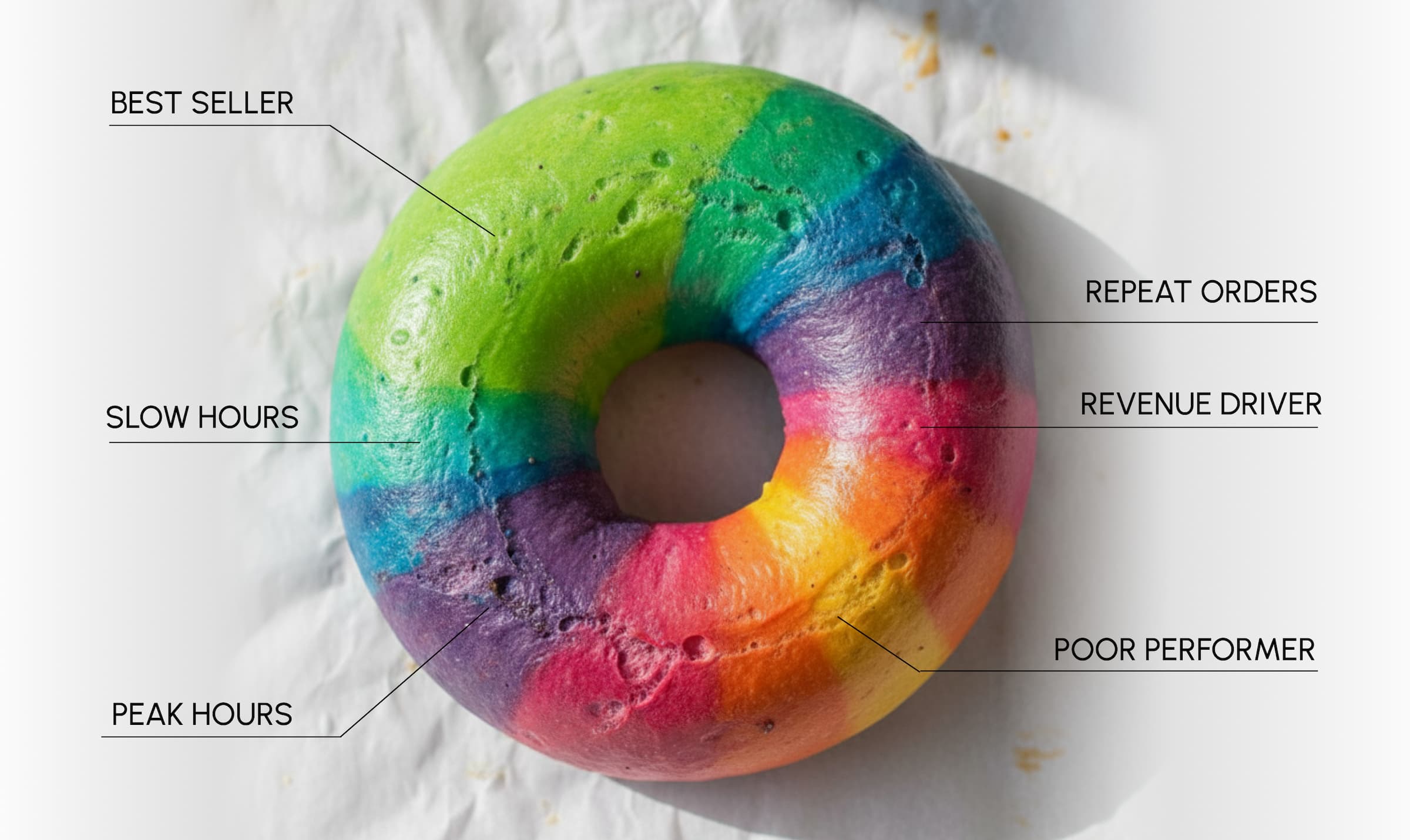
Key Takeaways
- Restaurant data analytics turns sales, operational, inventory, labor, customer, and channel data into evidence you can use to improve pricing, staffing, fulfillment, marketing, and other restaurant decisions.
- Descriptive, diagnostic, predictive, and prescriptive analytics help you understand what happened, identify why it happened, anticipate likely outcomes, and determine what to do next.
- Restaurant data analytics is most effective when you track metrics connected to decisions, including AOV, prime cost, contribution margin, retention, fulfillment timeliness, customer feedback, and marketing ROI.
- Your benchmarks should reflect comparable locations, channels, dayparts, service models, and operating conditions rather than relying solely on universal industry targets.
- Reliable analysis requires standardized records, consistent metric definitions, clean system integrations, clear decision owners, and a repeatable process for testing actions and reviewing their results.
- Restaurant data analytics from Restolabs connects direct-ordering insights with menu, promotion, availability, loyalty, and order-flow controls, helping you respond to customer demand while retaining ownership of your ordering data.
How many decisions did you make during yesterday’s service without knowing whether the numbers supported them? You may have adjusted staffing, prep quantities, or prices with the evidence scattered across your POS tool, online ordering platform, and customer records.
That lack of visibility is expensive in an industry with almost no margin for error. According to the National Restaurant Association, 42% of restaurant owners said their businesses weren’t profitable in 2025 and that they had limited ability to raise menu prices.
As one commenter asked in a Reddit discussion about data science in restaurants:
Your restaurant already logs many of those answers. This guide will help you identify which data matters, select the right performance metrics, and connect what you learn to pricing, staffing, inventory, marketing, and fulfillment decisions.
What Is Restaurant Data Analytics?
Restaurant data analytics is the process of combining and analyzing operational, transactional, and customer data to understand performance, identify patterns, and support better decision making.
It turns data points generated during everyday restaurant operations into information you can interpret and act on.
The process can draw from:
- Sales data: Orders, total sales, average order value, discounts, refunds, payment methods, and menu items recorded by your POS system or online ordering platform
- Operational data: Preparation times, fulfillment status, order errors, availability, peak hours, and other signals that affect operational efficiency
- Inventory data: Ingredient usage, stock levels, purchasing, food and beverage costs, stockouts, and food waste
- Labor data: Scheduled and actual labor hours, wages, overtime, role coverage, and labor costs
- Customer data: Order frequency, customer preferences, loyalty program activity, customer feedback, ratings, and lifetime spend
- Channel data: Orders from your website, reservation systems, third-party delivery apps, in-store channels, and marketing campaigns
Why Does Restaurant Analytics Matter for Growth?
It helps you preserve decision quality as more people, channels, shifts, and locations become involved in running the business. Your teams gain a common basis for evaluating performance instead of allowing each function to work from a different definition of success.
For example, a promotion planned by marketing may increase order volume while also changing kitchen demand, item availability, labor requirements, customer wait times, and restaurant profitability.
If your marketing, operations, and finance teams review those effects separately, each conclusion may be accurate but incomplete. Restaurant analytics creates greater operating discipline by helping you:
- Give teams a common performance language: Standardize how you calculate revenue, margins, repeat orders, delays, and other outcomes so a review doesn’t begin with reconciling conflicting numbers.
- Test assumptions before scaling them: Determine whether a decision produced the intended result and identify trade-offs created elsewhere in your restaurant business.
- Retain operational knowledge: Document what worked, what failed, and under which conditions so valuable learning doesn’t disappear when restaurant managers or employees change.
As National Restaurant Association Chief Economist Chad Moutray puts it, “In today’s margin-sensitive environment, visibility into cost structure is critical.”
What Are the Four Types of Restaurant Analytics?
Let’s take a look at the types of analytics that help you move from understanding past performance to deciding what you should do next:
1. Descriptive analytics (What happened?)
Descriptive analytics summarizes historical restaurant data. It helps you review sales trends and operating results without yet explaining their causes. It can answer questions such as:
- Which days and dayparts produced the highest order volume?
- Which menu items generated the most sales last month?
- How many orders used a promotional discount?
2. Diagnostic analytics (Why did it happen?)
Diagnostic analytics investigates the factors behind a result. It helps you separate coincidence from a repeatable relationship and identify the likely cause of a sales drop, margin change, or service problem. It can answer questions such as:
- Why did repeat orders decline at one location?
- Did staffing levels affect order wait times during peak hours?
- Did a promotion shift demand toward less profitable menu items?
3. Predictive analytics (What is likely to happen?”
Predictive analytics uses historical sales trends, seasonal trends, and other variables to forecast a likely outcome. The forecast offers you a probability-based view of future customer behavior or demand. It can answer questions such as:
- Which menu items are likely to sell more next quarter?
- How is forecast weather likely to affect customer demand next week?
- How much stock and labor might you need for an upcoming service period?
4. Prescriptive analytics (What should you do?)
Prescriptive analytics combines performance data, forecasts, operating constraints, and business goals to recommend an action. It helps you evaluate possible responses instead of leaving you with an unexplained chart. It can answer questions such as:
- Which low-margin item should you reprice, reposition, or remove?
- Which marketing strategies are most likely to increase repeat orders?
- How many employees should you schedule for Friday dinner service?
Which Restaurant Data Metrics Should You Track in 2026?
Track the metrics that correspond to decisions you can make, not every number your systems can display. The table below explains what each metric reveals, how to calculate it, and how to review it without relying on a context-free target.
How Can You Implement Restaurant Data Analytics?
Industry figures can provide context, but your most useful benchmarks will usually come from comparable periods within your own operation. The implementation process below explores the questions to ask for establishing them:
1. Which decision do you want to improve?
Begin with a decision that affects revenue, cost, customer satisfaction, or operational efficiency. Examples include changing a price, adjusting labor scheduling, ordering inventory, selecting a promotion, or controlling incoming online orders during peak hours.
Write the decision as a question. “Why does our Friday delivery volume create longer preparation times?” is more useful than “Build an operations dashboard” because it identifies the outcome, the context, and the analysis you need.
For each question, record:
- The person responsible for making the decision
- How often the decision is made
- The metric that should inform it
- The action you can take when the result changes
- The date when you will review the outcome
2. Which restaurant data sources do you need?
Map only the sources required to answer your decision question. These may include your point-of-sale system, online ordering platform, labor scheduling tool, loyalty program, reservation data, customer feedback channels, or third-party delivery apps.
For every source, document:
- Which fields it captures
- Who owns or validates the data
- How frequently it updates
- How far back the records extend
- Which identifiers connect customers, locations, menu items, orders, and channels
This inventory shows whether the evidence already exists, whether important fields are missing, and whether two systems record the same target differently.
3. How should you clean and standardize the data?
Data driven insights are only as dependable as the underlying records. Before you analyze data, standardize the names, formats, categories, and time periods used across your systems.
Pay particular attention to:
Cleaning data may not always guarantee a correct conclusion. However, it does prevent avoidable errors from distorting your analysis.
4. How should you establish performance benchmarks?
Build your primary benchmarks from comparable periods inside your own restaurant business. External figures can show what is possible, but they rarely reflect your exact menu, market, channel mix, service model, or capacity.
Without a consistent definition and comparison period, a benchmark is just a guess. Use this process instead:
- Define the metric precisely. Specify the formula, including transactions, exclusions, location, channel, and timeframe.
- Choose a comparable baseline. Compare the same weekdays, dayparts, order modes, and locations rather than combining unlike operating conditions.
- Use enough history. Eight to twelve recent weeks may establish a short-term baseline; a full year may be necessary when seasonal trends materially affect demand.
- Label abnormal periods. Separate closures, stockouts, unusual weather, major events, one-time marketing campaigns, and system outages from normal trading periods.
- Set three reference points. Record the normal baseline, the desired target, and the action threshold that requires investigation.
- Review the benchmark. Recalculate it after material changes to prices, menus, operating hours, channels, locations, or customer behavior.
For example, don’t adopt a universal target for delivery timeliness and assume it fits your operation.
Calculate your recent on-time rate for comparable Friday dinner orders, determine its normal range, and establish the point at which restaurant managers must investigate capacity, preparation, dispatch, or promise-time settings.
5. How should you analyze the results?
Review data over time rather than reacting to one service period. Segment the result by the factors most likely to change its meaning, such as location, daypart, order mode, menu category, promotion, new versus returning customers, and fulfillment type.
When a result changes, ask:
- Is the movement outside the normal range?
- Did the calculation or available data change?
- Which segment contributed most to the movement?
- What else changed during the same period?
- Does the pattern repeat, or is it a one-time event?
- Which explanation can you test before changing the operation?
Suppose AOV increases while contribution margin falls. The sales data may reveal that a discount lifted order value, but customers shifted toward menu items with higher food costs or a more expensive fulfillment channel. Looking at revenue alone would hide the trade-off.
6. How will you turn insights into action?
An insight becomes valuable only when someone is responsible for acting on it and reviewing the result. For every recommendation, assign an owner, action date, expected outcome, and follow-up date.
Keep the first cycle small. You might change the placement of one add-on, adjust preparation quantities for one daypart, revise one promotion, or update labor scheduling for one service window. Compare the result with the benchmark before extending the change.
Document what happened, including unintended effects. This creates an operating record that helps future restaurant managers make data driven decisions without restarting the analysis from zero.
How Should You Integrate Analytics With Restaurant Systems?
When you connect analytics directly to your POS and online ordering systems, you get a single, consistent view of how orders are placed, fulfilled, and completed.
Sales, item-level demand, discounts, fulfillment methods, and customer behavior are captured at the source, which removes gaps caused by manual exports and mismatched system records. With near real-time data, you can see what is happening during service rather than after it ends.
If a menu item starts trending during peak hours, you can respond immediately by adjusting prep priorities, reallocating staff attention, or pausing promotions before inventory runs low or kitchens hit capacity limits.
Direct integration also makes analysis more practical
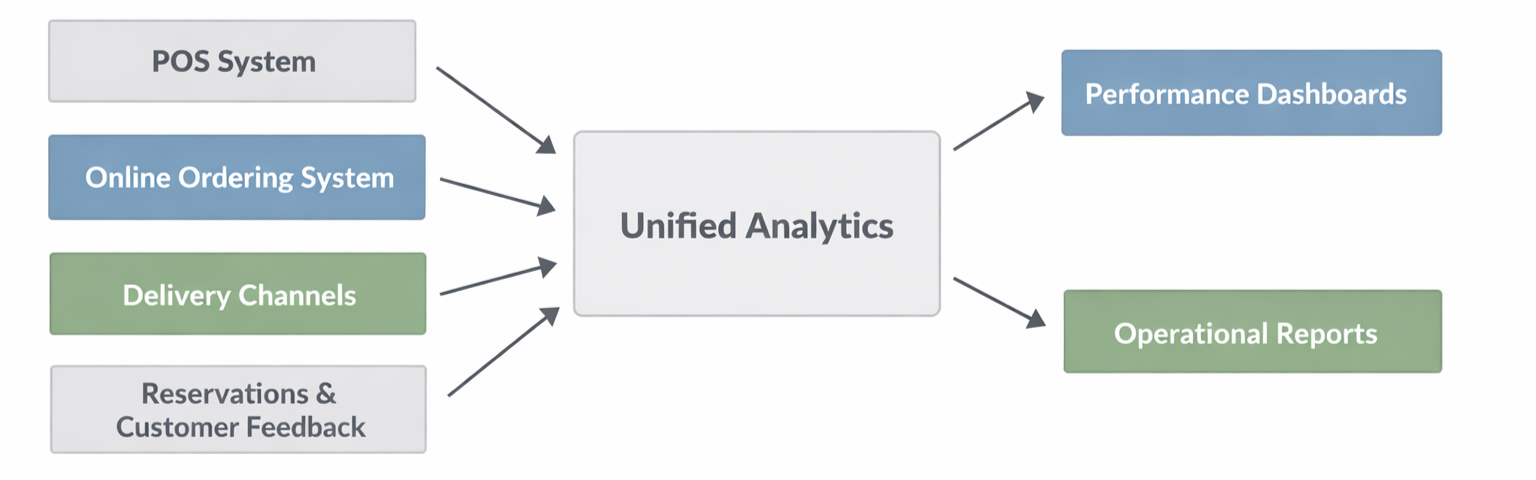
Because orders are recorded consistently across channels, you can compare promotional performance against baseline sales, review average order value by fulfillment type, or analyze order volume by time of day using the same underlying data.
This keeps reports stable and comparable instead of fragmented across tools.
Platforms like Restolabs support this by keeping menu data, pricing, modifiers, and availability synchronized across direct ordering channels.
- Features such as Quick Menu Setup and centralized menu management reduce configuration errors and ensure analytics demonstrate what customers actually see and order.
- Analytics becomes more useful when it connects to operational controls. If incoming order volume exceeds kitchen capacity, order throttling and busy hours let you slow or pause orders before service quality drops.
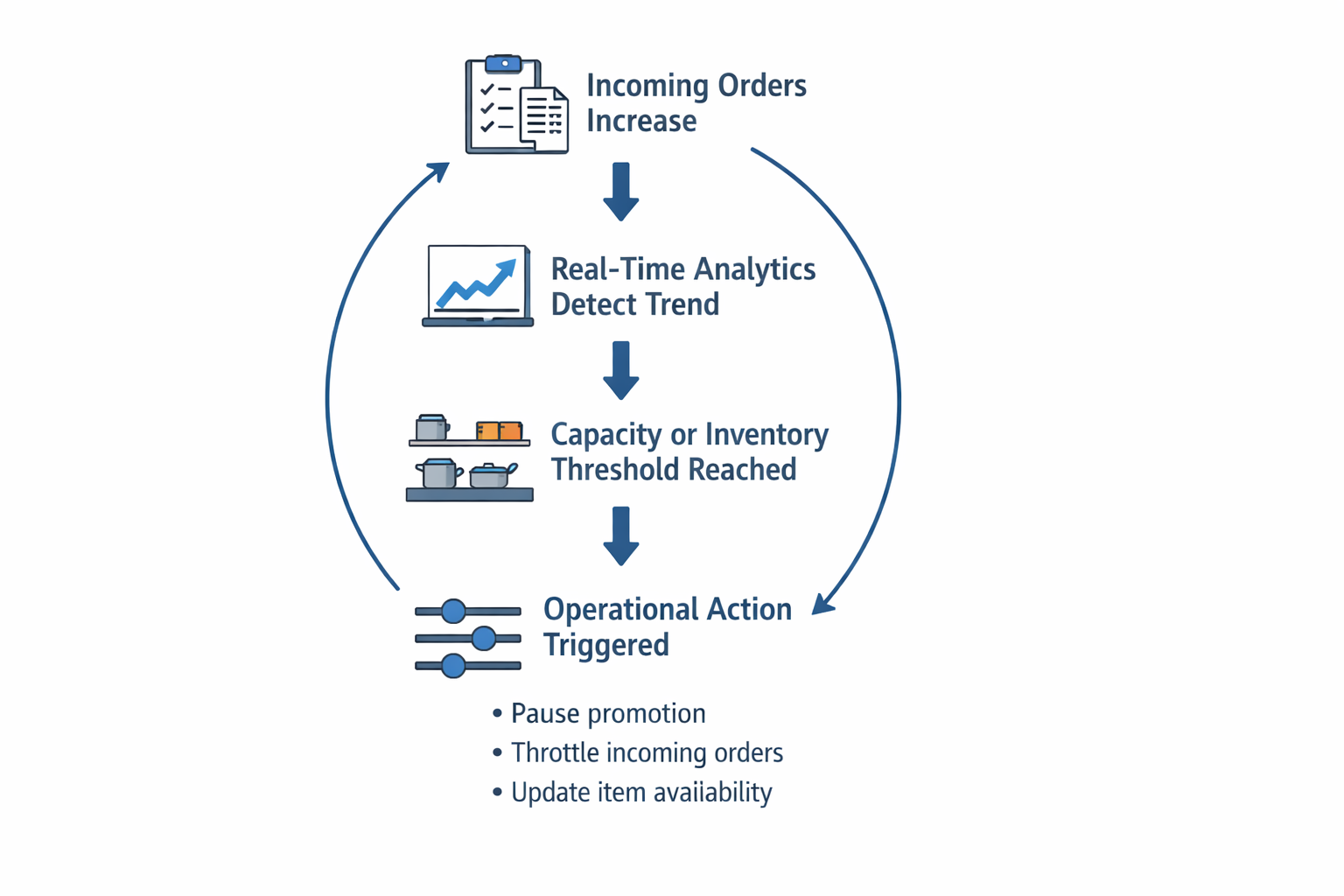
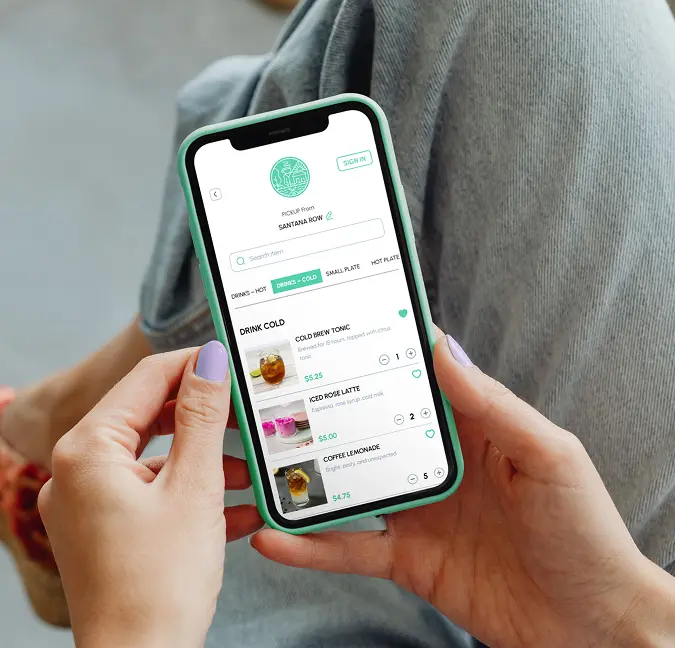
- Inventory-aware menus and stock counters remove unavailable items in real time, keeping demand signals aligned with sellable inventory.
- For multi-location setups, centralized integration keeps metrics consistent across stores and channels.
With menus, pricing rules, and order logic managed from one place, you can compare performance over time without reconciling conflicting reports from multiple systems.
Use Your Restaurant Data More Effectively With Restolabs
Restaurant success depends on making informed decisions backed by real data. Restolabs provides you with real-time reports, operational insights, and full ownership of your ordering and customer data without the complexity or hidden fees of enterprise analytics systems.
Here’s how you can use Restolabs data effectively:
- Identify top-selling and low-performing dishes: Analyze item-level sales performance to refine menus, adjust pricing, and focus on what customers actually order.
- Track daily sales, average order value (AOV), and peak hours: Understand demand patterns by time of day and order mode to better optimize staffing, promotions, and kitchen capacity.
- Monitor order flow and fulfillment performance: Review order volumes, prep times, and fulfillment trends across pickup, delivery, and dine-in to improve service efficiency.
- Analyze repeat orders and customer purchasing behavior: Identify loyal customers and repeat-order trends to inform loyalty programs, targeted promotions, and retention strategies.
- Plan inventory and prep more accurately: Use historical order data and real-time item availability to reduce stock-outs, minimize waste, and align inventory with demand.
- Evaluate promotion and loyalty performance: Track coupon usage, loyalty redemptions, and order impact to understand which offers drive conversions and repeat business.
Pizza Pirates reported a “25% month-on-month surge in online orders, with zero extra marketing” after adopting Restolabs, while also processing triple-digit daily orders and reducing time spent on manual phone entries.
That result reflects the wider opportunity: when your ordering system captures the right information and makes it usable, you can improve the customer experience and the operation at the same time.
Ready to put your data to work? Book a demo with Restolabs and see how integrated analytics can support smarter, more profitable decisions.

Sakthi Vignesh is a product and technology leader specializing in scalable solutions for the hospitality industry. As the force behind Restolabs, he focuses on building robust, user-centric platforms that help restaurants streamline operations and grow efficiently. With deep expertise in technology, product strategy, and system architecture, he drives innovation at the intersection of business and tech.
Frequently Asked Questions
No, modern restaurant data analytics solutions are designed for operators, managers, and owners. Platforms used in the data analytics in the restaurant industry focus on structured dashboards, filters, and predefined reports rather than raw data manipulation. With tools like Restolabs, users can analyze orders, customers, and menu performance without writing queries or managing databases. The system handles data collection and normalization behind the scenes, allowing teams to focus on interpretation and action.
Restaurant data analytics is valuable for restaurants of all sizes, not just large chains. While enterprise brands may invest in custom analytics stacks, most operators benefit first from consolidating POS and online ordering data into a single system. Tools like Restolabs are built to scale, supporting independent locations as well as multi-location brands with centralized reporting. Smaller restaurants gain clarity on sales trends, peak hours, and customer behavior without the overhead of enterprise tools.
Basic POS reports focus on transaction summaries, such as total sales or daily revenue, but they rarely provide operational context. Restaurant data analytics services go further by connecting sales data with order types, time-based trends, customer behavior, and menu performance. This allows restaurants to analyze how different fulfillment methods, promotions, or locations affect outcomes
The best restaurant data analytics software combines data accuracy, operational relevance, and ease of use. It should capture data at the source, standardize it across channels, and present it through clear, filterable reports. Strong restaurant data analytics solutions also align insights with real operational decisions, such as staffing, menu optimization, and order capacity management. Transparency and data ownership are equally important, ensuring restaurants can trust and export their reports as needed.
Restaurants typically begin seeing value from restaurant data analytics within weeks, not months. Once data sources are connected and standardized, trends in sales, order volume, and customer behavior become immediately visible. Restaurant data analytics solutions are most effective when teams review insights regularly and apply them to daily decisions. Early wins often include better staffing alignment, clearer menu performance insights, and improved promotion timing.
Yes. You don’t need all the data to begin analyzing a specific decision. Start with the minimum information required, document any missing fields or assumptions, and avoid presenting a directional finding as a definitive conclusion. Collecting data becomes valuable only when it improves a decision.
You may need business intelligence or a data warehouse when your existing systems can no longer produce one reliable definition of performance.
A data warehouse centralizes all operational data streams for analysis. This commonly happens when multiple restaurants use different POS platforms, menu structures, accounting periods, or channel labels.
No. Inventory data analytics and inventory management software perform different jobs. Your inventory system records stock counts, purchases, transfers, recipe usage, and wastage, while analytics helps you interpret how those records relate to demand and sales.
Using them together allows you to gain insights into over-ordering, unexpected ingredient usage, recurring stockouts, and items at risk of expiring.
Compare marketing channels using the same attribution window and commercial outcome. Evaluate your marketing efforts using incremental orders, contribution margin, acquisition cost, average order value, and repeat behavior.
When the data reveals that one channel generates high order volume but weak margins or few repeat customers, examine the wider sales patterns before reallocating your budget.
Operational friction often appears before your ratings decline. The National Restaurant Association reported this finding specifically among full-service restaurant customers: 64% of customers prioritize dining experience over meal cost.
Rising preparation times, order corrections, unavailable items, refunds, support requests, and longer gaps between repeat orders can all signal a deteriorating experience.
Menu insights become more useful when you look beyond which dishes sell the most. Restaurant data analytics can reveal common substitutions to improve menu design. Compare contribution margin, add-on rates, modifier usage, preparation time, discount dependence, and repeat-purchase behavior for each item.
The person who can change the outcome should own the decision, while a designated data owner should protect the accuracy of the calculation.
For example, operations may own preparation-time improvements, while marketing owns campaign performance and finance validates margin definitions. Assign every report a decision owner, data steward, review cadence, and action threshold.



.jpg)
.jpg)
.jpg)




.webp)

.svg)
.webp)