
Key Takeaways
- Control matters: Owning your pizza delivery app gives you control over pricing, prep times, delivery rules, and customer experience instead of relying on a food delivery platform.
- Right-fit decision: Restaurants typically choose a white label solution when they want to avoid technical complexity, launch quickly, and not manage ongoing development or maintenance.
- Aggregator tradeoffs: Marketplaces can support discovery, but commissions and lost customer data make them inefficient for repeat orders at scale. Direct ordering helps restaurants turn repeat demand into owned revenue.
- Feature discipline: The best white label pizza delivery app solution mirrors real kitchen rules, not generic restaurant workflows.
- Execution counts: Launch success depends on accurate menu logic, delivery zones, prep-time buffers, and staff training, not just software features.
- Platform choice: Choosing a restaurant-focused platform like Restolabs helps pizzerias reduce marketplace dependence, support repeat ordering, and keep direct customer relationships under their control.
- Fast setup matters: A managed platform with expert setup helps restaurants launch direct ordering faster than custom development, without taking on technical maintenance.
Where Restolabs fits: If the goal is to launch direct ordering without building software from scratch, Restolabs gives restaurants a commission-free way to offer branded web and mobile ordering while keeping customer data, pricing, and delivery rules under their control.
When you run a pizza business, peak hours often introduce problems that stay hidden the rest of the day.
For instance, modifier pricing breaks on half-and-half pizzas, delivery promises slip because prep times are fixed, and checkout slows down when customers add notes, tips, or address changes at the last step.
The result? Your staff has to first correct orders instead of moving them through the kitchen. And as volume grows, these gaps compound.
Delays turn into refunds, refunds turn into complaints, and customers who had a bad experience often reorder through marketplaces next time to avoid friction. Even when your pizza is the best in the neighborhood, control over demand, margins, and customer behavior starts to weaken.
This guide is written for that moment. For a pizzeria owner, the real issue is not whether customers can place an order online. It is whether each order protects margin, captures customer data, and gives the team enough control to deliver on time when the kitchen is under pressure. It explains how a white-label pizza delivery app solution can help, why it makes sense, and how to launch one. Let's get started.
What Does a White Label Pizza Delivery App Solution Include?
A white label pizza delivery app solution is a ready-made ordering and delivery system that runs under your pizzeria's name and plugs directly into your kitchen workflow.
A complete setup has four parts:
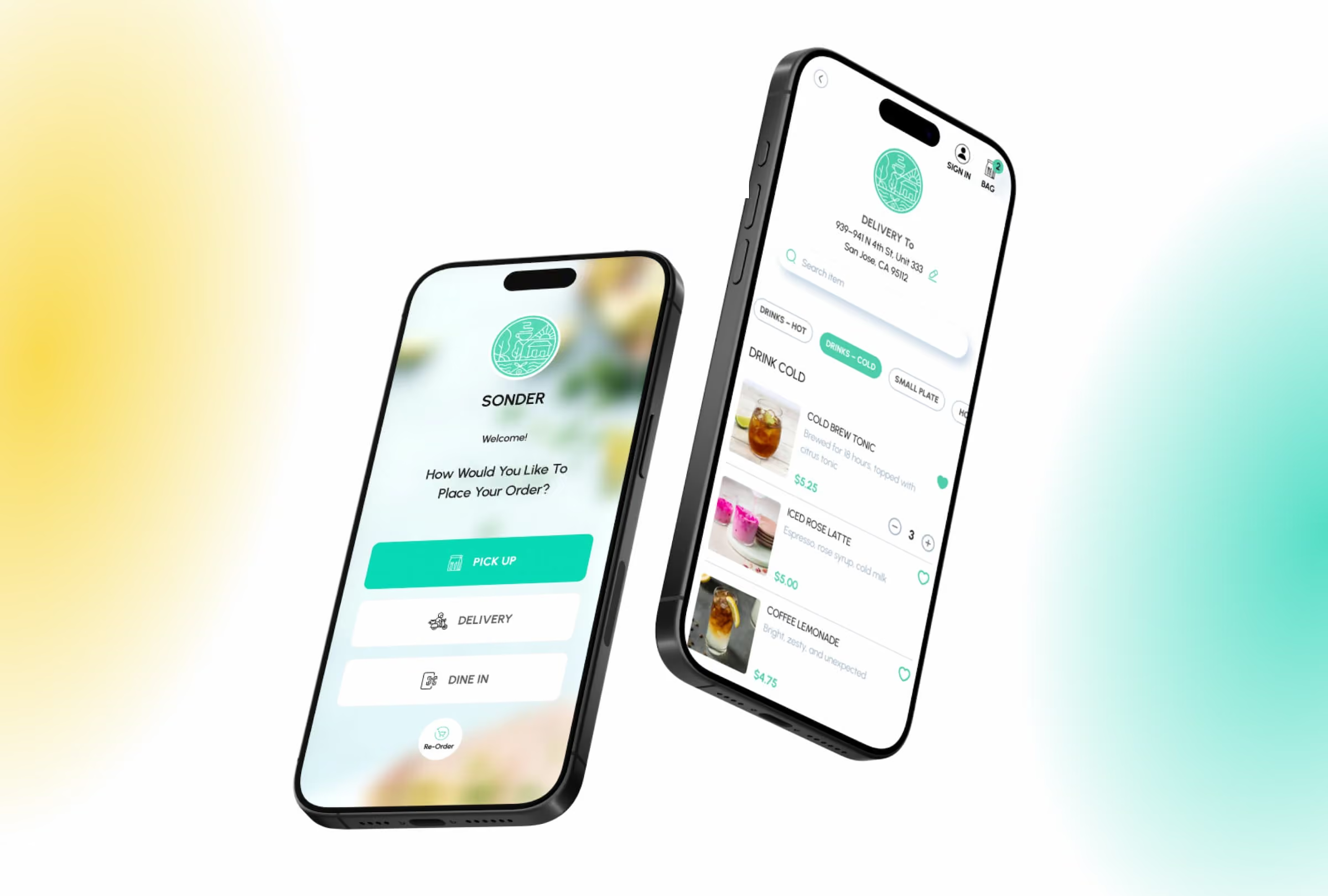
- Branded ordering app experience: This is the customer-facing layer — whether customers order through your branded mobile app or your responsive web ordering site. Customers browse the menu, customize pizzas, place repeat orders, and pay here. A strong setup should also include a web-based direct ordering interface. Customers should be able to order just as easily from a phone, tablet, or desktop without feeling like they have entered a different system.
- Restaurant operations dashboard: Orders are accepted, delayed, or paused here. During peak service, this is where staff controls flow rather than reacting to it.
- Delivery management: This includes delivery zones, fees, minimum order rules, prep-time buffers, and dispatch through your own riders, third-party partners, or both. Weak delivery controls usually show up as missed ETAs and refund requests.
- Admin control: This covers user access, multi-location setup, reporting, and permissions. Without clear access rules, staff changes settings they should not, and errors become hard to trace.
How Does a White Label Pizza Delivery App Work?
Understanding the order lifecycle helps you evaluate whether a platform is truly built for pizza operations — or just marketed that way. Here is the end-to-end flow:
- Customer places an order through your branded app or web ordering site. Menu logic validates the selection — enforcing topping limits, half-and-half pricing rules, and modifier availability in real time.
- The restaurant accepts the order through the operations dashboard. Staff can confirm the prep time, delay with an updated ETA, or pause ordering if the kitchen is at capacity.
- Delivery is assigned to an in-house driver or routed to a third-party fulfillment partner based on the zone, time window, and capacity rules you have configured.
- The customer receives real-time updates — order confirmation, prep status, dispatch notification, and delivery ETA — reducing inbound calls to staff.
- Order and customer data is stored in your system. Every completed order builds a customer profile you own — including contact details, order history, saved addresses, and reorder behavior — available for retention campaigns, loyalty programs, and future menu decisions.
Business Benefits of a White Label Pizza Delivery App Solution
Switching from marketplace-dependent ordering to a branded direct channel affects more than just commissions. Here is what changes operationally and financially:
- Margin protection: Every order placed through your direct channel keeps the full order value inside the business instead of surrendering 20–30% to a marketplace.
- Customer data ownership: You receive complete customer profiles, order history, contact details, and reorder patterns — data that aggregators retain when you use their platforms.
- Brand loyalty: Customers who order through your app associate repeat purchases with your brand, not the marketplace. That distinction compounds over time.
- Direct customer experience control: You control the checkout flow, promotions, upsells, loyalty mechanics, and post-order communication — without platform rules overriding your decisions.
- Faster repeat ordering: Saved addresses, favorites, and one-tap reorder reduce friction for returning customers, increasing reorder frequency.
- Reduced marketplace dependency: Aggregators remain useful for discovery. A direct ordering channel handles retention — reducing the share of revenue you pay to reach your own repeat customers.
- Multi-location consistency: Centralized menu, pricing, and brand management ensures every outlet delivers the same experience without manual reconciliation.
- Operational predictability during peak hours: Built-in prep-time buffers, order caps, and scheduling controls let the kitchen manage volume instead of reacting to uncontrolled inflow.
When a White Label Pizza Delivery App Is the Right Choice
A white-label app makes the most sense when direct ordering is already part of the business, but too much of that demand is still controlled by marketplaces.
1. A large share of your orders comes from repeat customers
If customers are already reordering frequently, owning the ordering channel ensures they come back to you directly instead of defaulting to a marketplace app.
2. Delivery is already a core revenue stream
When delivery drives meaningful revenue, improving margins doesn't require increasing demand. It requires shifting repeat orders to your own direct channel.
3. You want more predictable margins
Marketplace commissions fluctuate and scale with order volume. A direct ordering system gives you greater cost stability and long-term margin control.
4. You operate or plan to open multiple outlets
Centralized control over menus, pricing, and branding prevents inconsistencies across locations and simplifies expansion.
5. Peak hours feel difficult to manage
If your kitchen struggles during rush periods, built-in order caps, prep-time buffers, and scheduling controls help you manage volume instead of reacting to overload.
6. You want to be more tech-forward and present on your customers' phones
A branded ordering experience gives customers direct, convenient access to your business — without relying entirely on aggregator apps.
When a White Label Delivery App Solution May Not Be an Immediate Priority
1. Order volume is still very low and inconsistent
If you're still validating demand, your priority may be stabilizing traffic first. However, a direct ordering system like Restolabs can still support growth through loyalty, promotions, and repeat customer engagement.
2. You don't yet have repeat customers
A white label system works best when it strengthens existing customer relationships. If most of your orders come from first-time marketplace users and very few reorder, your focus may need to be on retention strategy, not just software.
3. You're unable to manage delivery directly or in hybrid form
If delivery logistics aren't structured — either through your own drivers or third-party integrations — execution becomes the bottleneck regardless of the ordering setup.
Custom Pizza Delivery App vs White Label Pizza Delivery App Solution
Before reviewing how the two models compare, it helps to understand what a custom build actually is. Simply put, it means developing your own ordering and delivery system from scratch — either with an in-house engineering team or an external development agency.
You own the code, infrastructure, and feature roadmap, and are responsible for building, testing, maintaining, and updating the platform over time.
Some large pizza chains choose the custom build route to support highly specific workflows, but it requires ongoing technical ownership rather than a one-time setup. Here's how it differs from a white label solution:
For most restaurant operators, the question is not whether custom software offers more theoretical control. It is whether the added cost, delay, and maintenance burden help the business sell more food today. A white-label system gives restaurants the practical control they need without turning the business into a software company.
White Label Pizza Delivery App vs Third-Party Delivery Apps
Third-party aggregators are delivery platforms such as DoorDash, Uber Eats, and Grubhub that list your restaurant alongside others and handle customer ordering through their apps.
They're primarily used for customer discovery and convenience, with the platform controlling the ordering interface and customer relationship. In exchange, the restaurant pays a commission on each order and has limited access to customer data.
Here's how they differ from white label direct ordering platforms:
The bigger loss is not always the commission line item. When customer details, order history, and reorder behavior stay inside a marketplace, the restaurant loses the ability to build direct relationships with its best customers. A white-label ordering system changes that by making every repeat order a source of both revenue and insight.
The real cost of aggregator commissions for pizza businesses
To understand the margin impact, it helps to look at a simple monthly scenario:
Aggregators become most expensive when your business is performing well because commission scales directly with order count, while your core operating costs don't increase at the same rate. That is the core difference between rented demand and owned demand. Aggregators may help new customers discover the restaurant, but direct ordering helps the restaurant keep the relationship after that first order.
How Much Does a White Label Pizza Delivery App Cost?
Cost is one of the first questions restaurant operators ask — and one of the least clearly answered by most vendors. The honest answer is that white label ordering platforms vary widely depending on what is included. Here are the main cost categories to evaluate:
Hidden Costs to Watch for Before Choosing a White Label Delivery Platform
The subscription price is rarely the full picture. Before signing with any platform, confirm the following:
- SMS and notification fees: Some platforms charge per message for order confirmations, delay alerts, and delivery updates.
- Hardware or tablet requirements: If the platform requires proprietary devices, that adds upfront hardware cost.
- Menu migration cost: Some vendors charge for setup labor if your menu is complex.
- Support tier access: Basic plans sometimes include only email support. Phone or priority support may require a higher tier.
- Delivery partner pass-through fees: If the platform routes orders to DoorDash Drive or a similar fleet, per-delivery fees apply in addition to your subscription.
- Refund handling: Clarify whether partial and full refunds are processed at no charge or whether transaction reversal fees apply.
- Integration maintenance: POS and payment integrations may require re-configuration when either system updates — confirm who handles this.
Must-Have Features of a High-Performing White Label Pizza Delivery App Solution
Below are the functional requirements this software meets in day-to-day operations:
1. Pizza menu and pricing logic
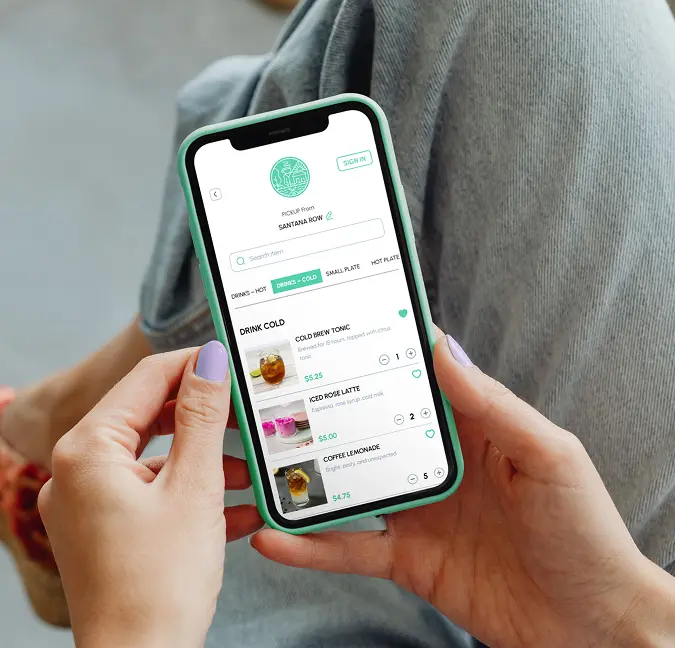
Your ordering system must reflect how pizzas are made and priced in your kitchen. That means defining which sizes allow which crusts, how many toppings are included per size, how extra toppings are priced, and how half-and-half pizzas are calculated.
Source: Restolabs Product UI/UX
For example, if a large pizza allows four toppings but a medium allows three, the system must enforce that. If half-and-half pricing is based on the higher-priced side, that rule must be explicit.
Combos, BOGO offers, and coupons must apply consistently across all paths. A customer should see the same price whether they make a pizza from scratch, reorder a past item, or add it through a combo.
In addition, the online pizza ordering software must support inclusive and exclusive taxes, item-level taxes, and order-level charges such as packaging or service fees.
2. Modifier handling
Pizza orders almost always include modifiers — extra cheese, topping swaps, special instructions. What separates a well-built system from a frustrating one is how invisibly those modifiers work at the moment a customer is building their order.
Modifiers need to work inline, without pushing customers through separate confirmation screens. Adding extra cheese should not trigger a new page load or reset the order flow. If it does, a percentage of customers abandon the cart — and that friction compounds across hundreds of orders a week.
3. Single-screen checkout flow
Checkout needs to be completed on one screen. Payment selection, tip amount, delivery notes, and contactless preferences should all be visible and editable in one place. Customers shouldn't be pushed into separate screens to add a tip or update instructions.
4. Repeat ordering mechanics
The online ordering platform should support reordering past meals exactly as they were ordered, saving favorites, and reusing addresses and delivery instructions. A customer shouldn't have to rebuild a regular order topping by topping. If repeat ordering requires too many steps, customers default to the fastest available option.
Source: Restolabs Product UI/UX
5. Prep-time and capacity controls
A fixed 25-minute prep time may look fine at 3 PM. At 7:30 PM, when the oven is full and five drivers are waiting, it becomes a promise the kitchen cannot keep. That is why the ordering system needs prep-time buffers and order caps that adjust before delays turn into refunds.
For example, if your kitchen can reliably handle 20 orders every 15 minutes during rush periods, that limit should be enforced by the system — not left to staff judgment under pressure.
6. Scheduled orders with defined time slots
Scheduled orders should be tied to fixed time slots. For instance, allowing customers to choose a 6:30–6:45 PM slot is operationally manageable.
Allowing "deliver around 7 PM" pushes too many orders into the same prep window and creates bottlenecks. Defined slots allow the kitchen to plan production and staffing instead of reacting to unpredictable spikes.
Source: Restolabs Product UI/UX
7. Order control during service
During a rush, staff should not have to hunt through multiple screens to slow things down. The team needs one clear place to accept orders, update ETAs, pause ordering, or reject an order when the kitchen is already at capacity.
8. Operational visibility after service
Once service ends, managers need clear answers to basic questions. Reporting should show how many orders came in by time of day, which channels performed best, where cancellations occurred, how long deliveries actually took, and how often customers reordered.
9. Delivery execution rules
A $12 order five miles away can quietly drain delivery capacity during a rush. Clear delivery zones prevent that. Each zone should reflect real travel time, minimum order value, and delivery fees so the restaurant does not lose money fulfilling low-value, long-distance orders.
If surge or peak fees are used, they should apply only during specific time windows so customers understand when and why prices change.
10. Hybrid delivery support
Most pizzerias don't rely on a single delivery method. You may use your own drivers during peak hours and third-party services during overflow or off-peak periods. The ordering system needs to route orders by zone, time, or capacity — without that switching process changing anything the customer sees or experiences.
Tracking, notifications, and order status should remain consistent regardless of who fulfills the delivery.
11. Admin and access control
Admin controls define who can change what during service and after hours. The online ordering system should support role-based permissions so only authorized users can pause ordering, adjust prep times, change pricing, or issue refunds.
For multi-location or franchise setups, admin control must support centralized menu and pricing management with location-level overrides. Reporting should be available by outlet, brand, and region.
12. Real-time order tracking and customer notifications
Every inbound call asking "where's my order?" is a small service failure — and those calls stack up during peak hours. A well-configured tracking and notification layer prevents most of them.
The system should send order confirmation, prep-started, dispatched, and delivered status updates automatically. If a delay occurs, the customer receives a proactive notification with an updated ETA rather than having to follow up. Driver assignment visibility, pickup vs. delivery messaging, and failed delivery communication should all be handled by the platform — not by your staff manually.
13. Payment, wallet, refund, and loyalty capabilities
Payments are not a single feature — they are a system. The platform should support card payments, digital wallets, cash handling rules, and tips. Partial refunds need to process cleanly and sync to settlement reports without creating reconciliation headaches.
Loyalty points, coupons, and combo offers should apply at checkout without friction — and they should sync with POS records so every transaction tells a consistent story across systems. If loyalty and payment data live in separate silos, customers notice the inconsistencies before management does.
How to Launch a White Label Pizza Delivery App
Before getting into the launch steps, it is worth clarifying one thing: the same framework applies whether the restaurant is launching a branded mobile app, a web ordering site, or a fully integrated direct ordering system. If an online ordering setup already exists, these steps can also work as a stress test before peak hours expose hidden gaps.
Typical implementation timeline
1. Build the menu exactly as it is ordered in real life
Start by translating your actual order patterns into the system, rather than copying your printed menu or POS defaults.
Printed menus don't reflect how customers actually customize, and POS configurations often contain legacy logic that no longer matches your pricing rules. When that structure is replicated online, small inconsistencies turn into peak-hour errors.
List every pizza size you sell and map which crusts are allowed for each size. Define topping groups clearly. For example, if medium pizzas allow up to 3 toppings and large pizzas allow 4, simply reflect that rule in the system. For half-and-half pizzas, choose how you want pricing to work — many pizzerias price based on the higher-cost half.
Once that's defined, the system follows the rule automatically. Next, audit modifiers that cause friction today. If your staff frequently explains "extra cheese means different things on thin vs pan crust," that distinction must be reflected in pricing rules rather than being handled verbally.
Finally, remove items or combinations you routinely refuse during rush hours. If you already say "we don't do that on Fridays," the app shouldn't accept it either.
2. Define delivery zones using distance and time
Create delivery zones based on travel time. Start with three zones:
- Zone 1: 0–2 miles or under 15 minutes
- Zone 2: 2–4 miles or 15–25 minutes
- Zone 3: 4–6 miles or 25–40 minutes
Adjust these based on your city's traffic patterns. For example, a 3-mile delivery in a dense area may take longer than a 6-mile delivery in a suburb.
Assign each zone a delivery fee, a minimum order value, and a maximum delivery time. For example, Zone 3 might require a higher minimum order or be disabled during peak hours. This prevents low-value, long-distance orders from overwhelming delivery capacity.
Use Google Maps or your driver logs from previous weeks to validate actual delivery times before locking zones.
3. Set prep times based on throughput
Prep time should reflect how fast your kitchen works at 70–80% capacity. Calculate how many pizzas your kitchen can realistically produce in 15 minutes during a rush.
If your oven handles 12 pizzas every 10 minutes and you average two pizzas per order, your practical throughput is lower than you think once sides and desserts are included. Set a base prep time for normal hours, then increase it automatically during peak windows.
- Off-peak: 20 minutes
- Peak: 30–35 minutes
Avoid fixed prep times that never change. They create false promises and late deliveries once order volume spikes.
4. Configure order caps and pause rules before launch
Decide how many orders your kitchen can handle per 15-minute block without delays. For example, if your staff can process 25 orders every 15 minutes during peak service, that becomes your cap. Once the cap is reached, the system should either push new orders into the next time slot or pause ordering temporarily. Don't rely on your staff to reject orders manually.
5. Test the entire order-to-refund workflow step by step
Run structured test scenarios before going live. Place test orders from each delivery zone:
- One normal order
- One large order with modifiers
- One scheduled order
For at least one test order: delay it intentionally, mark an item out of stock, and process a partial refund. Confirm how staff receives the order, how delay notifications are sent, how refunds are triggered and recorded, and how settlement reports reflect the refund. This testing reveals problems that only appear once real orders are placed.
6. Train staff on service controls
Training should be short, role-based, and scenario-driven. For counter staff and kitchen leads, focus only on: accepting orders, delaying orders, pausing ordering, and routing delivery to the correct driver or partner.
Avoid feature walkthroughs. Instead, simulate real situations:
- "Orders are backing up. What do you do?"
- "A driver is late. How do you delay?"
- "The kitchen is overloaded. How do you pause ordering?"
Run a 30-minute session before launch, then repeat a shorter refresher after the first weekend.
7. Go live quietly, stabilize service, then promote
Launch without announcing the app publicly. Watch the first few peak periods closely. Adjust prep times, order caps, and zones based on real behavior.
Once service is stable, start customer activation using QR codes, packaging inserts, and a simple direct-order incentive. Avoid promoting aggressively until you're confident peak hours are predictable.
How to Choose the Right White Label Pizza Delivery App Solution
Before evaluating any vendor, it helps to have a clear set of criteria specific to pizza operations. Generic food delivery platforms are not always built for the modifier depth, peak-hour controls, and delivery zone logic that pizza businesses require.
Use this checklist when comparing platforms:
What to Look for in a Pizza-Focused White Label Delivery Platform
Running a pizza operation introduces constraints that generic ordering platforms struggle to handle. You need an online ordering system that reflects how your kitchen, delivery, and peak hours actually work.
Restolabs is a commission-free online ordering platform built for restaurants, with workflows that can support pizza-specific ordering needs like modifiers, size-based pricing, delivery zones, and repeat orders. It powers direct ordering through a restaurant's own website and branded apps, keeping pricing, fulfillment, and customer relationships under the restaurant's control instead of a marketplace's.
For many restaurants, Restolabs can help shorten the path from decision to live ordering dramatically. With guided setup and ready integrations, teams can start selling online quickly instead of waiting months for custom development. With expert setup, many restaurants can start selling online in as little as one day.
Here are some of its features:
- Pizza-specific menu logic: Restolabs supports split modifiers, nested add-ons, and size-based pricing rules without disrupting checkout. Customers see accurate pricing as they build their orders, and staff spend less time correcting mistakes during service.
- Control during peak hours: Restolabs provides operational controls such as prep-time management, order limits, and busy-hour settings so restaurants can regulate how many orders the kitchen accepts at a time.
- Delivery on your terms: Restolabs supports zone-based delivery rules and hybrid fulfillment, so restaurants can use in-house drivers, third-party partners, or both without moving customers back to marketplace apps.
- Built for repeat ordering: Restolabs supports reordering past meals, saving addresses, and marking favorites to reduce friction for returning customers. Promotions, combos, and loyalty programs are managed directly, without relying on third-party discounts that reduce margins.
If you're building a pizza business that wants to grow delivery revenue without giving up ownership, it's worth seeing how Restolabs fits into your operation.
How to Launch a White-Label Pizza Delivery App with Restolabs
1. Define your business requirements
Every pizza brand runs slightly differently. You may offer build-your-own pizzas, multiple crust options, half-and-half toppings, combo meals, or delivery across different zones.
During onboarding, the Restolabs team maps the restaurant's exact workflow so the ordering setup reflects real kitchen operations, not the other way around. The goal is to translate how your business already runs into a structured digital format without disrupting your process.
2. Configure your branded ordering system
Once the details are confirmed, Restolabs handles the technical setup. This includes uploading the menu with all customization options, configuring delivery areas and taxes, integrating preferred payment gateways, and applying the restaurant's logo, colors, and design.
Your Android and iOS apps and web interface are fully white-labeled — customers see only your brand, regardless of where they place the order.
The setup reflects the workflow discussed during onboarding, so pricing logic, modifiers, and delivery rules function exactly as defined. There's no need to manage developers or navigate the technical complexities of app store submissions.
3. Begin receiving direct orders
Once live, orders flow directly into the restaurant's system. Orders can flow through a tablet, dashboard, or POS integration, depending on the restaurant's setup. That matters during service because staff should not have to rekey orders when the kitchen is already under pressure.
Real-time notifications keep the team informed, while prep times and delivery rules remain under the restaurant's control. Most importantly, the restaurant retains full ownership of the customer relationship, customer data, and complete order value without marketplace commissions reducing margins.
4. Optimize and grow your direct channel
After launch, online-exclusive promotions, loyalty programs, customer data collection, and peak-hour reporting all become available. Over time, this allows repeat orders to shift toward the branded platform rather than relying entirely on third-party marketplaces for visibility.
Book a Demo to see how Restolabs can help your restaurant launch commission-free direct ordering with the right menu, delivery, and payment setup.

Asavari drives content development at Restolabs. With over a decade of experience partnering with fast paced technology and marketing teams, she turns complex product and industry details into clear, meaningful communication for restaurant partners.
Frequently Asked Questions
White label delivery means the restaurant uses a ready-built ordering and delivery platform that runs entirely under its own brand name. Customers see the restaurant's logo, colors, and domain — not the platform provider's. The restaurant controls pricing, menu logic, delivery rules, and customer data, while the platform handles the underlying technology.
Yes — but not all platforms handle this equally well. A purpose-built solution should support half-and-half pricing (priced by the higher-cost half), size-based topping limits, nested modifiers, and combo rules that apply consistently whether a customer orders from scratch or reorders a saved item. Verify these capabilities specifically before committing to a platform.
Unlike custom app development projects that may take several months, many restaurants can start selling online quickly with Restolabs. With expert setup and ready integrations, some restaurants can launch in as little as one day, depending on menu complexity, integrations, and required approvals. The setup is guided and structured — no in-house technical team is required, and there is no ongoing development infrastructure to manage.
Both options are available. A complete white label setup typically includes a branded mobile app for iOS and Android and a responsive web ordering site. Customers can order from a browser on any device without downloading anything. For most pizzerias, web ordering drives the majority of direct orders — especially from repeat customers who have bookmarked the ordering page or scanned a QR code from packaging.
In most cases, yes. Customer data such as names, contact details, and order history can usually be migrated, depending on how it is stored today and what systems you are moving from. It's important to confirm what data can be imported, what format it needs to be in, and how repeat customers will be recognized after the switch.
White label platform costs vary by provider and feature set. Most subscription-based platforms charge a monthly fee — which is predictable and commission-free. Setup costs are typically low or included. Payment processing fees from your gateway still apply. Key questions to ask: Are there SMS fees? Is POS integration included? Are app store submissions handled by the vendor? Platforms like Restolabs offer transparent, contract-free pricing — making total cost of ownership significantly lower than both custom development and ongoing marketplace commissions.
No. A white label setup can work with in-house drivers, third-party delivery partners, or a combination of both. Many pizza businesses use their own riders during peak hours and rely on external services during overflow or off-peak periods. What matters is that the system supports routing orders cleanly without changing the customer experience.







.webp)

.svg)
.webp)