

Key Takeaways
Restaurant order management system (OMS) helps route orders to the kitchen, syncs status across systems, and keeps your operations aligned as order volume increases. It lets you handle orders from multiple channels by keeping the order flow streamlined and from a single point.
Without a clear order flow, even small gaps can lead to missed tickets, delays, and reporting issues across platforms. In this guide, you’ll learn what it actually does and what to look for when choosing one for your business.
If you manage a restaurant, you know what 8 pm feels like. Orders come in from your POS system, delivery apps, and phone, one after another, prompting your staff to switch between screens to keep up.
Most of the time, things run smoothly. But it takes only one missed order. Tickets start piling up, and your kitchen, already running at full capacity, has to juggle dine-in, delivery, and pickup simultaneously without a clear sense of priority.
By the end of the night, the totals from each platform don’t match. You’re left manually cross-checking them just to figure out what was sold.
This is where a restaurant order management system changes everything. In this guide, you’ll learn what it actually does and what to look for when choosing one for your business.
What Is a Restaurant Order Management System (OMS)?
A restaurant OMS is a software that collects and centralizes orders from different sales channels, including website, delivery apps, dine-in, and phone. It routes orders to the correct kitchen display system (KDS) or printer based on order type and station.
The OMS also syncs order status across the front of house (FOH) and back of house (BOH) in real time, and consolidates sales data into a single end-of-day report.
Depending on the system, a restaurant order management system can include aggregating orders from third-party platforms or managing direct online orders alongside in-store operations.
Without an OMS, most restaurants face these problems:
- Too many order channels, not enough visibility: Orders come from dine-in, takeout, your website, and delivery apps. Staff switch between screens, increasing the risk of missed or delayed orders.
- Manual entry leads to errors: Re-entering orders into the POS slows service and introduces mistakes, such as missed modifiers, wrong items, and frustrated customers.
- No centralized reporting: Without a single system, it’s difficult to track performance across channels or understand what’s actually driving revenue.
Order Management System (OMS) vs Point Of Sale (POS) vs Online Ordering
So, is an OMS the same as a POS or an online ordering platform? No. While these three tools often work together, they serve distinct roles.
What You Should Look for in a Restaurant Order Management System?
The features below define how the system manages orders, from intake to preparation and fulfillment:
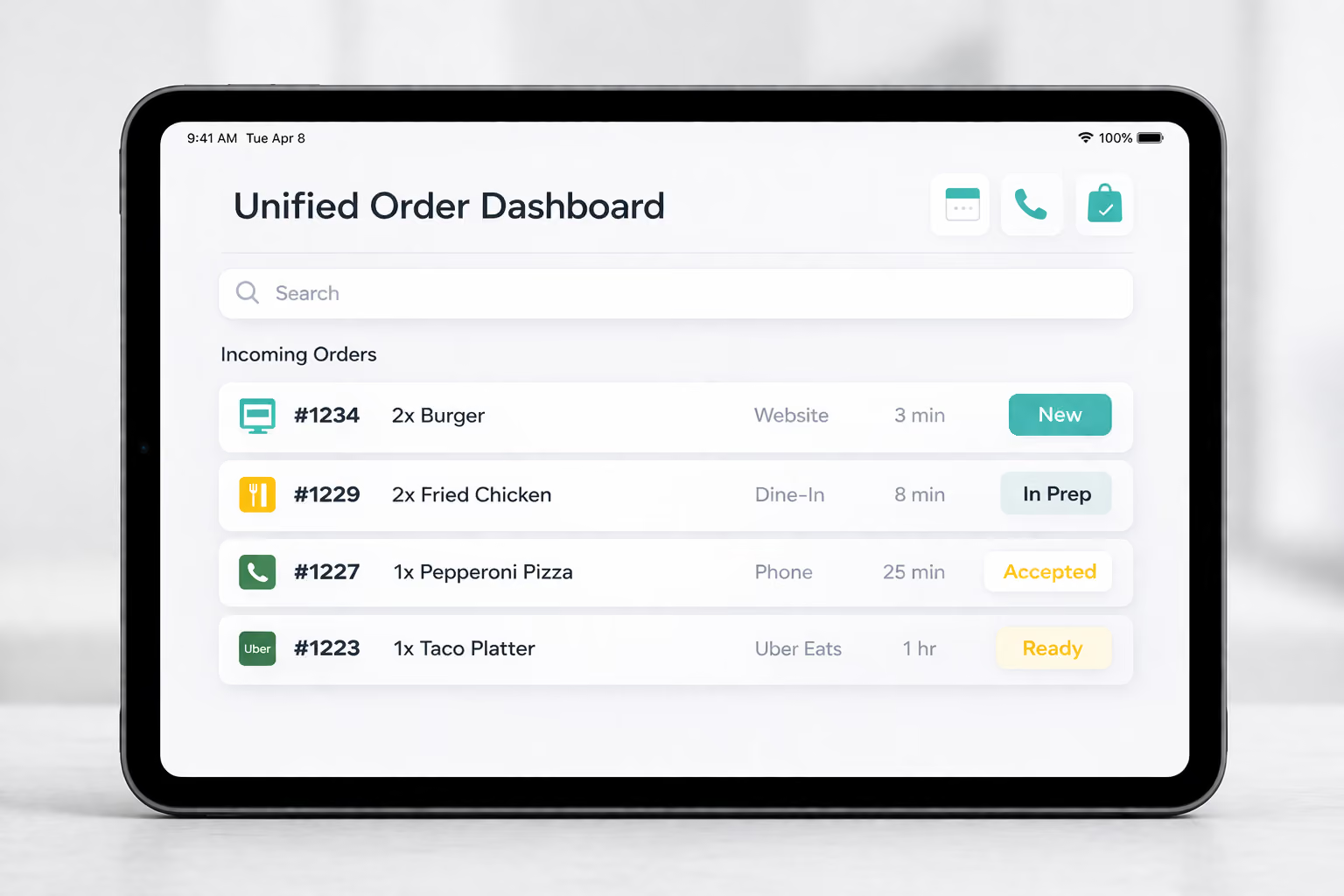
1. Unified order dashboard
Orders from all channels (e.g., website, dine-in, phone, and delivery platforms) appear in a single operational dashboard. Every entry is displayed in a queue with details like items, modifiers, timestamps, source, and status, making it easy for your staff to track incoming demand.
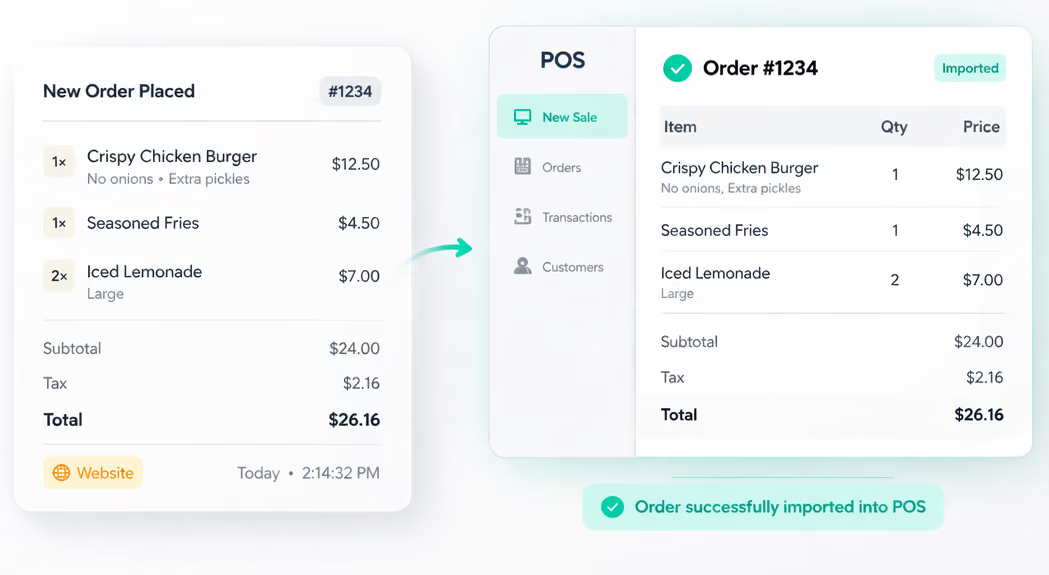
2. Automatic POS order injection
The OMS integrates with your POS system. It creates orders as they’re placed, automatically transferring items, pricing, taxes, and customer details.
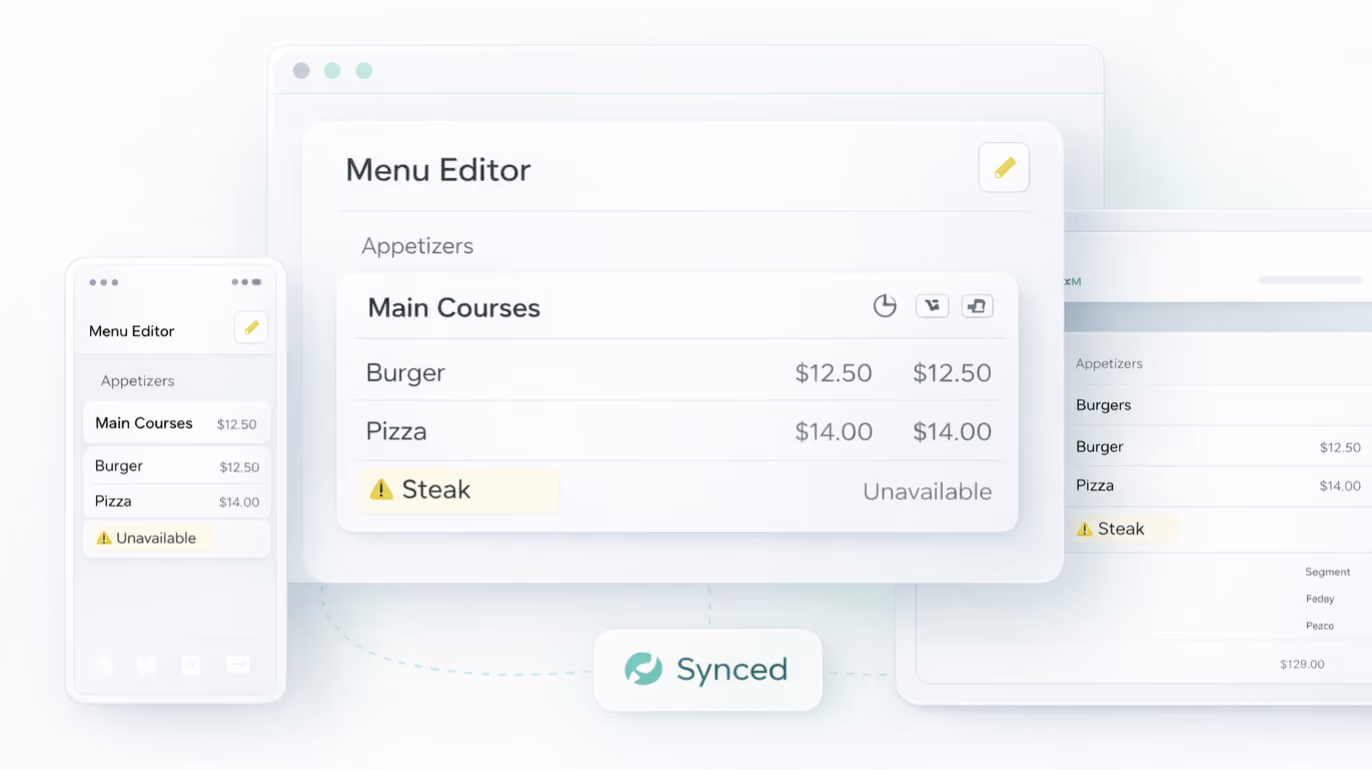
3. Menu management with real-time sync
The OMS keeps your menu consistent across all ordering channels. That means any change you make, whether it’s marking a dish unavailable or updating what’s offered, applies everywhere immediately. This prevents customers from ordering items your kitchen can’t fulfill.
4. Rule-based routing to kitchen stations
Items are automatically routed to the right kitchen stations based on type and preparation workflow. In a single order, for example, a burger goes to the grill, fries to the fryer, and a milkshake to the beverage station.
5. Live order status tracking
Each order moves through defined stages, including placed, accepted, in preparation, ready, and completed, giving your team clear, real-time visibility into its status.
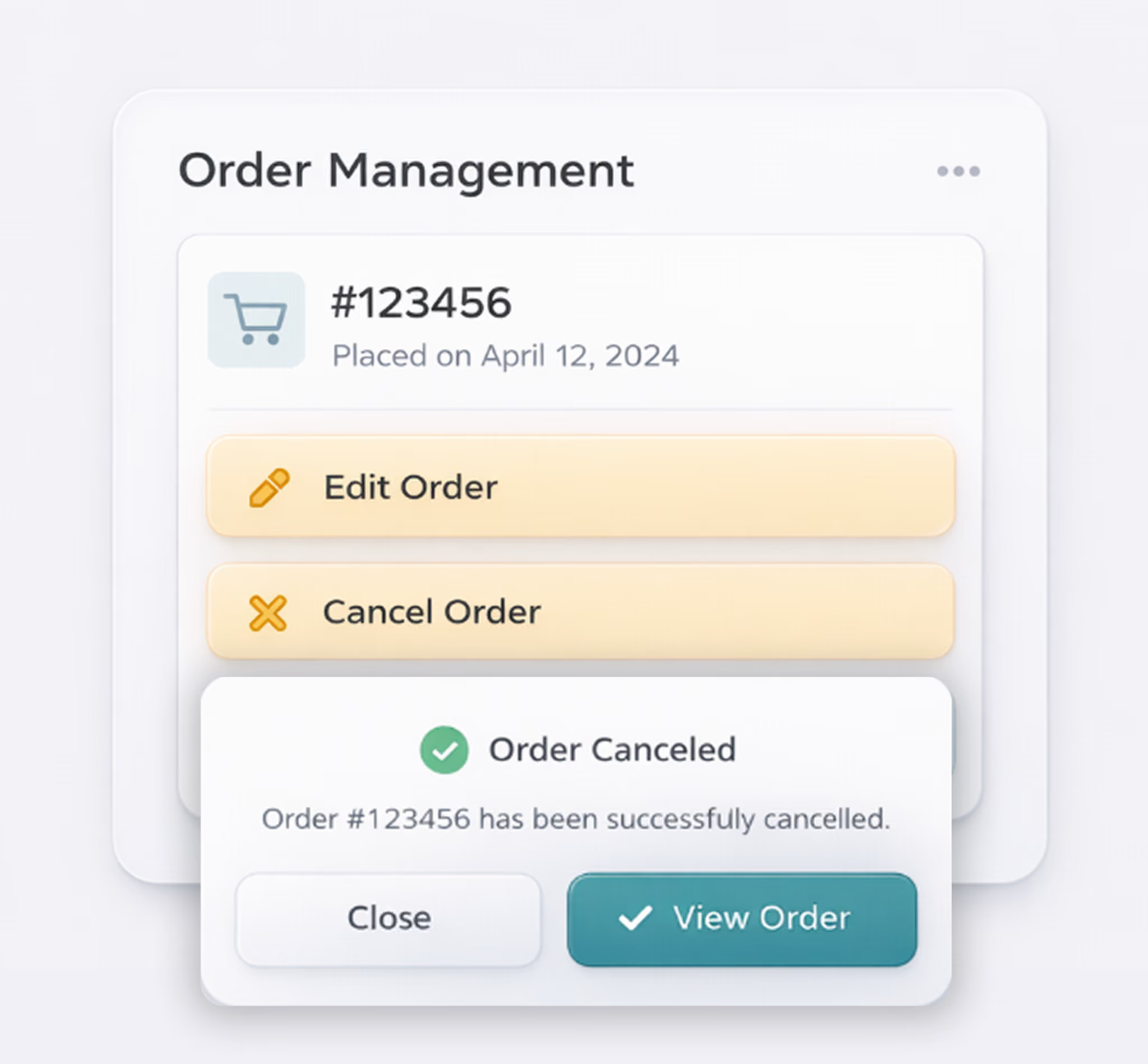
6. Order modifications, cancellations, and refunds
Your managers can handle cancellations, refunds, and order changes from one interface without switching between platforms. For instance, if a customer calls to cancel a delivery order, it can be processed directly within the OMS.
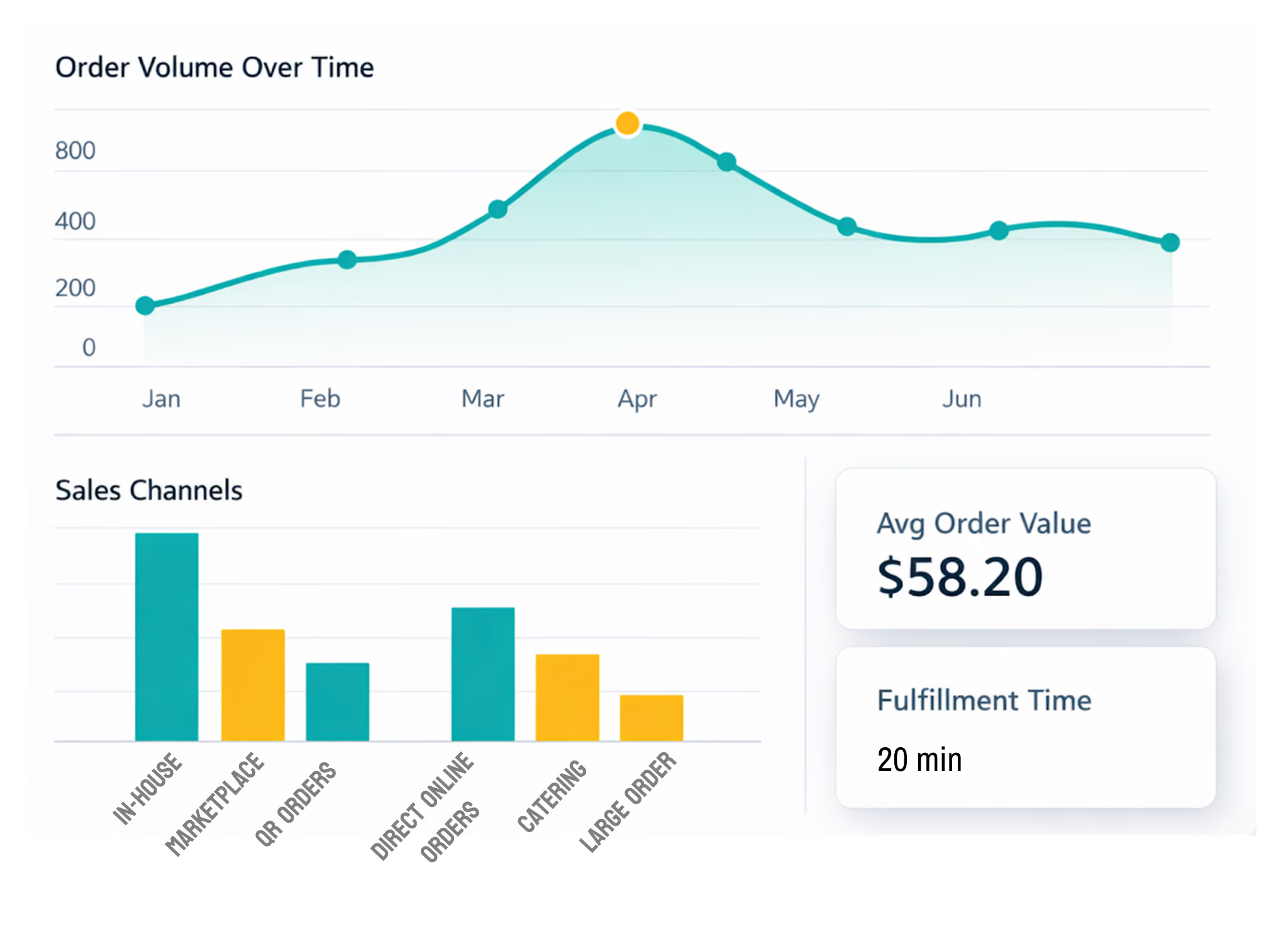
7. Order analytics and performance reporting
The OMS captures data across order volume, timing, value, fulfillment speed, and channel distribution, organized into reports for review. This helps you identify peak periods and plan staffing and prep accordingly.
How to Implement OMS for Restaurants the Right Way
Looking for the right system is only half the job. The real impact comes from how you implement it. A well-configured OMS can streamline your entire operation. A poorly implemented one will only add another layer of confusion. Here’s how to set it up properly:
1. Assess your current order flow
The first step in this process is to understand how your current order flow actually works. For that, list every place orders come from – your website, POS, delivery apps, phone, and walk-ins:
- If a customer places it on your website, note where it appears first and how it reaches the POS.
- When it arrives at the kitchen, check whether all modifiers and notes came through.
- When it’s ready, confirm how your staff knows – does the system update, or does someone call it out?
Write down the exact sequence. For example:
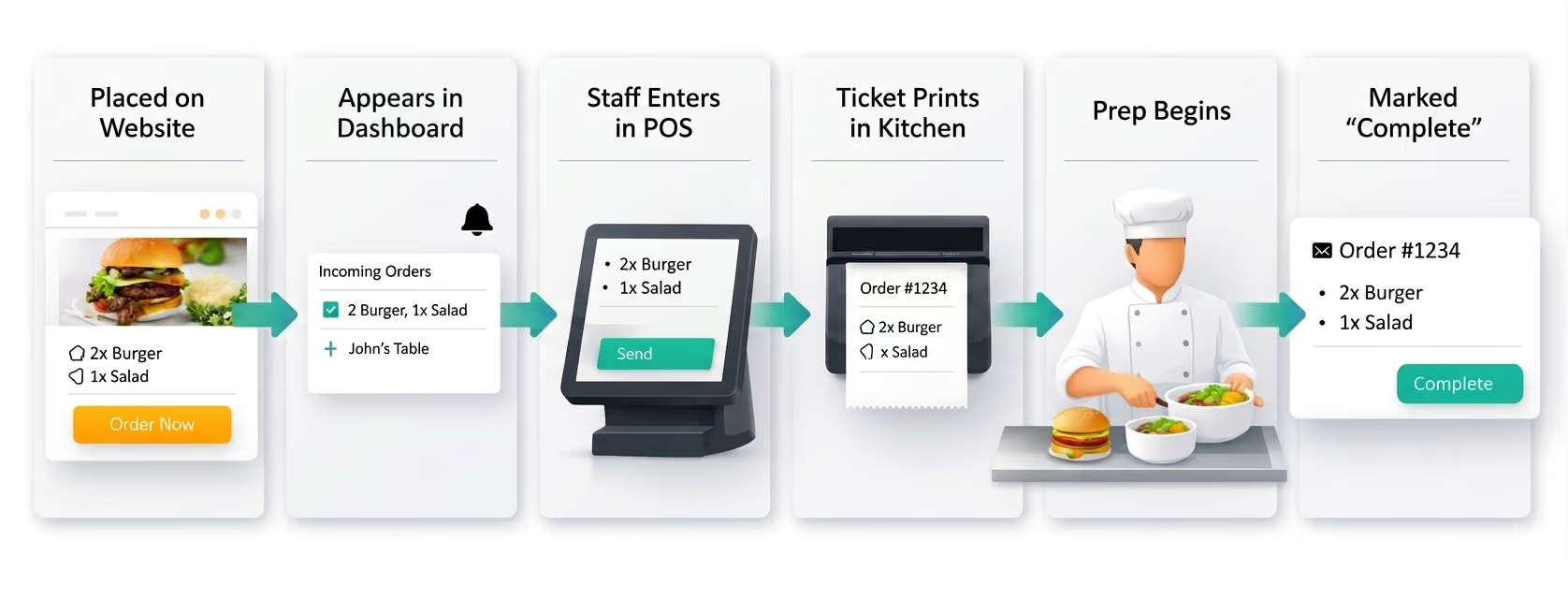
Pay attention to how the orders form a queue on the system. Check whether staff can view everything in one place or need to monitor multiple screens. Look at how the kitchen receives orders and how prep priority is communicated.
This exercise shows which steps pass information automatically and which depend on someone to move things forward.
2. Select the right OMS for your restaurant
After you’ve mapped your current workflow, choose a system that fits your setup, not just one that looks good on paper. Let's look closely at key features to consider before choosing your Restaurant Order Management System.
- Integrations : Your OMS must connect directly with your POS, website, and delivery platforms like Uber Eats or DoorDash. If orders don’t flow automatically, your team will end up re-entering them manually, which defeats the purpose of having a system in the first place.
- Centralized Dashboard : Next, look at how orders are managed day to day. A centralized dashboard should give your team a single place to view and act on all incoming orders in real time.
If staff still need to switch between screens, the system is adding complexity instead of reducing it.
- Scalability : This is another critical factor. What works for one location during steady hours may break during peak times or when you expand. The system should handle higher order volumes, additional kitchen stations, and new locations without requiring constant support intervention.
- Analytics & Data Visibility : Data visibility also matters. Beyond processing orders, the restaurant order management system should help you understand what’s happening across your operation – order volume, peak hours, and channel performance, so you can make informed decisions.
- Cost & ROI : Finally, consider the cost. Instead of looking only at subscription fees, factor in setup time, hardware costs, implementation fees, and the impact on your team’s efficiency. The right system should reduce manual work and improve efficiency enough to justify the investment.
3. Set up your OMS and integrations
Once you’ve chosen the system, it’s now time to configure it. Start by connecting your OMS to your POS system, website, and any delivery platforms you use.
When this is done correctly, orders should flow automatically into your POS with all details intact, such as items, modifiers, and customer information without any manual entry.
Next, set up your menu and availability across all channels. This means syncing your menu so that if an item is unavailable or updated in one place, it reflects everywhere. Without this, customers may order items your kitchen can’t fulfill.
Then, define how orders are routed inside your kitchen. For example, in a single order, a burger should go to the grill station, fries to the fryer, and drinks to the beverage station. These routing rules ensure your team doesn’t have to manually sort tickets during busy hours.
4. Train your team and go live
The people who use the system every day – kitchen staff, front-of-house, expo – will notice things you won’t. Therefore, it’s important to carve out time to properly onboard and train them.
For starters, have them open the interface and work through the actions they handle most – how many screens does it take to find the order, confirm it hasn’t been started, and remove it from the queue?
If any of these actions take more than two or three steps, that’s friction your team will feel constantly during a shift.
Secondly, look at how updates flow across the system. When your front-of-house team makes a change, does it reflect instantly on the kitchen display? Or does someone need to reprint a ticket and manually pass it along?
Every extra step slows down communication. And in a busy kitchen, anything that slows a reading slows a prep.
5. Monitor performance and optimize
Implementation doesn’t end at launch—ongoing optimization is key. Think about a scenario two years from now. You’ve opened a second location. Your kitchen at the original site now has a dedicated station for online orders that didn’t exist when you started using the restaurant OMS.
With some systems, adding that station means calling support, waiting for a configuration change, and hoping it doesn’t impact how orders route to your other stations. With others, a manager can adjust routing rules from the dashboard within minutes.
How a system handles edge cases tells you more about how it was built than how it handles the straightforward ones.
What to Do Next After Setting up Your Restaurant Order Management System
Managing restaurant orders isn’t about adding more tools. It’s about making sure every order moves through your system without friction, from the moment it’s placed to the moment it’s fulfilled.
As your order volume grows, small gaps in order management flow become bigger problems. Orders get delayed, tickets are missed, and your team spends more time fixing issues than handling service.
The right setup depends on your operation. Some restaurants need a full OMS to coordinate multiple channels and complex kitchen workflows.
Others need to strengthen how orders are captured, routed, and tracked across their existing systems, which is where direct ordering channels play a critical role.
How Restolabs helps you drive and manage direct orders
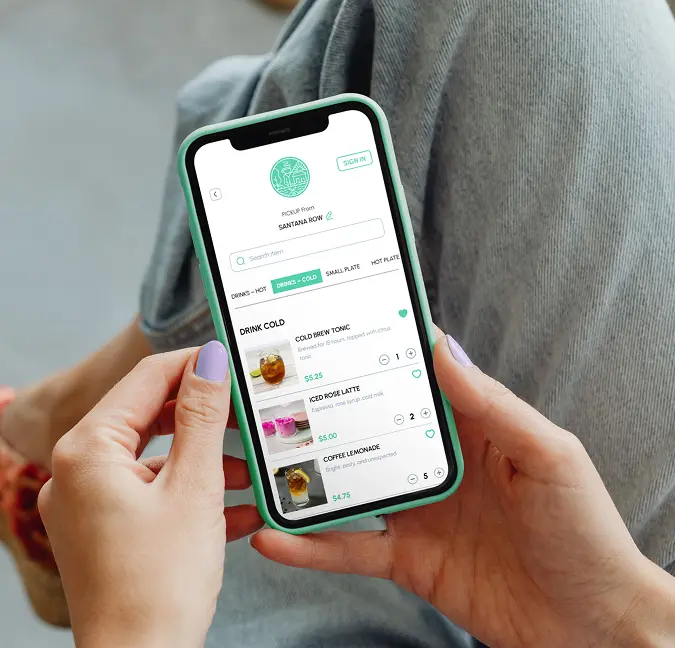
Restolabs is a direct online ordering platform that helps you capture and manage orders from your own channels, while keeping them aligned with your POS and kitchen workflows. It gives you a competitive edge through:
- Commission-free direct ordering: Through a branded website and mobile apps, supporting delivery, pickup, curbside, pre-orders, and flexible menu customization
- Seamless POS integration: Orders flow directly into your POS with real-time alerts and printer sync, minimizing manual work and keeping kitchen operations aligned
- Flexible delivery management: Use your own drivers or services like DoorDash and Uber Eats, including live tracking, delivery zones, and fee configuration
- Built-in loyalty and customer engagement: Loyalty points, coupons, push notifications, and branded guest experience across web and app help drive repeat orders
- Real-time analytics: Track order volume, top-selling items, and customer behavior, with filters by time, location, and order type
When your direct ordering channel is fully integrated into your operations, it becomes easier to manage demand, reduce manual work, and keep your order flow consistent as you grow.
Book a demo and see how Restolabs handles your workflow.

Sruthi Sekar specializes in brand strategy, growth, and user experience in the hospitality industry. As the driving force behind Restolabs, she helps restaurants harness technology to scale and thrive. With a background in design, branding, and entrepreneurship, she brings a sharp focus on crafting digital experiences that drive real business impact.
Frequently Asked Questions
Run the order management system in parallel with your current setup during off-peak hours or slower days to catch issues without any operational pressure. Train your staff on only the core actions they’ll perform on the tool – for instance, managing order flow or making status updates. Switch fully only after the system handles real orders without manual workarounds.
Most restaurants focus on subscription pricing and miss operational costs, which include POS and delivery platform integrations, onboarding time, staff training, and short-term slowdowns during the transition. If your software adds steps, it’s adding cost, no matter what you pay for it.
Data from a restaurant order management app shows what people order, when they order, and through which channel. You can use this to run targeted promotions, adjust pricing or bundles, and push high-margin items during peak demand. The value comes from acting on patterns, not just collecting reports.
No, Restolabs does not replace your POS system—it works alongside it. Orders placed through your website or app are automatically pushed into your POS via integrations, ensuring all items, modifiers, and customer details are transferred accurately.
Yes, Restolabs allows you to control order volume using features like order throttling and busy hours. You can limit how many orders are accepted within a specific timeframe and pause ordering during predefined time windows or closures.
Restolabs offers extensive customization within its ordering interface, allowing you to align the experience with your brand. You can adjust colors, layouts, and customer-facing text, choose from multiple frontend templates, and use a custom domain. This ensures your ordering interface feels branded and consistent, without relying on a generic third-party app.
Instead of relying on multiple tools for online ordering and related capabilities, Restolabs offers these into a single subscription, typically in the $69–$99/month range.
It also doesn’t lock you into proprietary hardware or a fixed payment processor, which means you avoid additional costs like device upgrades or higher card-not-present processing fees that automatically apply to online orders in closed systems.


.jpg)
.jpg)
.jpg)
.jpg)




.webp)

.svg)
.webp)