
Key Takeaways
If your restaurant has good food, happy customers, and a team that shows up every day, the only thing standing between you and more orders is whether the right diners can find you at the right moment. But most restaurant owners have a visibility problem: incomplete profiles, inconsistent listings, a website that doesn't convert, and a social presence that isn't working hard enough. Restaurant SEO is what fixes that. Let’s find out how.
How many nearby diners are choosing another restaurant before they ever reach you online?
You may have strong food, good service, and loyal regulars. But search is where many new customers make their first decision. They look for a cuisine, a location, a dish, a reservation option, or a place that can deliver now.
If your restaurant is hard to find at that moment, the customer moves on. So, how do you make your restaurant easier to discover online when people are ready to eat?
In this guide, you’ll learn how restaurant SEO can improve your visibility in local search, strengthen the signals Google uses to understand your business, and turn more search traffic into direct orders, reservations, and visits.
Understanding SEO and Its Importance for Restaurants
Before you improve your rankings, it helps to understand how search engines decide which restaurants to show for a diner’s search.
What is SEO for restaurants?
Restaurant SEO is the process of improving how your restaurant appears in search results when people look for places to eat, order from, reserve, or explore in a specific area.
It includes your website, Google Business Profile, Google Maps presence, local listings, reviews, menu information, and direct online ordering details, so search engines can understand your cuisine, location, dining options, and brand.
How does restaurant SEO work?
Google ranks restaurants by looking at three main factors:
- Relevance means your restaurant matches what the diner searched for. For instance, if someone searches for “vegan Thai restaurant near me,” Google looks for signs that your restaurant offers that cuisine, serves that need, and fits the search intent.
- Distance refers to how close your restaurant is to the searcher or to the location named in the search. A diner searching from your neighborhood may see different results than someone searching from another part of the city.
- Prominence reflects how trusted and well-known your restaurant appears online. Reviews, local mentions, backlinks, directory listings, and overall authority can all strengthen this signal.
How Do AI Search Tools Recommend Restaurants?
AI search tools like ChatGPT, Perplexity, and Google’s AI Overviews are now influencing how diners discover restaurants.
Unlike standard local search results, these tools don’t show a ranked list of nearby options. Instead, they often return a shorter set of recommendations based on information they can find, understand, and verify across the web, including:
For restaurants, AI discovery depends on four practical signals:
- Authority means credible sources mention your restaurant. Local food blogs, city publications, press features, review platforms, and relevant backlinks can give AI tools more context about your business.
- Consistency means your restaurant details match across the web. Your name, location, hours, menu details, ordering link, and reservation options should stay accurate wherever your business appears.
- Reputation signals show how customers and third-party sources talk about your restaurant. Reviews, ratings, recommendations, creator mentions, and repeated mentions from credible sources can support trust.
- Clear website content helps AI tools and search engines understand what you offer. Your website should clearly explain your cuisine, menu, delivery options, reservation details, locations, and FAQs.
🍽️ Related guide: AI for Restaurant Marketing
Why is SEO important for restaurants?
Restaurant SEO matters because of the following reasons:
- Capture demand that already exists: People searching for “best chinese in fenway area” or “pizza delivery near me” are already hungry. SEO helps you show up when the customer is ready to choose, instead of trying to create demand from scratch.
- Reduce revenue leakage from third-party platforms: When customers find your direct ordering link first, more orders can come through your own website instead of third-party delivery apps or marketplaces that charge 20–30% commission fees. That only works if diners can actually discover your restaurant before they reach those marketplaces, making online visibility an essential part of any direct ordering strategy.
- Make your best proof visible before the customer decides: Recent reviews, real food photos, current menus, accurate hours, and clear dining options help customers choose you without needing to call, guess, or compare five more restaurants.
Key Strategies for Effective Restaurant SEO
Getting SEO for restaurants right takes some groundwork. The sections below walk you through each part, so you know exactly what to look at, where to focus, and of course, how to get going.
Restaurant
SEO Checklist
The best steps to get found on Google — your profile, listings, website & reviews, all in one place.
Download Free
A → Optimize your Google Business Profile
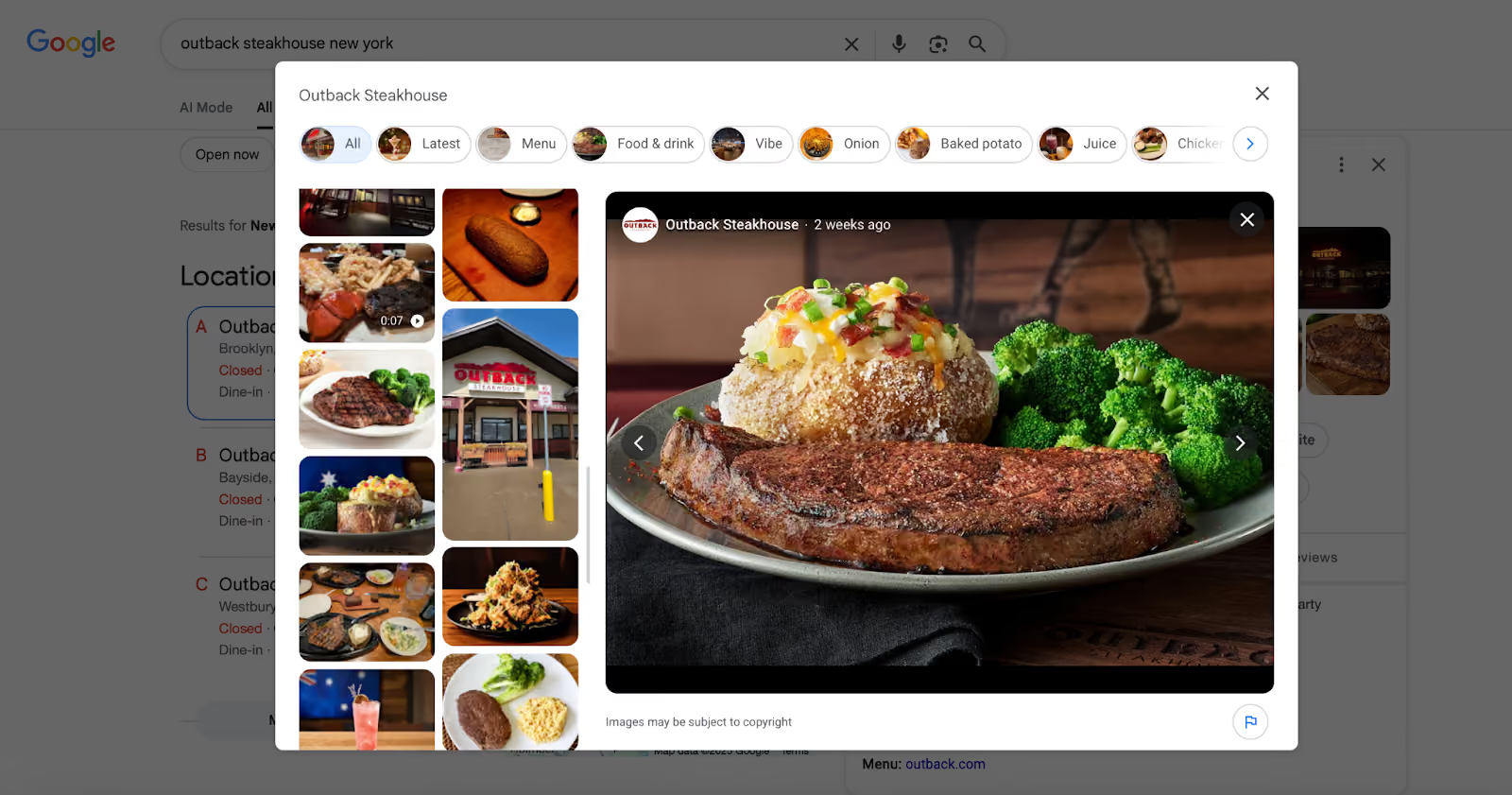
Your Google Business Profile, or GBP, is the listing that appears across Google Search and Google Maps when people search for your restaurant, your cuisine, or nearby dining options.
It should be the first place you improve because it directly affects what customers see before they visit your website. Here’s what you need to do:
1. Update your core business information first
Start with the basics: your restaurant name, address, phone number, website, menu link, ordering link, and opening hours. Make sure every detail is accurate and current. To update these, go to business.google.com, sign in, and click Edit Profile.
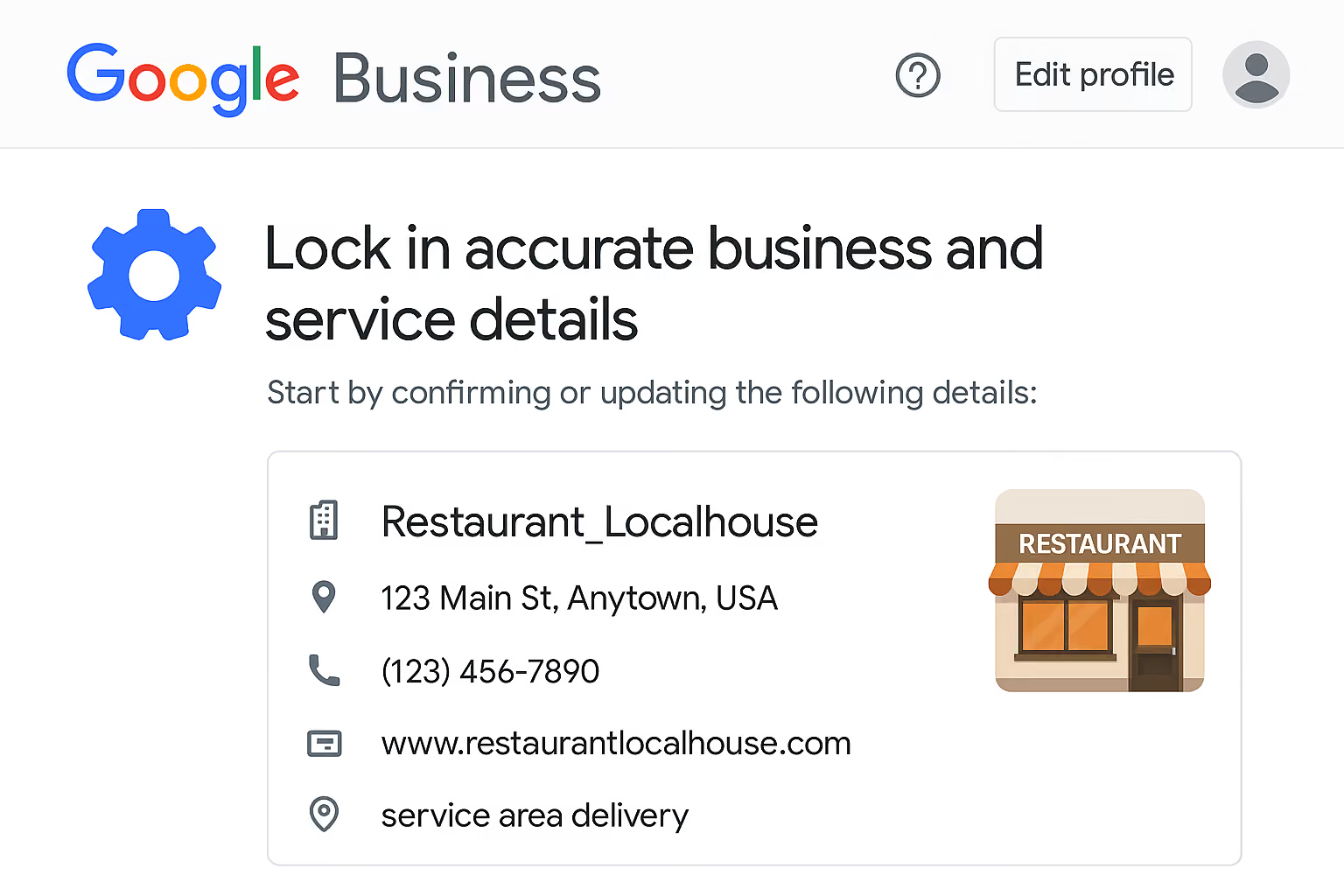
Google uses this information to understand whether your restaurant matches a local search, and customers use it to decide whether to visit, call, reserve, or order.
2. Choose the right business categories
Select a primary category on GBP that clearly describes your main restaurant type. For example, you could pick options like Italian restaurant, Thai restaurant, Pizza restaurant, Family restaurant, or Fine dining restaurant, depending on what best represents your business.
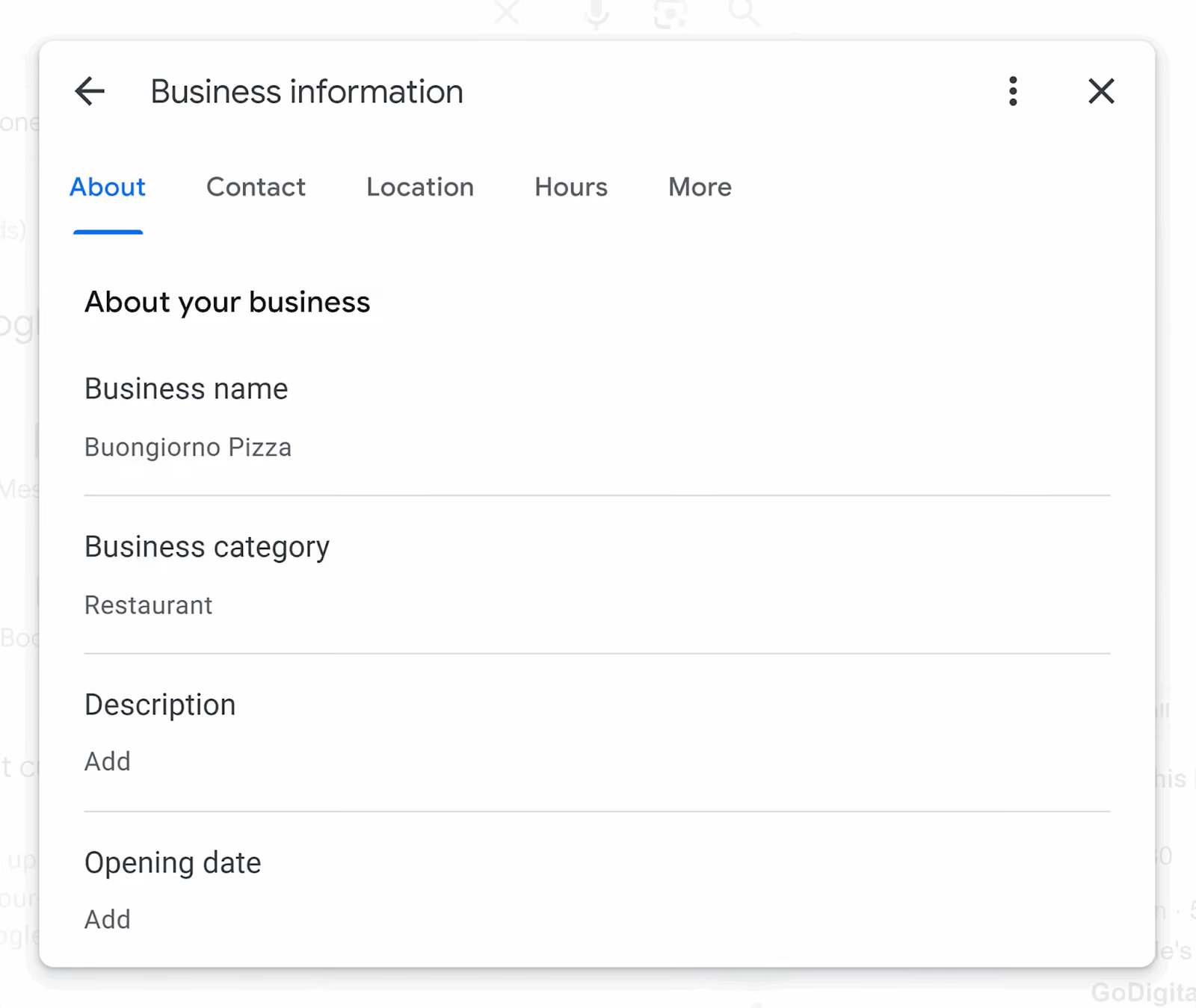
Add secondary categories only when they reflect what you actually offer. For example, if Bella Roma is an Italian restaurant in Chicago and pizza is a major part of its menu, Italian restaurant should be the primary category, and Pizza restaurant can work as a secondary category.
3. Add service options and restaurant attributes
Select every service option that applies to your restaurant, such as dine-in, takeout, delivery, outdoor seating, catering, reservations, or online ordering.
Also add useful attributes such as vegetarian options, vegan options, wheelchair access, family-friendly dining, pet-friendly seating, or private dining, if they apply.
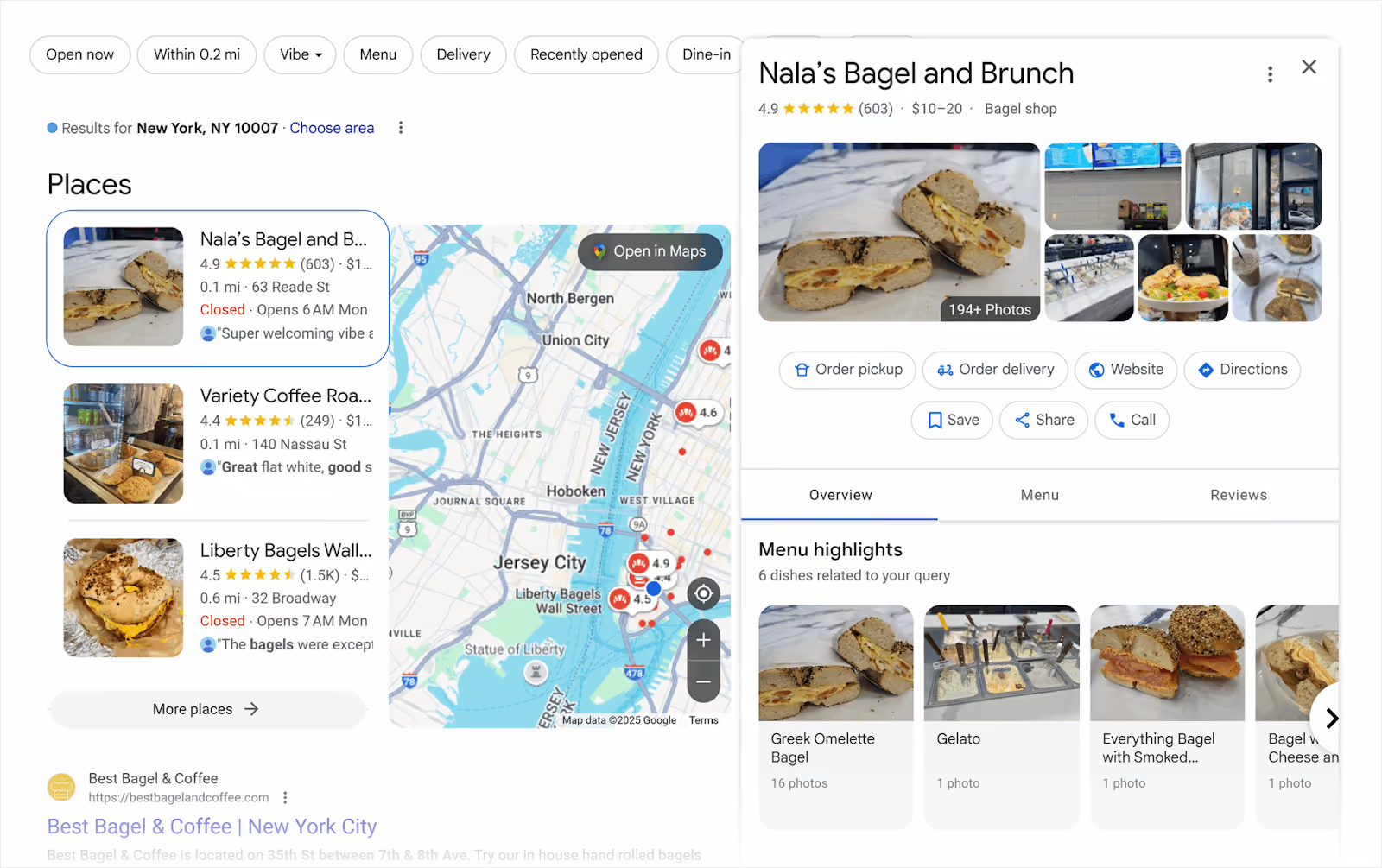
4. Make your menu easy to find
Upload your menu directly to your Google Business Profile where possible. Use clear item names, short descriptions, prices, and sections such as appetizers, mains, desserts, drinks, lunch specials, or family meals.
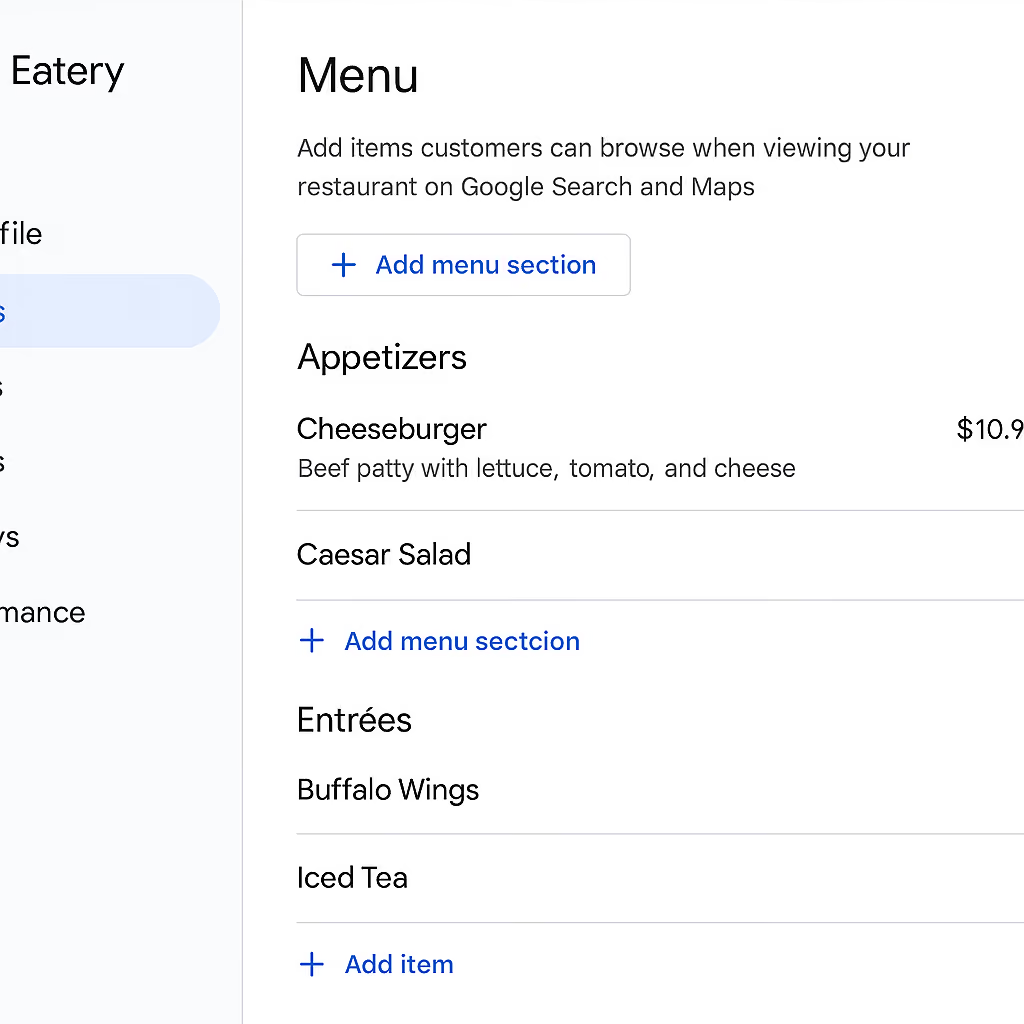
If you use a separate menu page or downloadable PDF, make sure the link opens the latest version. Keep the HTML menu on your website updated as the primary version, and use the PDF only as a supporting option.
5. Point customers to your direct ordering page
If you accept online orders, include your direct ordering link on your profile. This matters because customers who find you on Google are already close to ordering. Sending them to your own website instead of a third-party delivery app can help you protect margins, own the customer relationship, and turn search visibility into direct revenue.
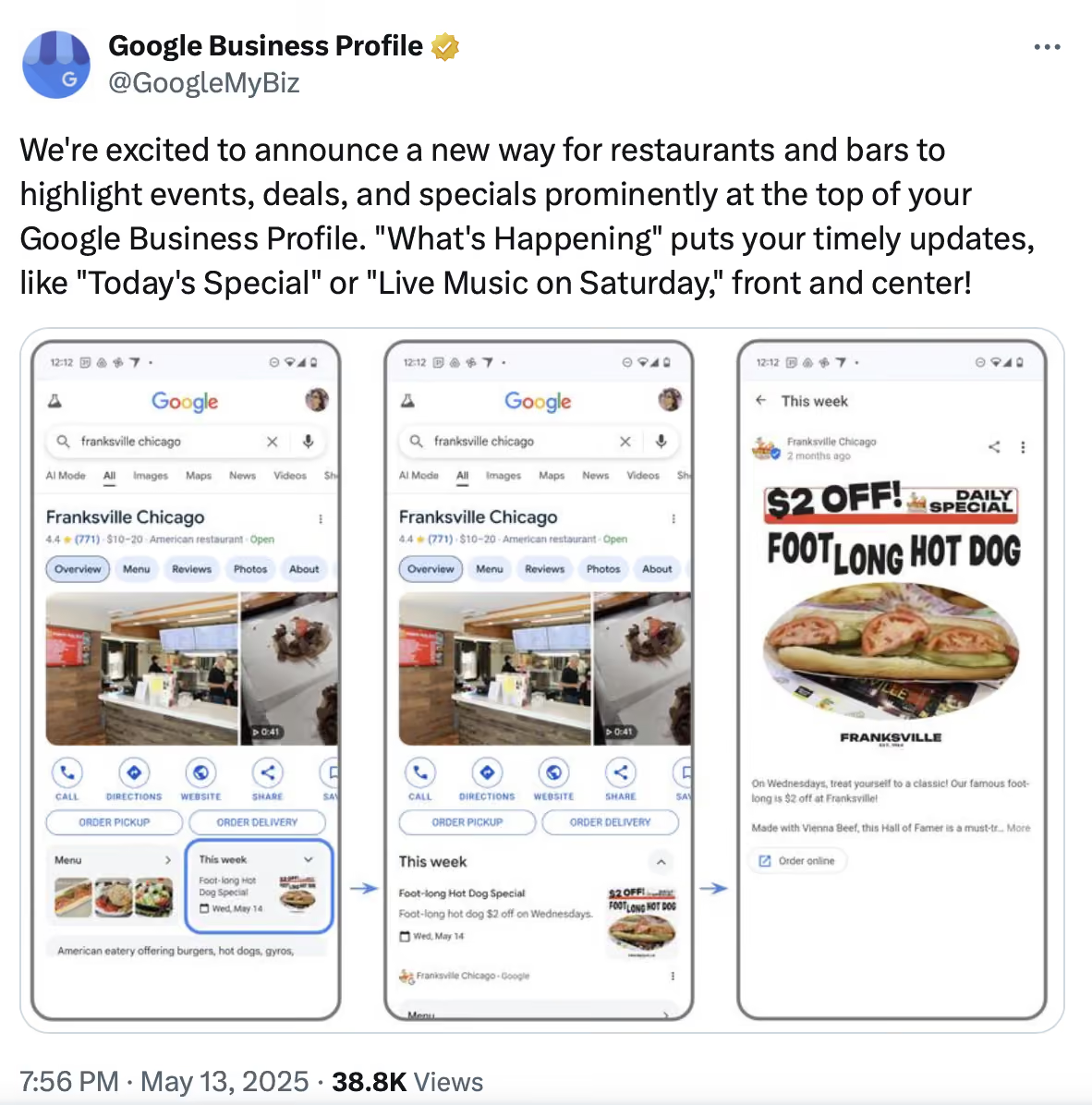
6. Publish Google Business Profile posts regularly
Such posts keep your profile active and give customers another reason to choose your restaurant when they find you on Google. For example, if you launch a weekday lunch menu, Valentine’s Day dinner, weekend brunch, or limited-time dessert, share a short post with the offer, dates, and ordering or reservation link.
7. Ask satisfied customers for Google reviews
A steady flow of positive, recent reviews gives Google more signals about your restaurant’s popularity, service quality, cuisine, and customer experience. It also gives diners confidence when they compare you with nearby restaurants.
Therefore, build review requests into your routine instead of asking randomly.
For dine-in visits, train your staff to mention reviews at the end of a good meal, especially when a customer gives positive feedback in person. For direct online orders, set up a short follow-up message with your review link after the order is fulfilled.
You can also share the link through receipts, follow-up texts, emails, QR codes, or table cards.
B →Improve local SEO beyond your Google profile
Sure, your Google Business Profile is important. But it’s not the only place Google and customers find information about your restaurant.
Your local restaurant SEO also depends on how consistently you appear across maps, directories, review platforms, reservation platforms, delivery apps, and local websites. Here’s what you need to do.
1. Claim and update your major listings first
Create a simple tracking spreadsheet with each platform name, login link, listing status, last updated date, and the details you need to check.
Then work through each platform one at a time, focusing on the ones customers actually use to find, review, book, or order from restaurants. Here’s where to find or claim your listing on the most important platforms:
Make sure each listing includes your correct restaurant name, address, phone number, website, opening hours, menu link, ordering link, reservation link, cuisine type, photos, and service options.
The most common place inconsistencies appear is between delivery apps and Google, because those profiles are often set up at different times — sometimes by different people — and rarely checked together. Begin there when you audit.
For example, if your Google profile says Maya’s Tacos, your Yelp listing shouldn’t say Maya Tacos East Austin unless that is your official business name.
If your website shows one phone number and Facebook shows another, customers may get confused and search engines may have less confidence in your business information. Use one approved version of your restaurant details. Then apply it everywhere.
2. Treat Apple Maps, Facebook, and delivery apps as part of local discovery
Many restaurant owners focus only on Google, but customers often check other platforms before deciding where to eat. For instance:
- Apple Maps matters because many diners use it for directions.
- Facebook matters because customers may check hours, photos, reviews, and recent activity there.
- DoorDash, Uber Eats, and similar platforms matter because customers may discover your restaurant there before they ever visit your website.
Keep your menu, prices, hours, address, delivery options, and photos accurate on all of these platforms. Even if your main goal is to increase direct orders, incorrect information on third-party platforms can still hurt the customer experience.
3. Create dedicated pages and profiles for each branch and service
If you have more than one branch, create a separate website page for each one, which should include the address, phone number, hours, menu, photos, reservation link, ordering options, parking details, and nearby landmarks.
Each eligible branch should also have its own Google Business Profile. This helps customers find the correct address, call the right number, check current hours, read branch-specific reviews, and get directions in Google Maps.
4. Build local backlinks and mentions from websites in your area
Identify the local websites that already cover food, events, or neighborhoods in your area:
- City food blogs and local magazines
- Neighborhood guides and tourism websites
- Event pages and chamber of commerce directories
- Hotel recommendation pages and community organizations
Once you have a shortlist, approach each one with a specific reason to feature your restaurant. Don’t just ask for a backlink, give them something useful to publish.
You can pitch a:
- New menu launch or seasonal special
- Chef story or restaurant milestone
- Local event you are hosting
- Catering offer for nearby offices or colleges
- Special discount for hotel guests, students, or event attendees
- Inclusion in a local dining guide or neighborhood roundup
For example, Maya’s Tacos could contact an East Austin event website and ask to be listed as a nearby dining option for attendees. It could also reach out to a local hotel and offer a direct ordering link or guest discount that the hotel can add to its recommendations page.
When you reach out, make it easy for the website owner or editor to feature you. Send your restaurant name, location, website link, menu link, ordering or reservation link, high-quality photos, short business description, and the specific offer or story you want them to mention.
C → Set up your website to convert search visitors into direct orders and reservations
Your website is where restaurant SEO starts turning into revenue. Once someone lands on your page, they should be able to check the menu, place an order, reserve a table, call the restaurant, or find your location without searching around.
Here’s how to make conversions happen:
1. Put your most important actions near the top of the page
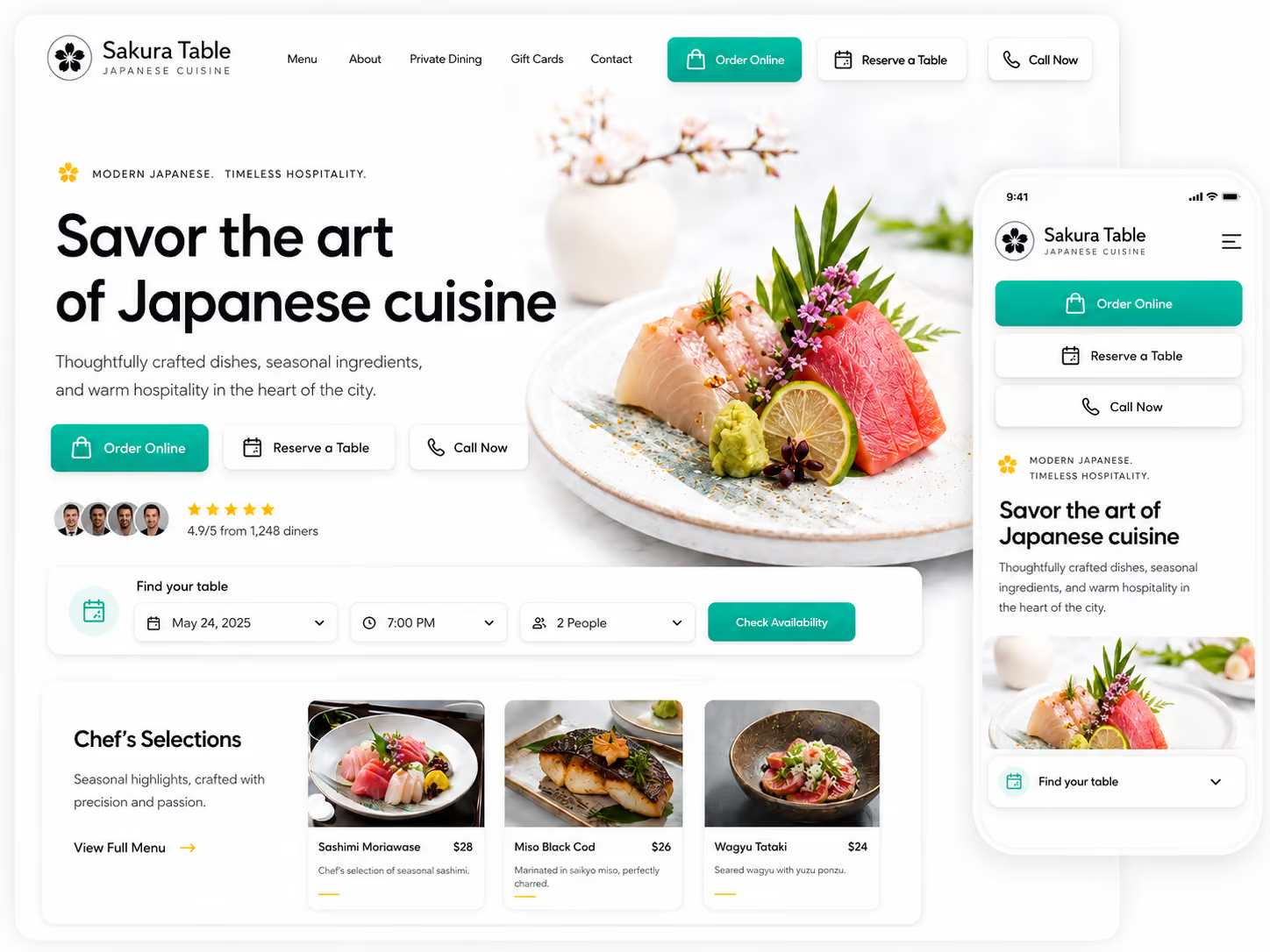
Place clear buttons for Order Online, Reserve a Table, and Call Now on both mobile and desktop. If direct orders matter most, the ordering button should be visible before the customer scrolls. If reservations matter most, the booking button should be just as easy to find.
🛒 Next step: Essential UI/UX Features for Restaurant Online Ordering
2. Make your menu an HTML page, not just a PDF
Include dish names, prices, descriptions, dietary labels, and clear sections such as appetizers, mains, desserts, drinks, lunch specials, catering, or party platters.
A PDF can still be available as a download, but it shouldn’t be the only menu format because it is harder to use on mobile and harder for search engines to read.
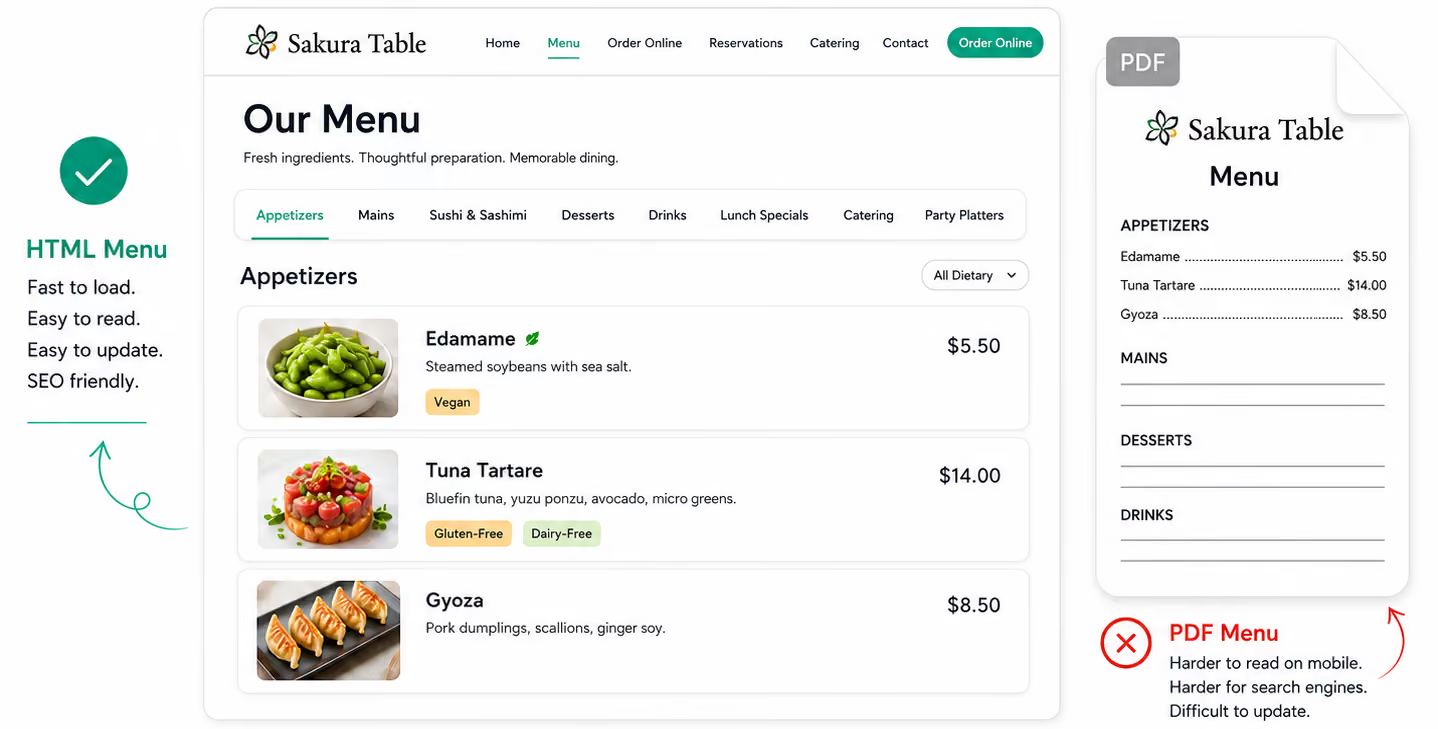
On the other hand, an HTML menu is easier to update whenever prices change, items sell out, or seasonal specials rotate in.
3. Keep the mobile experience fast and simple
Compress large food photos, remove unnecessary pop-ups, make buttons easy to tap, and check that the ordering or reservation flow works properly on a phone. Most restaurant searches happen when people want to decide quickly, so a slow or confusing mobile site can cost you the customer.
4. Use clear page titles and headings
A title like Sushi Restaurant in Capitol Hill, Seattle is more useful than Home because it tells both diners and search engines what the page is about. Therefore, make each page on your website clearly state what it is about. For instance:
- Your menu page should mention your cuisine and popular dishes.
- Your catering page should explain what kind of events you serve.
- Your ordering page should make takeout, delivery, and pickup options obvious.
- Your location page should include the branch name, neighborhood, address, hours, parking details, and nearby landmarks.
📣 Related guide: Digital Marketing for Restaurants
5. Build pages for seasonal offers and high-intent searches
Use dedicated website pages for offers that people are likely to search for before choosing a restaurant.
Start with occasions or services that bring clear demand, such as Mother’s Day brunch, Valentine’s Day dinner, Christmas catering, private dining, office lunch catering, or gluten-free pizza.
Pick one offer and build one focused page around it. Use a clear title such as Mother’s Day Brunch in Boston or Christmas Catering in Austin.
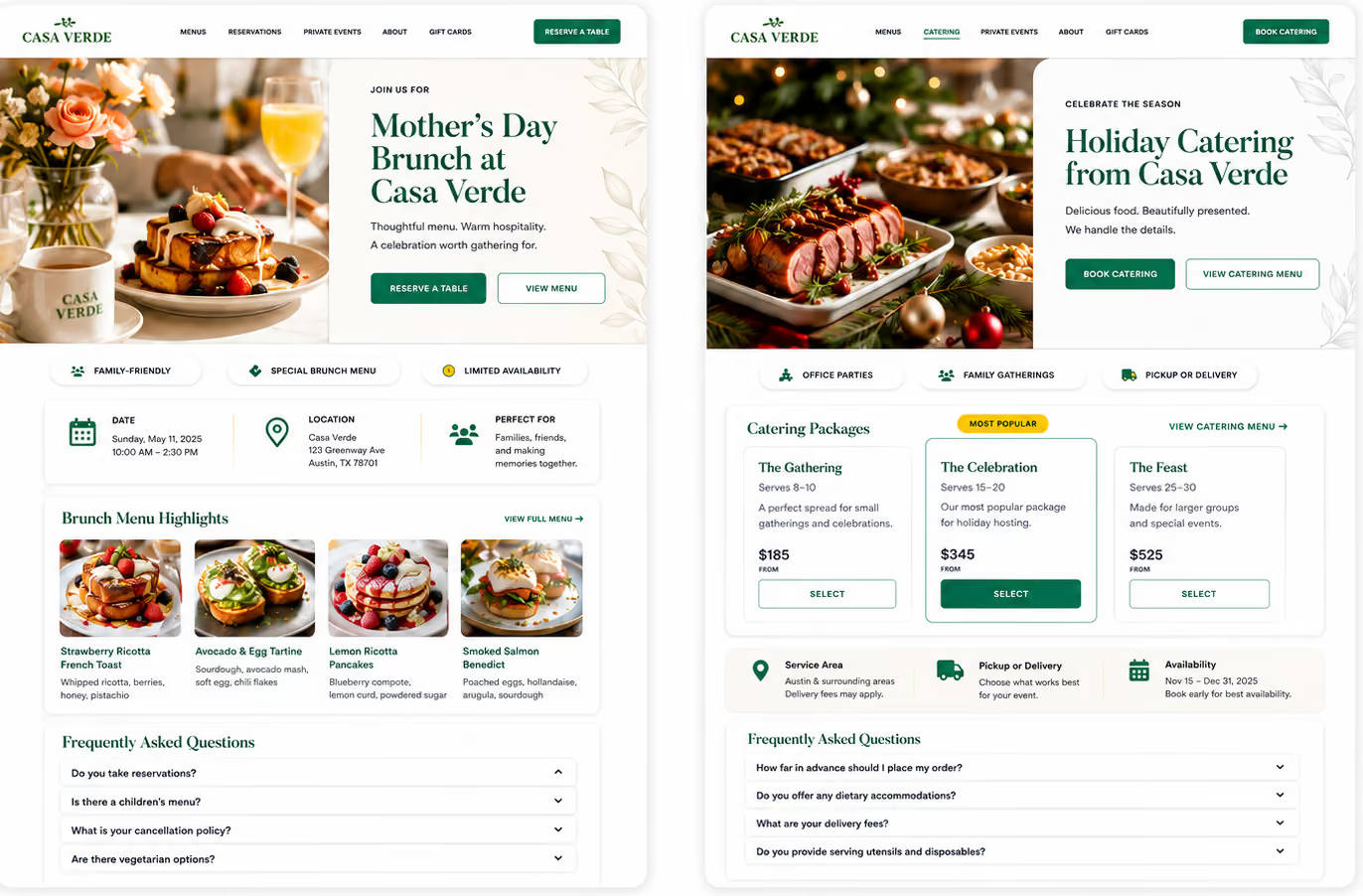
Add the menu, date or availability, price range if available, location, photos, FAQs, and a clear Reserve a Table, Order Online, or Book Catering button.
Make the page easy to find. Link to it from your homepage, Google Business Profile posts, social media profiles, email campaigns, and any relevant menu or catering pages. Do this early enough for people to find it before the occasion, not a day before the offer ends.
6. Cover real diner questions with a dedicated FAQ section
Answer questions about delivery areas, parking, reservations, dietary options, catering, private events, outdoor seating, large groups, and direct ordering. For example, a sushi restaurant could answer:
- Do you offer gluten-free sushi?
- Do you deliver to Capitol Hill?
- Can I reserve a table for a large group?
- Do you offer party platters?
7. Add schema markup to your restaurant website
Schema markup helps you label important restaurant details in your website code, such as your cuisine, address, hours, menu, reservation link, ordering options, and reviews. This gives search engines a cleaner way to read your business information instead of relying only on page text.
D → Use social media, creators, and local mentions to build discovery
Social platforms support restaurant SEO by increasing discovery, branded searches, customer proof, and local mentions. Diners may find you on Instagram, TikTok, or Facebook first, then search your name, refresh your menu, read reviews, and order or reserve.
1. Set up each profile to send traffic where it matters
Public social profiles and some public posts can also appear in search results, so your profile name, bio, captions, and links should clearly describe your restaurant.
That means your social profile name, bio, captions, and links can help people discover your restaurant on Google Search, not just on the social platform itself.
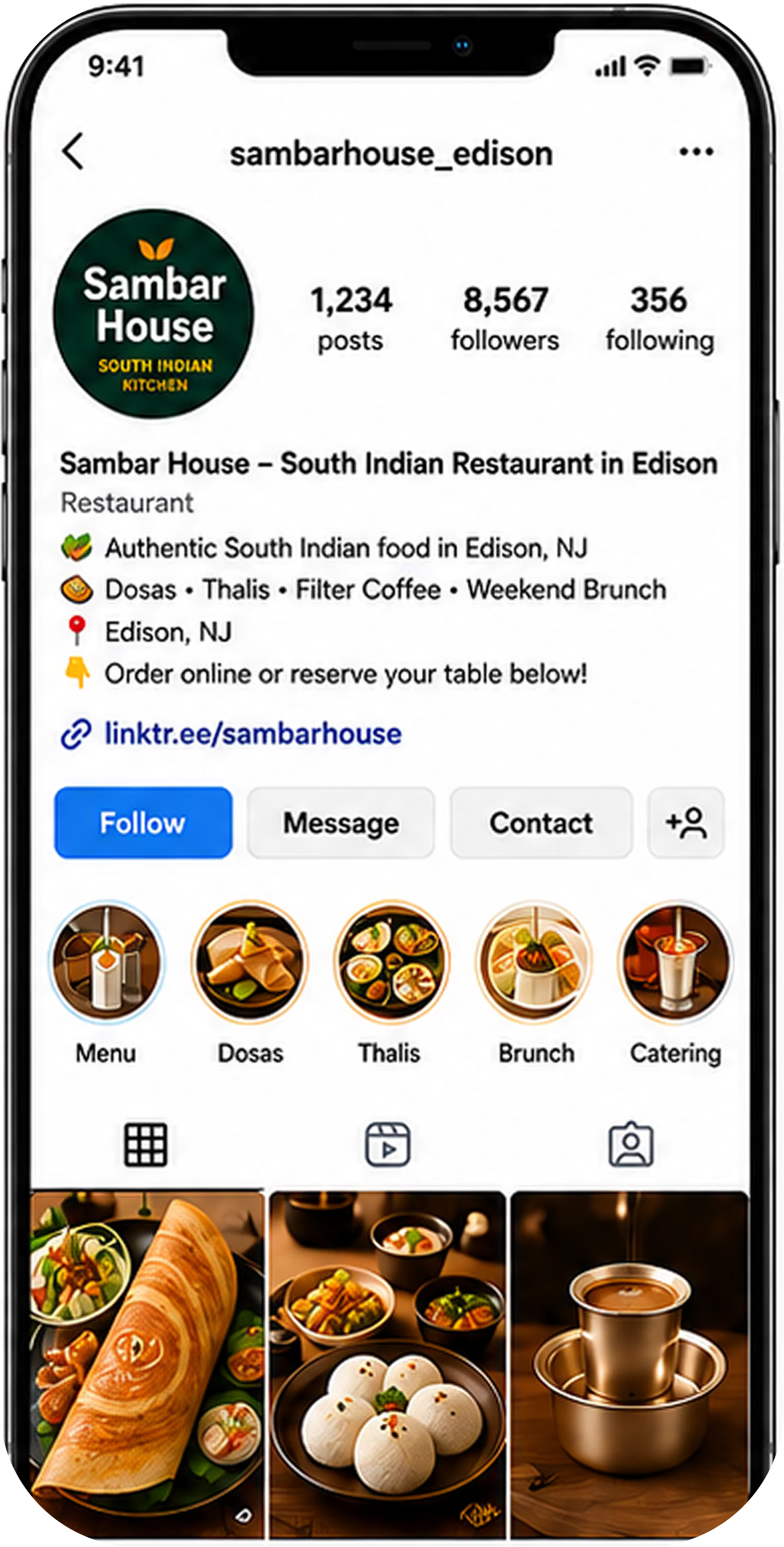
Therefore, the first thing to do here is to update the bio. It should quickly answer four things:
- What cuisine you serve
- Where you are
- What you are known for
- What action people should take next
For example: South Indian restaurant in Edison serving dosas, thalis, filter coffee, and weekend brunch. Order online or reserve below.
Use natural search phrases in the profile name, bio, captions, and highlights, such as South Indian restaurant in Edison, dosa catering, weekend brunch, or vegetarian thali.
Next, make the profile easy to act on.
Your main profile link should send customers to the action you care about most: viewing the menu, ordering online, reserving a table, booking catering, or getting directions. Don’t send everyone to a generic homepage if a direct ordering or reservation page would work better.
If you need to show more than one option, use a simple link page. This can be a tool like Linktree, Beacons, or Later Link in Bio, or a page on your own website.
Keep the buttons clear: View Menu, Order Online, Reserve a Table, Book Catering, Get Directions.
Finally, use a business or professional profile where available so you can add customer-friendly options like contact details, profile links, action buttons, and performance insights where the platform supports them.
2. Post content that moves people from scroll to order
Rotate four types of content every week: your best-selling dishes, customer proof, local relevance, and time-sensitive offers.
For instance, a weekend brunch café in Boston could post a short video of its pancake stack, reshare a customer photo from the patio, publish a story about a nearby weekend market, and share a post for “Mother’s Day brunch in Boston” with a reservation link.
3. Encourage customers to create and tag social content
Customer photos, videos, tags, and reviews act as social proof because they show real people enjoying your restaurant. They can also help more people discover you when customers tag your account, use your location, or share your food with their own followers.
Make it easy for customers to tag you. Add your Instagram/TikTok handle and a simple line such as “Tag us in your visit — we’d love to reshare you” on table cards, receipts, packaging, menus, or counter signs. You can also use a QR code that takes customers directly to your social media profile.
4. Work with local food creators and influencers
Local food creators on Instagram, TikTok, and YouTube can introduce your restaurant to an audience that already trusts their recommendations.
This may not directly improve your Google rankings. However, it can lead to more branded searches, profile visits, website clicks, customer posts, and reviews.
To get started, search your city or neighborhood name with terms like “food creator,” “restaurant reviewer,” “best eats,” “[city] food blogger,” and cuisine hashtags. Prioritize creators with engaged local audiences over large but broad followings.
For instance, a creator with 8,000 engaged local followers is often more valuable than one with 80,000 followers spread nationally.
Then, invite them to try a new seasonal menu or visit during a quiet service and post at their own pace — send your best dishes, your ordering or reservation link, and let them post honestly. Authenticity is what makes their audience act on it.
🧑🍳 Go deeper: A Complete Guide to Building Brand Awareness and Driving Revenue
How Do You Track if Your Restaurant SEO Is Working?
Restaurant SEO should be measured by customer actions, not traffic alone. The question is simple: are more diners finding your restaurant, viewing your menu, calling, requesting directions, reserving tables, placing direct orders, and leaving reviews?
You don’t need a complex restaurant analytics setup.
Create one monthly scorecard and record the same numbers every month. Pull the numbers from Google Business Profile Performance, Google Search Console, Google Analytics, your ordering platform, and your reservation platform.
- If Google actions are growing, more diners are finding you.
- If menu views, calls, and direction requests are growing, more diners are considering you.
- If direct orders and reservations are growing, SEO is helping revenue.
- If reviews are growing, trust is improving.
- If one area is flat, that is the first place to improve next month.
Monthly restaurant SEO scorecard
Restaurant SEO Is a Long-term Process, Not a Quick Fix
You now have the strategies, tools, and resources to improve your restaurant SEO without guessing what to do first. The real challenge is keeping those moving parts aligned as your menu, hours, offers, locations, and customer behavior change.
That is where the right restaurant ordering setup matters, and that’s where Restolabs enters the picture. It helps restaurants connect their SEO-ready website, direct ordering page, live menu, and customer ordering experience in one system.
You can build your website with mobile-optimized pages, local discovery structure, branded visuals, menu sections, FAQs, catering pages, and ordering sync, so customers and search engines get clearer information from the same place.
Restolabs can also help you keep the ordering path current. You can manage menu availability, pricing, modifiers, item-level dietary tags, time-based menus, pickup, delivery, curbside orders, customer profiles, payment options, and multi-location order management from the dashboard.
Restaurant SEO works best when discovery and ordering are not treated as separate systems. When your website, Google profile, menu, ordering page, and customer data work together, you make it easier for diners to find you, trust you, and order directly from you.

Sakthi Vignesh is a product and technology leader specializing in scalable solutions for the hospitality industry. As the force behind Restolabs, he focuses on building robust, user-centric platforms that help restaurants streamline operations and grow efficiently. With deep expertise in technology, product strategy, and system architecture, he drives innovation at the intersection of business and tech.
Frequently Asked Questions
Yes. Blog content gives your website another chance to rank for searches tied to your food, location, services, and dining occasions. The key is to keep the topics practical. Build posts around local searches, menu interests, dietary needs, events, and services. For example, you can write about the best dishes to try at your restaurant, gluten-free dining in [city], private dining in [neighborhood], office lunch catering in [city], Mother’s Day brunch in [city], or what to order for a family dinner from your restaurant.
Yes. Competitor analysis for restaurant SEO helps you understand why another restaurant may be earning more visibility, stronger trust, or more customer action from the same local searches. A competitor may have more recent reviews, better food photos, clearer categories, stronger location pages, or a simpler direct ordering path. Once you see those gaps, you can improve your own profile, website, menu pages, and ordering experience without copying their strategy.
Yes. Reddit can support restaurant SEO by helping your restaurant appear in local conversations, recommendations, and branded searches. It works best when you participate in city, neighborhood, cuisine, or food-related communities where people are already asking where to eat, order, or book. You should not treat Reddit like a posting channel unless you have the time to participate consistently. Answer relevant questions, share specials only where the community allows it, and avoid posts that read like ads.
Restolabs helps with restaurant SEO by giving you an SEO-supported, mobile-optimized restaurant website connected directly to your ordering setup. Your website can include your menu, location details, FAQs, catering pages, branded visuals, and ordering flow in one place, which helps customers and search engines understand what your restaurant offers. Restolabs also keeps your menu, hours, and updates synced through the ordering system, so your website does not depend on outdated static pages or manual menu edits.





.webp)

.svg)
.webp)