

Key Takeaways
- Restaurant websites should guide guests toward direct orders, not third-party marketplaces.
- HTML menus improve mobile usability, SEO, and the path to checkout.
- A restaurant's conversion rate measures the percentage of visitors who complete a desired action — and most sites can improve it significantly with the right fixes.
- Restolabs helps restaurants launch commission-free online ordering with expert setup, integrations, and customer data ownership.
A restaurant website can look polished and still lose orders. If guests land on the menu, check the hours, and then place their order through a third-party app, the restaurant gives away margin on traffic it already earned.
The highest-converting restaurant websites make the next step obvious: view the menu, choose pickup or delivery, and place a direct order without friction. Every element on the page — the photography, the menu format, the contact details, the ordering button — either moves a guest toward checkout or loses them to a marketplace.
For a busy operator, this is not just a website problem. It is a margin problem, a workflow problem, and a customer ownership problem. When online orders flow through the restaurant's own site, the team keeps more revenue, reduces marketplace dependence, and builds a customer list it can actually use.
That is where a direct ordering platform matters. Restolabs helps restaurants turn their own websites into commission-free ordering channels, so operators can keep more margin, own the customer relationship, and launch without a long technical project.
Quick answer: The five most impactful restaurant website conversion improvements are: (1) professional food photography that drives clicks toward the order button, (2) prominent location, hours, and direct ordering options visible above the fold, (3) an SEO-friendly HTML menu instead of PDFs, (4) commission-free direct online ordering built into the site, and (5) trust signals — reviews, awards, and payment badges — placed near the decision point.
- A restaurant website should guide visitors toward direct ordering, not just display information.
- Menus should be mobile-friendly, searchable, and built in HTML whenever possible.
- Prominent order buttons, fast-loading images, and clear location details reduce guest drop-off.
- Direct online ordering helps restaurants protect margins and keep customer data they own.
- Restolabs helps restaurants launch commission-free ordering with expert setup, POS and delivery integrations, and flexible plans.
What Is a Restaurant Website Conversion Rate?
A restaurant website conversion rate is the percentage of visitors who complete a desired action on the site. That action could be placing a direct online order, clicking to call, booking a table, joining a loyalty list, requesting catering, or tapping for directions. It is not a single number — it depends on which action the restaurant is measuring.
The formula is straightforward:
Conversion Rate = (Conversions ÷ Total Visitors) × 100
Example: If 1,000 visitors come to a restaurant website in a month and 80 place direct orders, the direct order conversion rate is 8%. If 150 of those visitors tap the click-to-call button, the call conversion rate is 15%. Both numbers matter, but they measure different things.
Conversion actions for restaurants include:
- Completed online orders (the highest-value action for most restaurants)
- Checkout starts (measures how far guests get before dropping off)
- Click-to-call taps on mobile
- Reservation or booking clicks
- Map direction requests
- Loyalty program signups
- Catering inquiry form submissions
- Coupon or promo code redemptions
What Is a Good Restaurant Website Conversion Rate?
There is no single benchmark that applies to every restaurant. A 12% conversion rate can be excellent for a general website goal like click-to-call, but underwhelming for a high-intent paid search campaign where visitors are already looking to order. Performance depends on traffic source, conversion goal, and restaurant type.
The table below provides practical interpretation ranges by conversion goal:
The most important benchmark is not the industry average — it is the restaurant's own baseline. Track the current rate, apply the improvements below, and measure the change over 30-day windows.
Restaurant Website Conversion Rate Benchmarks by Traffic Source
Not all traffic behaves the same way. A guest who types a restaurant's name directly into Google is ready to act. A guest who discovered the restaurant through a social media post is still in discovery mode. Traffic source is one of the strongest predictors of conversion intent.
5 Proven Ways to Improve Restaurant Website Conversion Rates
Use Professional Food Photography to Increase Menu Clicks and Orders
A guest does not taste the food through the screen. They decide with their eyes first.
If the hero image shows a dim dining room or a generic stock photo, the menu has to work harder. But when the page opens with a crisp photo of a best-selling burger, pizza, or entrée, the guest gets a reason to keep moving toward the order button. Every extra second spent on a bad image is a second closer to closing the tab.
Which images convert best? The highest-impact placements are: (1) a full-bleed hero image of the best-selling item, not a dining room shot; (2) individual menu item photos next to each dish in the ordering flow; (3) category header images that visually group the menu; (4) limited-time offer visuals displayed near the top of the page; and (5) checkout thumbnails that confirm what the guest is about to order. Avoid generic stock photography — it signals nothing specific about the food and erodes trust with repeat visitors.
Here are the image guidelines that make the biggest difference for restaurant website conversions:
- Use high-resolution images — Small details in food photography are what push a browsing guest toward ordering. For full-screen backgrounds, upload images at least 2000 pixels wide. Use WebP format for best quality-to-size ratio. Descriptive filenames (e.g., grilled-salmon-restaurant.webp) also help search engines understand image content.
- Compress every image before publishing. Slow pages kill orders, especially on mobile. Use tools like Squoosh or TinyPNG and aim for food images under 150KB where possible.
- Use lazy loading below the fold. This keeps the first screen fast while still allowing richer visuals deeper in the page — and directly supports Core Web Vitals scores that affect Google rankings.
- Use descriptive alt text on every image — Search engine crawlers read text, not pixels. Alt text like "wood-fired margherita pizza at [Restaurant Name] downtown location" tells Google exactly what the image shows and connects it to local search intent. This is a fast, high-impact SEO improvement that takes minutes per image.
Make Location, Hours, Contact Details, and Ordering Options Visible Above the Fold
A hungry guest should not have to search for the basics. If hours, pickup details, delivery zones, or the order button are hard to find, that guest may call the restaurant, switch to a marketplace app, or choose another option entirely. That is a lost order on traffic the restaurant already earned.
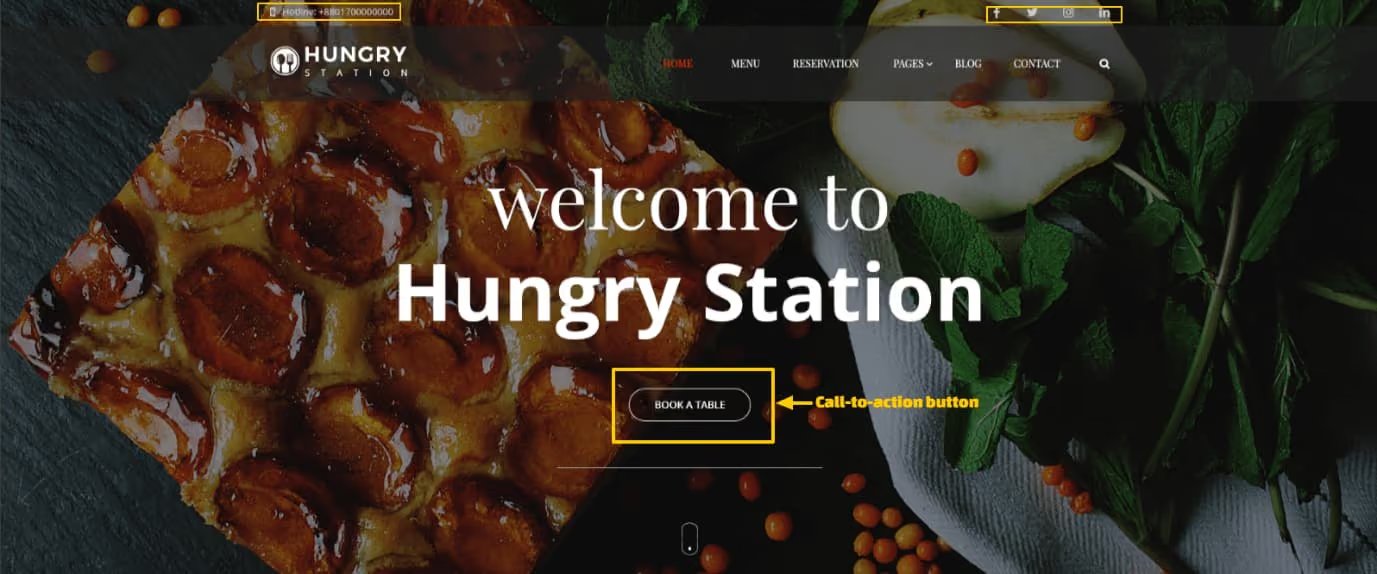
List the restaurant's name, address, phone number, and direct ordering link in the navigation bar or hero section. This information should be clearly visible on every page — not buried in a footer or hidden behind a contact form. For pizzerias, fast-casual restaurants, and ghost kitchens especially, the path from "I'm hungry" to "order placed" needs to be frictionless.
Go the extra mile. Embed a Google Map so guests can immediately visualize the location and get directions without leaving the site. Add click-to-call phone links for mobile users and clearly state delivery zones or pickup instructions where they apply.
Mobile-first UX checklist for location and ordering visibility: On mobile, a sticky "Order Now" button should remain visible as the guest scrolls. The phone number should be a tap-to-call link, not plain text. The Google Map embed should be tap-friendly and open in the native Maps app. Pickup and delivery toggles should appear at the top of the ordering flow — not after the guest has already selected items. Hidden navigation patterns on mobile kill conversion; if a guest has to hunt for the menu or the order button, most will not bother.
Local SEO checklist for restaurant websites:
- NAP (Name, Address, Phone) consistent across every page and Google Business Profile
- Embedded Google Map on the contact or homepage
- Business hours displayed prominently, including holiday hours
- Click-to-call phone button visible on mobile
- LocalBusiness schema markup implemented in site code
- Delivery radius or pickup zone clearly stated
- Restaurant website homepage showing clear address, menu, and contact details
Use an SEO-Friendly HTML Menu Instead of a PDF Menu
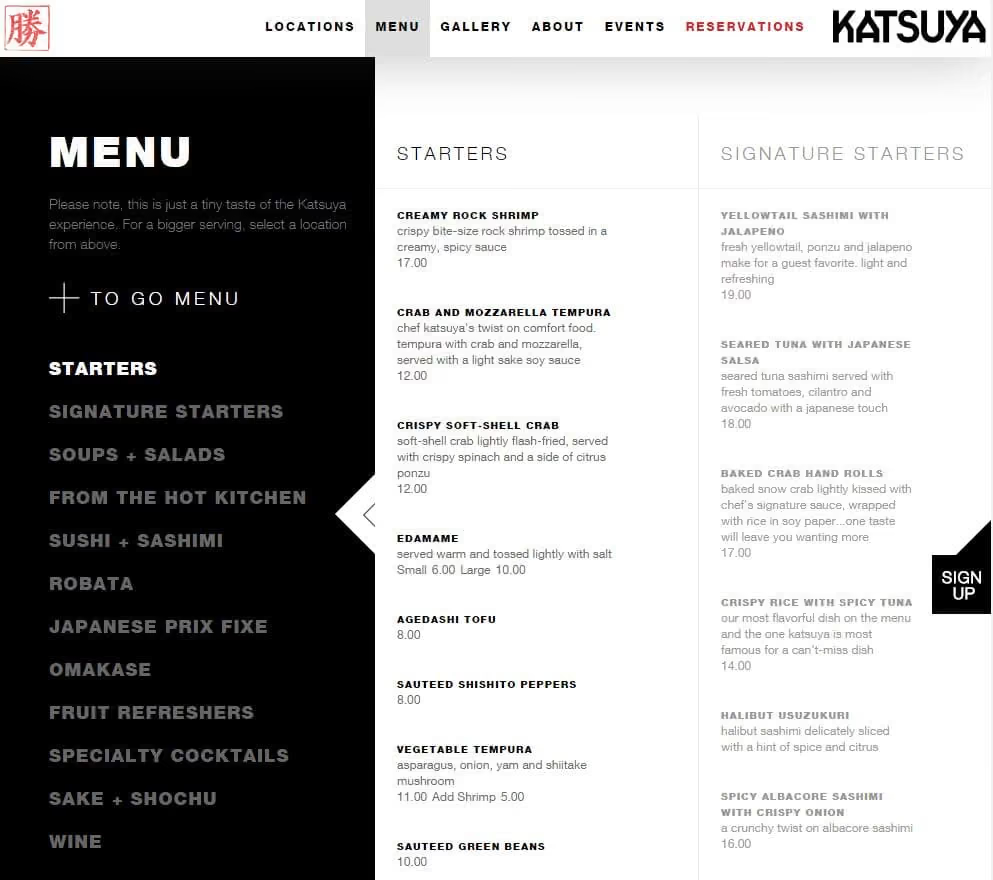
A PDF menu feels convenient to upload, but it creates real problems for restaurant owners. A guest opening a PDF on mobile has to pinch, zoom, and scroll through a document that was designed for print. Many give up before they find what they want. At the same time, Google cannot crawl a PDF as effectively as an HTML page — so the menu that represents a restaurant's core offering is effectively invisible to search engines.
An HTML menu lets search engine crawlers index every dish, category, and description. When a guest searches "best pasta near me" or "gluten-free pizza downtown," a properly structured HTML menu gives the restaurant a real chance to appear in those results. Add structured data and schema markup and the menu becomes eligible for rich results across Google Search and Maps.
For restaurants that update menus frequently — seasonal dishes, daily specials, price changes — an HTML menu is also easier to edit than regenerating a PDF.
Menu elements that directly improve conversion: An HTML menu is not just an SEO tool — it is a sales tool. Item descriptions that explain flavors and preparation increase order confidence. Dietary labels (gluten-free, vegan, spicy) reduce the friction of guests having to call to confirm. Modifier prompts (add extra cheese, choose a side) increase average order value. "Most Ordered" or "Guest Favorite" badges reduce decision paralysis and steer guests toward high-margin items. Transparent pricing with no surprises builds checkout trust. And a direct add-to-cart button on every item removes the extra step that causes abandonment.
HTML menu vs. PDF menu — which is better for restaurant conversions?
Enable Direct Online Ordering to Convert Website Visitors Into Orders
If a guest is already on the restaurant's website, the restaurant should not have to pay a third-party marketplace to complete that order. That traffic was earned through the restaurant's own brand, search presence, or repeat customer relationship. Sending it through a delivery app can cost 15–30% of the order value in commission — every time.
A direct online ordering system for restaurants keeps the order on the restaurant's own website. Restolabs helps restaurants accept commission-free orders, keep customer data, and connect ordering with payment, delivery, and POS workflows — without long-term contracts. Restaurants can start accepting direct orders within a single day.
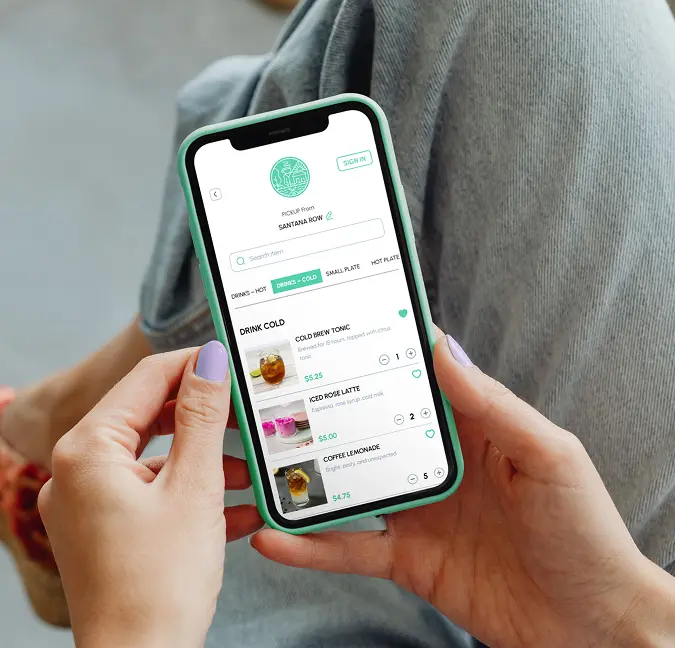
For the guest, the experience feels simple: browse the menu, choose pickup or delivery, and check out. For the restaurant, every direct order protects margin and builds an owned customer relationship that no third-party app can take away.
Direct online orders also create a valuable opportunity for restaurants to collect customer data they can use for repeat marketing, loyalty campaigns, and better guest experiences. That data — names, order history, contact details, preferences — belongs to the restaurant, not to a marketplace. Use it ethically to turn first-time buyers into regulars. Track how much commission-equivalent margin is being protected with the Commission Savings Calculator.
What to measure after enabling direct ordering: Once direct ordering is live, track four metrics in analytics: (1) direct order conversion rate — the percentage of site visitors who complete a checkout; (2) average order value — whether online guests are spending more than walk-in or phone orders; (3) checkout abandonment rate — how many guests start the order flow but do not complete it; and (4) repeat order rate — whether direct-ordering guests come back within 30 or 60 days. These four numbers give a complete picture of whether the ordering experience is working.
Ready to turn website traffic into direct orders? Restolabs helps restaurants launch commission-free online ordering with expert setup, integrations, and full customer data ownership.
Use Trust Signals That Help Guests Feel Ready to Order
Trust signals work best when they appear close to the decision point. A guest comparing dinner options may not visit a dedicated press page — but they will notice a local award, a strong review, or a short customer quote beside the menu. That moment of social proof is often what tips the decision from browsing to ordering.
Trust usually breaks at the moment of decision. A guest may like the menu, but if checkout feels uncertain or the restaurant looks unproven, hesitation creeps in. These signals help remove that doubt before it costs the restaurant an order:
- Recent customer reviews — Pull in Google or Yelp review snippets directly on the homepage or menu page. "4.8 stars across 600 reviews" next to the order button carries real weight.
- Local awards and recognition — "Best Burger 2026" or a neighborhood dining award signals quality to first-time visitors.
- Popular dish labels — Mark top sellers with a "Most Ordered" or "Guest Favorite" tag. It reduces decision paralysis and increases average order value.
- Secure payment badges — Display SSL and payment security icons at checkout. Guests who trust the payment process complete orders at higher rates.
- Delivery zone and pickup clarity — State exactly what areas are covered and expected delivery times. Ambiguity causes abandonment.
- Press mentions — A logo from a recognized local outlet or food publication adds credibility, especially for newer restaurants building reputation.
The best trust sections sit close to the ordering path, where they can reassure guests before checkout hesitation begins.
Common Reasons Restaurant Website Visitors Do Not Convert
Traffic without conversions is a diagnostic signal, not a strategy failure. Before applying optimizations, it helps to know which barrier is actually blocking guests. Here are the most common blockers and what to do about each:
- Slow page load time — Mobile guests abandon pages that take more than 3 seconds. Compress images, enable lazy loading, and test Core Web Vitals in Google Search Console.
- Hidden or unclear order button — If the "Order Now" button is not visible without scrolling on mobile, most guests will not find it. Make it sticky and above the fold.
- PDF-only menu — A PDF cannot link to checkout. Replace or supplement with an HTML menu that connects each item to the ordering flow.
- Unclear delivery zones or pickup instructions — If guests cannot quickly confirm you deliver to their address, they leave. State zones prominently.
- Missing or inconsistent pricing — Price surprises at checkout are the most common reason for cart abandonment. Display prices clearly on the menu page.
- Forced account creation — Guest checkout converts better than mandatory signup. Allow guests to order without creating an account.
- Too many checkout steps — Every extra screen between "add to cart" and "order confirmed" reduces completion rate. Simplify the flow.
- Weak or generic photography — Stock images or low-quality photos reduce appetite and trust. Invest in real food photography of actual dishes.
- Inconsistent hours — If the website shows different hours than Google Business Profile or the door, guests lose confidence. Audit NAP consistency across all platforms.
- No trust signals near checkout — A review snippet, a payment badge, or a delivery guarantee placed near the order button can meaningfully increase completion rates.
Key Website Features That Improve Restaurant Conversion Rates
Not all website platforms are built for restaurants. When evaluating options, these are the capabilities that directly affect order volume, guest experience, and search visibility:
Explore the full list of capabilities on the Restolabs features page.
How to Turn More Restaurant Website Visitors Into Direct Orders
The best restaurant websites do not make guests work. They show the menu clearly, answer practical questions immediately, and make direct ordering feel like the obvious next step — not a detour through a third-party app.
Restolabs helps restaurants launch commission-free online ordering with expert setup, customer data ownership, and flexible plans built for growth. Restaurants can start accepting direct orders in a single day, without long-term contracts.
Restaurant Website Conversion Optimization Checklist by Priority
🔴 Fix First — highest conversion impact, implement immediately
- ☐ "Order Now" button visible above the fold on mobile — no scrolling required
- ☐ Compress all images to under 150KB; enable lazy loading below the fold
- ☐ Replace PDF-only menu with an HTML menu linked to the ordering flow
- ☐ NAP (Name, Address, Phone) consistent and visible on every page
- ☐ Conversion tracking live: completed orders, checkout starts, order button clicks
🟡 Optimize Next — improve experience and search visibility
- ☐ H1 and homepage headline reference direct ordering, not just brand name
- ☐ Descriptive alt text on every meaningful image
- ☐ Google Map embedded on homepage or contact page
- ☐ Customer reviews or rating snippet displayed near the menu or order button
- ☐ Secure payment badge visible at checkout
- ☐ LocalBusiness schema markup implemented in site code
- ☐ Delivery zone and pickup instructions clearly stated
- ☐ Phone number linked as click-to-call on mobile
🟢 Test Over Time — refine and compound gains
- ☐ A/B test hero image (best-selling dish vs. dining room) and measure order button clicks
- ☐ Test "Most Ordered" and "Guest Favorite" labels on top menu items
- ☐ Test sticky mobile order button vs. inline CTA placement
- ☐ Track repeat order rate monthly — direct-order guests should return more often
- ☐ Review page speed and Core Web Vitals quarterly
- ☐ Audit NAP consistency across Google Business Profile, website, and third-party listings every 6 months

Frequently Asked Questions
A restaurant conversion rate is the percentage of website visitors who complete a desired action — such as placing a direct online order, calling, clicking to reserve a table, requesting directions, or signing up for a loyalty program. It is not a single number: a restaurant might track a 6% order conversion rate alongside a 14% click-to-call rate. Both matter, because they represent different parts of the guest relationship. The formula is: conversions divided by total visitors, multiplied by 100.
Divide the number of conversions by the total number of website visitors, then multiply by 100. For example: if 1,000 visitors come to a restaurant website in a month and 70 place direct orders, the direct order conversion rate is 7%. Calculate separately for each conversion goal — orders, calls, reservations, and map clicks should each have their own rate so operators know which part of the experience to fix first.
Every restaurant website should include professional food photography, an HTML menu with pricing and dietary labels, clearly displayed hours and address, an embedded Google Map, direct online ordering, customer reviews or ratings, and secure payment options. These elements work together to move guests from browsing to ordering without friction.
Restaurant websites increase conversions by making the ordering path obvious, reducing load time, placing the "Order Now" button above the fold on mobile, displaying trust signals near the menu, and offering direct online ordering so guests do not have to leave the site to complete a purchase. Eliminating PDF-only menus and improving image quality also have measurable impact on conversion rates.
It depends on what is being measured and where the traffic is coming from. A 12% conversion rate is strong for click-to-call on mobile or map direction taps, which are high-intent micro-conversions. For direct online orders, 12% would be exceptional — most restaurant websites see 2%–8% for completed checkouts. High-intent traffic sources like branded search or email campaigns convert significantly better than discovery channels like social media. Always compare the rate against the restaurant's own baseline, not just an industry average.
Traffic without orders usually signals a conversion barrier rather than a content problem. The most common blockers are: an order button that is not visible without scrolling on mobile, a PDF-only menu with no link to checkout, slow page load time that causes abandonment before the menu loads, unclear delivery zones that make guests uncertain whether you serve their address, and missing trust signals near checkout that cause hesitation at the final step. Start by checking these five on a mobile device — fix what is broken before investing in more traffic.
An HTML menu should be the primary version for most restaurant websites. If a guest searches for "gluten-free pizza near me," a PDF menu gives the restaurant very little to work with. An HTML menu gives Google actual dish names, descriptions, and categories to crawl, which makes the restaurant easier to discover and easier to order from. Restaurants can still offer a PDF as a backup for print purposes, but the direct ordering path should always start with an HTML menu.




.webp)

.svg)
.webp)